• Sudoku
• Tic Tac Toe
NOTE: To exit a game, push “Exit Button” then “Back
Arrow,” or “Home Button” on the touchscreen.
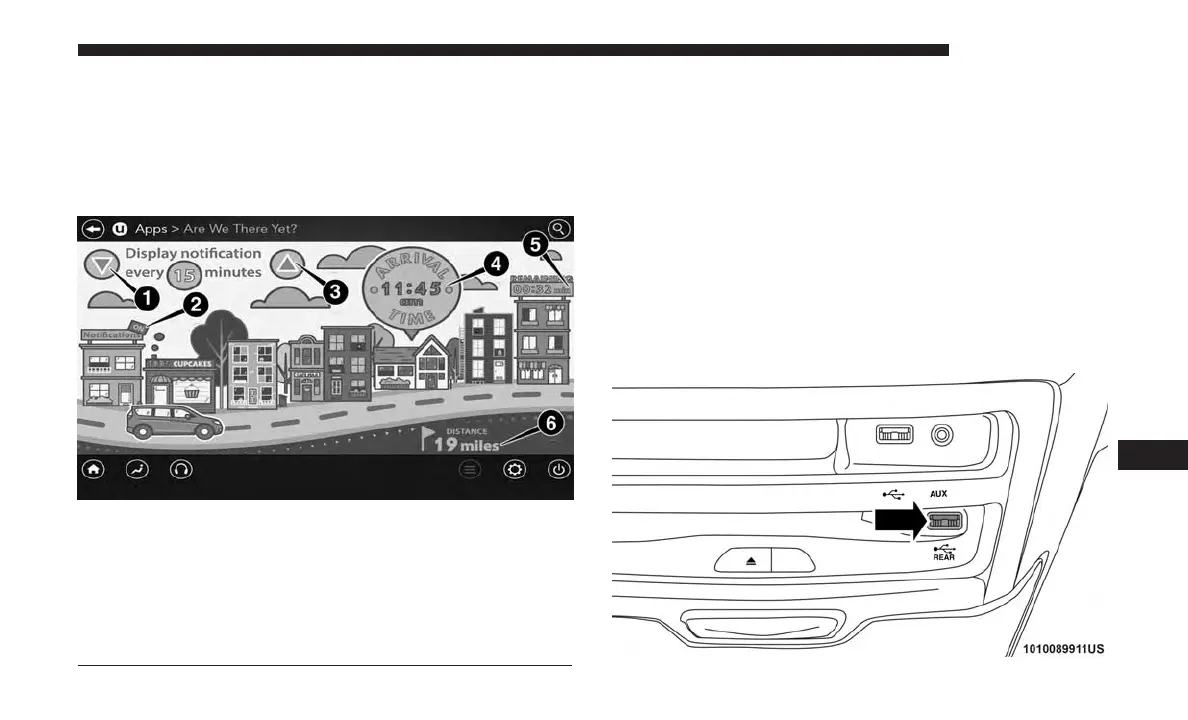
Are We There Yet? — Uconnect 4C NAV
When a navigation route has been set from the Uconnect
system, the second row passengers can use “Are We There
Yet?” for an animated screen showing distance and time
remaining on navigation routes, as well as the estimated
time of arrival with pop-up notifications. Notifications and
their frequency can be set up for route information by
using the arrow buttons, and can be turned on and off
using the “Notifications” button on the “Are We There
Yet?” App. Estimated time of arrival notifications pop-up
at the bottom center of the screen.
Using The Rear Video USB Port
Are We There Yet? App
1 — Decrease Timing Between Notifications Button
2 — Notifications ON/OFF Button
3 — Increase Timing Between Notifications Button
4 — Arrival Time
5 — Time Remaining Until Destination Is Reached
6 — Distance Remaining
Rear Video USB Port
10
MULTIMEDIA 647















 To Next Page