Access level
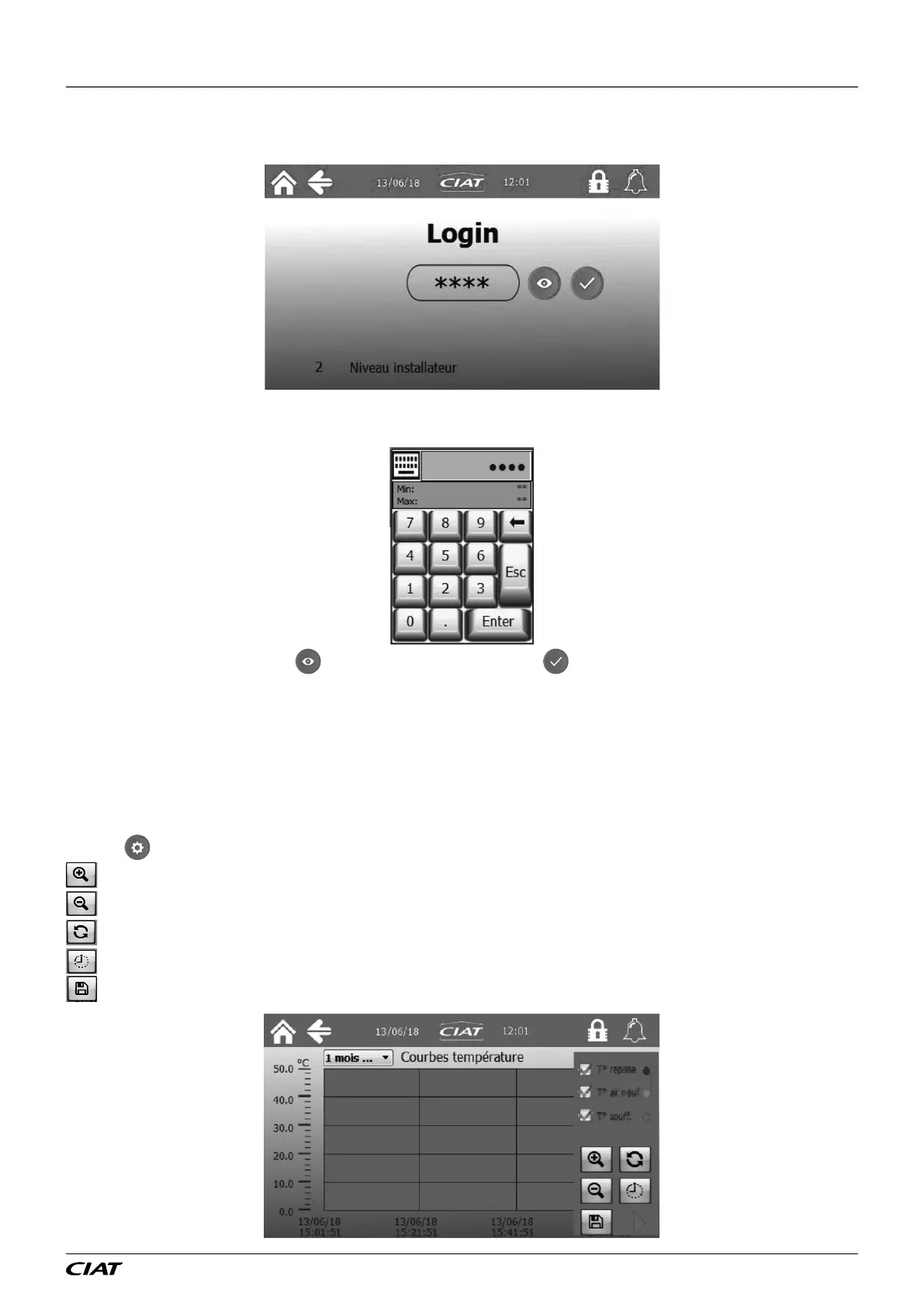
The access level selection can be accessed by pressing on the padlock in the menu bar or main menu.
The current level is displayed at the bottom of the screen. To go back to level 1, you need to enter the password "1111".
Pressing on the stars will bring up a numeric keypad to enter the password for the desired level:
Once a password has been entered, is used to view the password, and is used to conrm.
Curves
The screen records the values of the main parameters (temperatures, ow rate, duct pressure and lter dierential pressure). It is
possible to choose the record duration (1, 6, or 12 months), the oldest values are erased, which sets the sampling period (1
acquisition every 60 s for example))
1 month (1 every 60 s)
6 months (1 every 400 s)
12 months (1 every 800 s)
Pressing
brings up the curve settings :
: zoom in on the vertical axis
: zoom out on the vertical axis
: zoom reset
: change horizontal axis duration
: save values as CSV on a USB stick
2 - THE CONTROL PLC
EN-13 FLOWAY ACCESS



 To Next Page