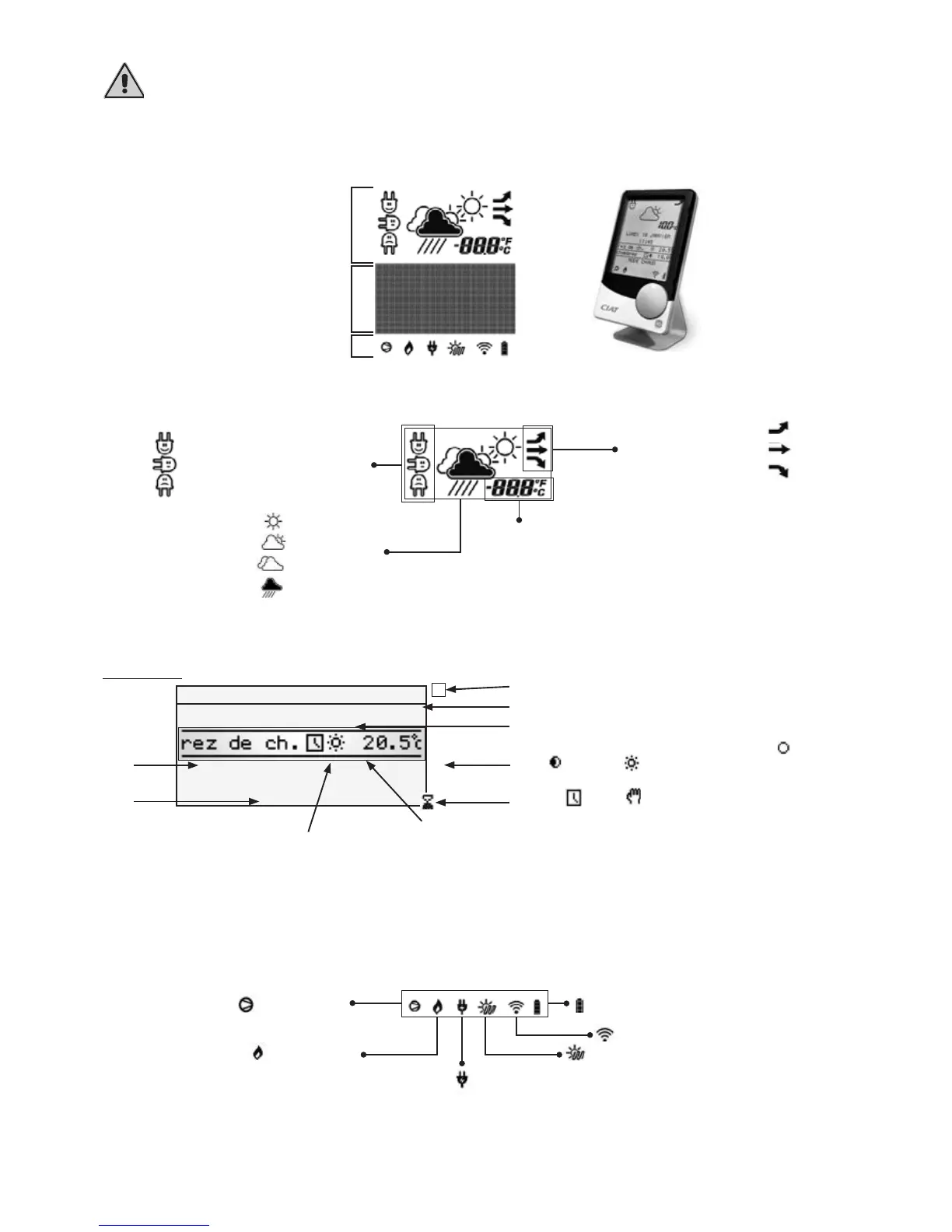
5. HOMECONNECT CONTROL
The GeoCIAT
TM
Modular control terminal cannot be used on heat pumps with HomeConnect control.
5.1 Terminal unit screen display
The graphic screen has two fixed-segment information areas (top and bottom) and an interactive area (centre).
Upper section
Central section
Lower section
Upper section
Low unit consumption
Medium unit consumption
High unit consumption
Improving trend
Stable weather trend
Degrading trend
Outdoor temperature in °C or °F
Good weather
Variable weather
Overcast
Rainy
Compressor on
Electric heating element operation
Boiler operating
Solar domestic hot water production
Radio signal reception level
Battery charge level
Central section
u
v
w
|
x
z
y
Home screen
Date display.
Time display.
Heating zone ambient temperature display.
Name of the heating zone (10 characters max.).
Setpoint status indicator (
frost-free,
economy, comfort).
Programming status indicator
( timed, override).
Unit operating mode.
Operation symbol in test mode.
Operating mode in backup mode following loss
of indoor or outdoor temperature sensor
I
Lower section



 To Next Page