EN -1
EN
IMPORTANT: The terminal is factory-set for a standard installation.
The installer must configure the unit's parameters according to the specific requirements of the
installation and the climate.
1. FOREWORD
Thank you for choosing CIAT. We are confident that you will be completely satisfied with the heat
pump that you have just purchased, for many years to come. All CIAT products are designed to
optimise performance and to provide our customers with guaranteed comfort and energy savings.
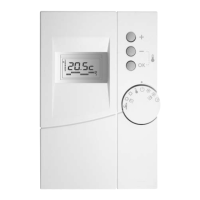
This manual will help you to use the MicroConnect control terminal to ensure that you get the
best out of your heat pump. This document will guide you in the unit's simple programming and
routine maintenance operations.
With a view to continually improving this product, CIAT reserves the right to modify this manual
at any time.
It should be noted that this manual is common to all CIAT products fitted with a MicroConnect
control. Consequently, some functions may not be applicable to all configurations.
2. SAFETY INSTRUCTIONS
- Keep out of the reach of children.
- Do not attempt to repair this unit yourself.
- Do not attempt to open the terminal.
- In the event of suspicious odour, abnormal noise or emission of smoke, switch your unit off and
contact your installer.
- Never use solvents to clean the control terminal.
- Do not place the terminal near to a source of heat and avoid direct exposure to sunlight.
- Do not place the control terminal in a metal box.
- This equipment must only be used indoors.
CONTENTS PAGE
1. Foreword
1
2. Safety instructions
1
3. Overview
2
3.1 The remote control 2
3.2 Main functions 2
3.2.1 The remote control display in detail 2
4. First steps
3
4.1 Setting the time 3
4.2 The different operating modes 3
5. Settings
4
5.1 Conguring the weekly programming 4
5.2 Activating/deactivating the weekly programming 4
5.3 If a fault is displayed 4
5.3.1 Type of fault 4
5.3.2 Clearing a fault 5
5.4 Frost protection mode (unoccupied mode) 5
6 Maintenance
5



 To Next Page