EN -3
EN
4. FIRST STEPS
4.1 Setting the time
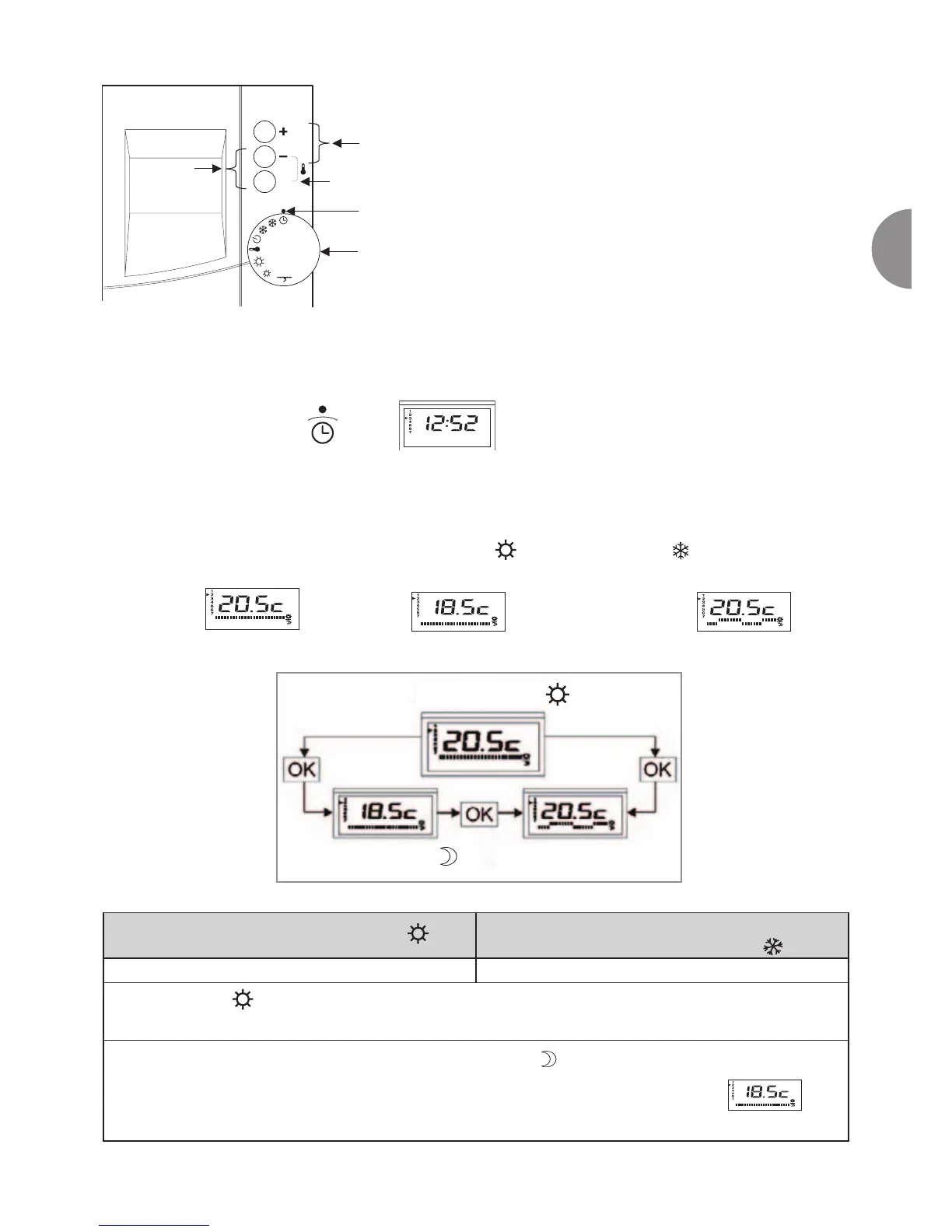
• Position the selector to
• The day and time can be set using the + and - buttons
• Press the OK button to change the day.
4.2 The different operating modes
When the selector is positioned in heating mode ( ) or cooling mode ( ) (depending on the
model), it is possible to choose between 3 operating modes:
Comfort mode, economy mode,
Weekly programming mode
Switch between these modes by pressing the OK button.
Operation in simple heating mode
Operation in simple cooling mode
(depending on the model)
Position the function selector to heating mode Position the function selector to cooling mode
In comfort mode,
set the required room temperature (setpoint) using the + and - buttons.
The unit then regulates the temperature according to the new setpoint requested.
In economy mode
Display economy mode by pressing the OK button
Set the required room temperature (setpoint) using the + and - buttons.
The unit then regulates the temperature according to the new setpoint requested.
Economy mode
Weekly programming mode
r 10- Up/down buttons.
r 11- Display the room temperature by pressing - and OK
simultaneously
r 12- Change modes (comfort, economy or programmed),
confirm your choice or clear faults.
r 13- Function selector marker
r 14- Function selector
r 15- Defrost cycle operating indicator (air-source machine)
r 16 - Opening the load shedding contact (configured by the
installer)
Comfort mode





 To Next Page