WARNING – Always make sure the input power is completely disconnected before attempting any troubleshooting procedures.
All troubleshooting should be done by a qualified professional.
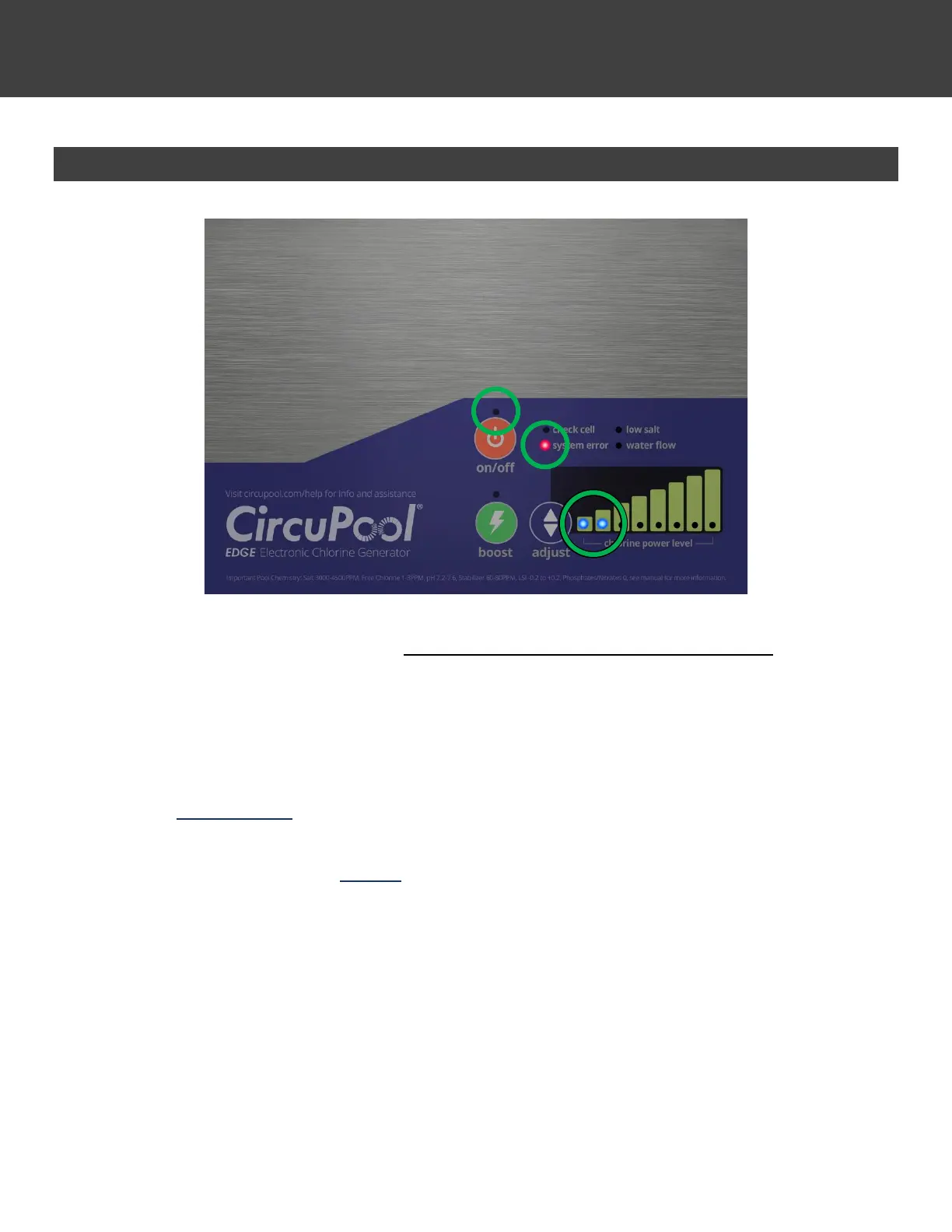
System Error 2 – Over-Current or Debris
If a System Error 2 is illuminated, it is critical to check and fix these issues before proceeding.
Turn off pump and salt system. The following issues will commonly cause this error.
• Check cell for any debris or foreign object that may be lodged between plates. Use a high
pressure garden hose to get it out, do not stick anything between plates. If mineral scale is
present, clean the cell according to the instructions in the manual.
• Check if cell plates are damaged, deteriorated, pitted or physically worn. If so, this indicates
corrosive water chemistry (low LSI, preventable) and the cell must be replaced.
• Check all cable connections and clean if necessary to remove any corrosion or debris.
If none of the above resolve the System Error 2, proceed with the additional troubleshooting on the next page to
determine the second numerical sub-error code for this issue. (Example: System Error 2.1, System Error 2.2)



 To Next Page