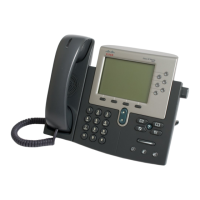
CISCO TELEPHONE 7961/62 Series
QUICK REFERENCE GUIDE
Common In-Call Phone Tasks
- Press the “NewCall”
softkey or lift handset.
- Dial 9 + the number
- Press “Dial” softkey
- Press the “NewCall” softkey
or lift handset.
- Dial extension
- Press “Dial” softkey
- To answer, lift the
handset.
- To end, press “EndCall”
softkey or hang up.
Make or Accept a
Call Without Lifting
Handset
- To make or accept a call using speakerphone, press the or “Speaker” key.
- To make or accept a call using a headset, press the or “Headset” key.
- To mute the mic in the handset or headset, press the or “Mute” key.
To redial your last call,
- Lift handset and press the “Redial” softkey
To redial your last call w/out using the handset,
- Press the “Redial” softkey
To transfer a call to another extension:
- Press “Trnsfer” softkey
- At dial tone, dial the other extension.
- Announce the call
- Press “Trnsfer” softkey again to complete the transfer.
If no one answers:
- Press “End Call” softkey
- Press “Resume” softkey
To return to original call:
- Press “Resume” softkey
To place a call on hold, press “Hold” softkey and hang up.
To reconnect with the call, lift the handset and press “Resume” softkey.
To conference up to 6 parties, while in conversation:
- Press “More” softkey
- Press “Confrn” softkey
- At the dial tone, dial another extension or number
- Announce the call
- Press “Confrn” softkey again to join the calls.
If a party doesn’t answer
or doesn’t want to join:
- Press “EndCall” softkey
- Press “Resume” softkey
To remove yourself from
the conference:
- Press “Hold” softkey
To forward calls to another
extension
Forward calls to your
voicemail
When not in a call, press the
“CFwdALL” softkey and dial
the destination extension
To cancel, simply press
“CFwdALL” softkey.
When not in a call, press
the “CFwdALL” softkey
and press the “Messages”
key.

 Need help?

 To Next Page
 General