Need help?
Do you have a question about the Cisco SPA509G and is the answer not in the manual?
Procedure to install the phone and connect it to your network.
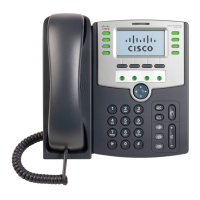
Pick up to place or answer a call.
Displays solid red for new voicemails or flashes red for incoming calls/updates.
Displays date, time, phone status, and softkey options.
Indicate phone line status (idle, active, hold, unregistered, network error).
Buttons that perform actions based on LCD screen prompts.
Allows scrolling through menu items and options on the LCD.
Accesses the voice mail system.
Places an active call on hold.
Accesses phone settings, directory, and call history.
Mutes or unmutes the phone's microphone or speaker.
Activates or deactivates the headset connection.
Adjusts the volume for handset, headset, speaker, or ringer.
Activates or deactivates the speakerphone function.
Used for dialing numbers, entering text, and navigating menus.
Details common softkey functions like call transfer, park, and conference.
Methods to initiate or receive calls using handset, speaker, or headset.
Procedure to place a call on hold and resume it.
How to terminate a call using handset, speakerphone, or headset.
Instructions for adjusting volume and muting the phone's audio.
Using keypad numbers to navigate phone menus and sub-menus.
Steps to find the IP address via the Network screen.
 General
| Speakerphone | Yes |
|---|---|
| Ethernet Ports | 2 |
| Power over Ethernet | Yes (IEEE 802.3af) |
| Audio Codecs | G.711, G.729a |
| Headset Support | Yes |
| Protocols | SIP |


 To Next Page