1-2
Cisco Video Surveillance 8020/8030 IP Camera Reference Guide
Chapter 1 Getting Started
Physical Description
• Motion Detection and Event notification—The cameras can examine designated areas for activity
and notify users or other applications when they detect activity that exceeds a predefined sensitivity
and threshold. The cameras also provide one digital input and one digital output that can be used to
initiate specific actions when an alarm is detected.
Physical Description
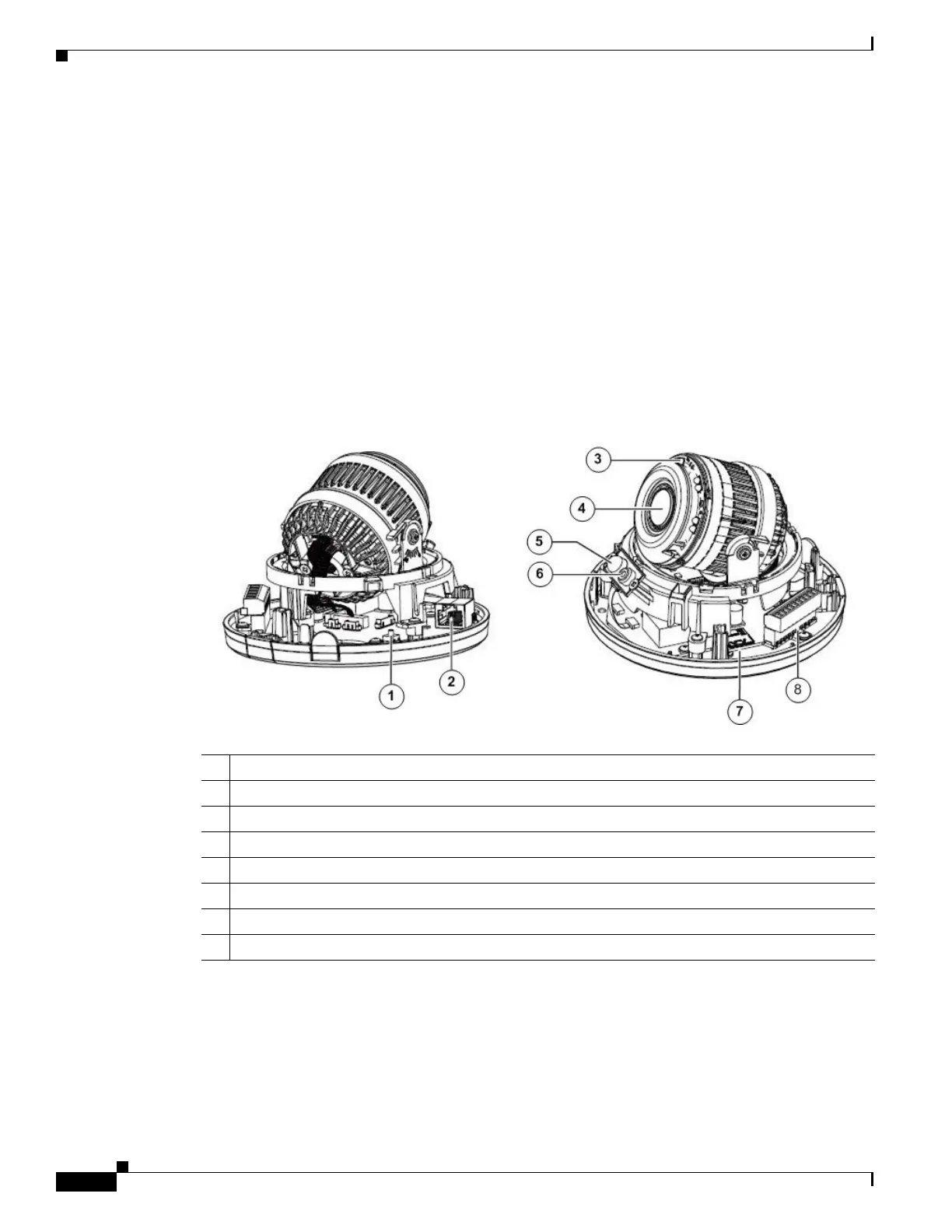
The following figures illustrate the camera:
• Figure 1-1—Cisco Video Surveillance 8020 IP Camera inner view
• Figure 1-2 —Cisco Video Surveillance 8020 IP Camera outer view
• Figure 1-3 —Cisco Video Surveillance 8030 IP Camera physical view
Figure 1-1 Cisco Video Surveillance 8020 IP Camera Inner View
1 Reset button
2 RJ45 Ethernet port
3 IR LEDs
4 Motorized or fixed lens
5 PIR
6 Microphone
7 SD/SDHC/SDXC Card Slot
8 Terminal block



 To Next Page