1-17
Cisco Video Surveillance 8020/8030 IP Camera Reference Guide
Chapter 1 Getting Started
Network Deployment
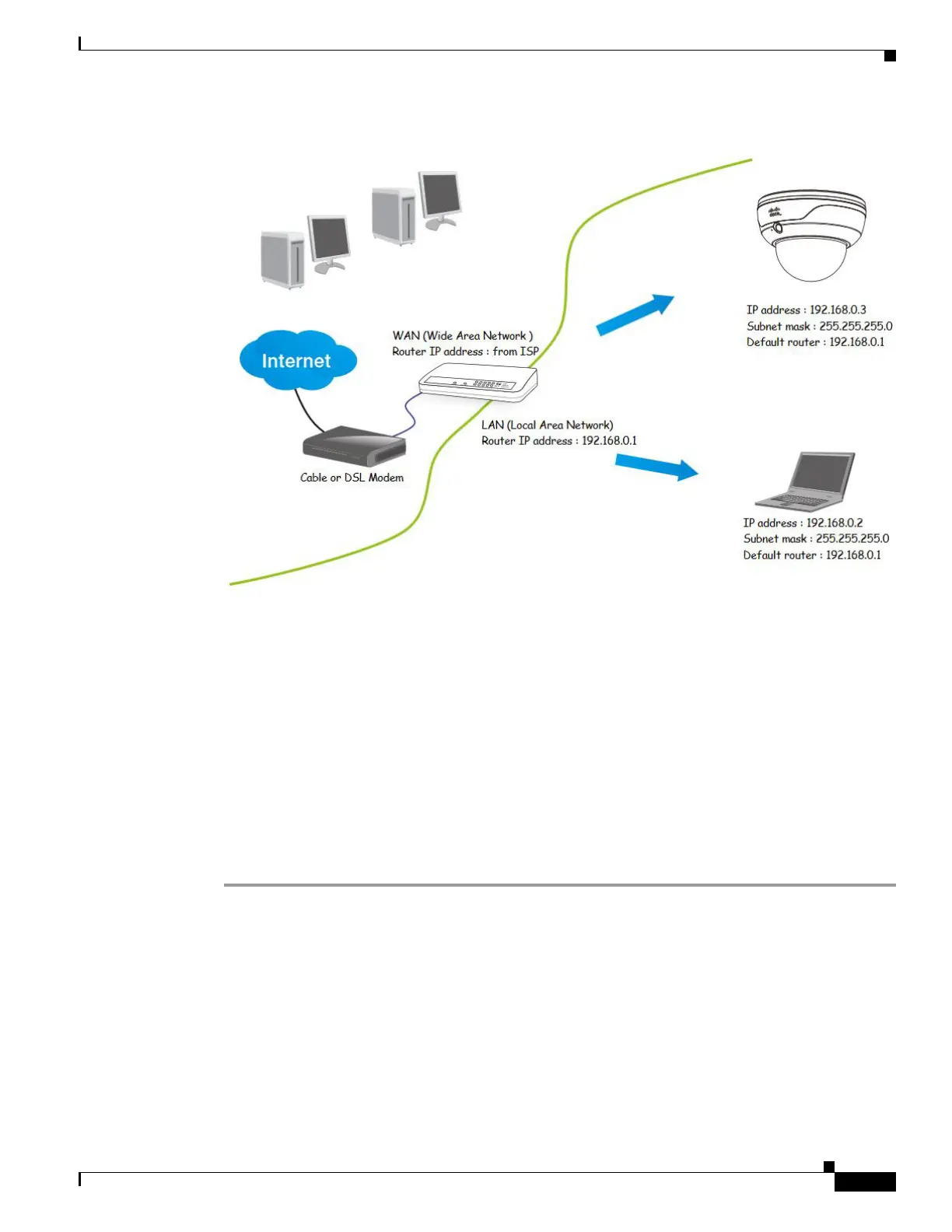
Figure 1-6 Connecting the Camera Via a Router
Step 2 In this case, if the Local Area Network (LAN) IP address of your camera is 192.168.0.3, forward the
following ports for the camera on the router.:
• HTTP port: default is 80
• RTSP port: default is 554
• RTP port for video: default is 5556
• RTCP port for video: default is 5557
If you have changed the port numbers on the Network page, open the ports accordingly on your router.
For information about how to forward ports on the router, see your router documentation.
Step 3 Find out the public IP address of your router provided by your Internet Service Provider (ISP).
Use the public IP and the secondary HTTP port to access the camera from the Internet. See the “Network
> General settings” section on page 5-19 for more information.
Internet Connection with Static IP
Choose this connection type if you are required to use a static IP for the camera. See the “Network >
General settings” section on page 5-19 for more information.
Internet Connection via Point-to-Point over Ethernet (PPPoE)
Choose this connection type if you are connected to the Internet via a DSL Line. See description of
PPPoE (Point-to-point over Ethernet) in the “Network Type Tab” section on page 5-19.



 To Next Page