5-40
Cisco Video Surveillance 8020/8030 IP Camera Reference Guide
Chapter 5 Configuration
Applications > Audio detection
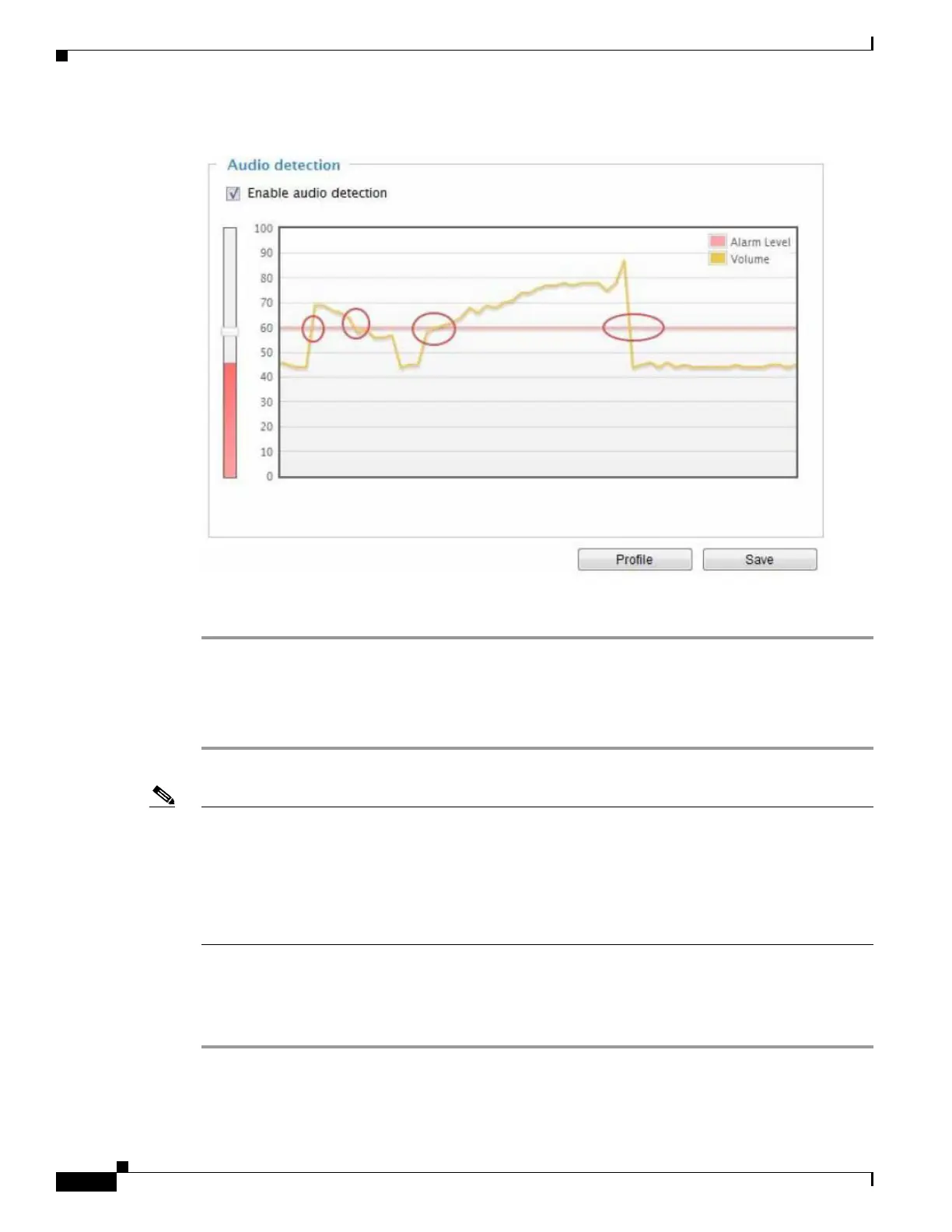
Figure 5-7 Audio Detection
To configure audio detection, follow these steps:
Step 1 Once the Audio detection window is opened, the current sound input will be interactively indicated by
a fluctuating yellow wave diagram.
Step 2 Use a mouse click to drag the Alarm level tab to a preferred location on the slide bar.
Step 3 Select the Enable audio detection check box and click Save to enable the feature.
Note • The volume numbers (0~100) on the side of wave diagram does not represent decibel (dB). Sound
intensity level has already been mapped to preset values. You can, however, use the real-world inputs
at your installation site that are shown on the wave diagram to configure an alarm level.
• To configure this feature, you must not mute the audio in Configuration > Media > Audio. The
default of the camera can be muted due to the lack of an internal microphone. An external
microphone is provided by users.
You c an use the Profile window to c onfigure a different Audio d etection setting. For example, a place
can be noisy in the day time and become very quiet in the night. To make this configuration, follow these
steps:
Step 1 Click on the Enable this profile check box.
Once the Audio detection window is opened, the current sound input will be interactively indicated by
a fluctuating yellow wave diagram.



 To Next Page