Front Panel LEDs
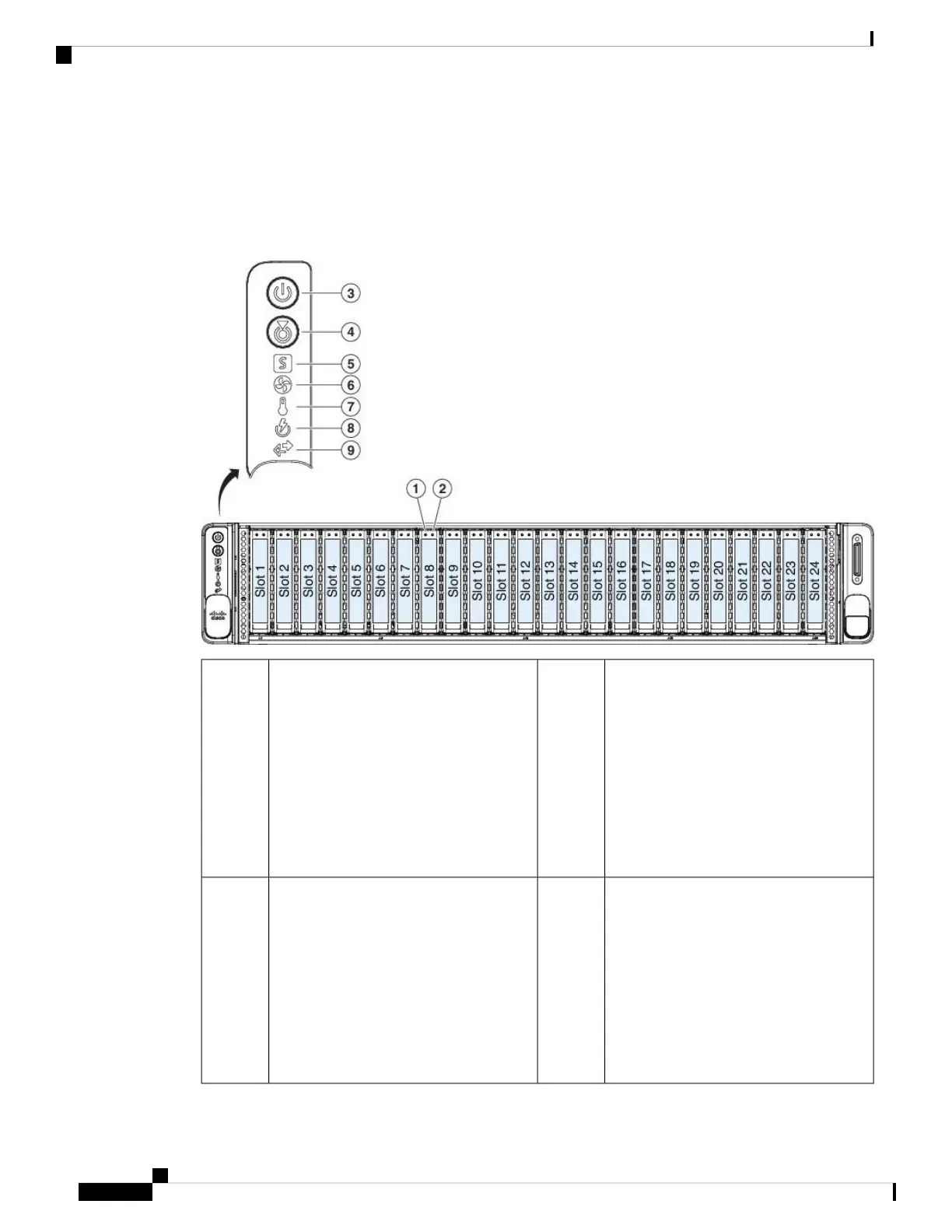
The following figure shows the front panel LEDs and describes their states.
Figure 5: Front Panel LEDs and Their States
SAS/SATA drive activity LED
• Off—There is no drive in the drive
tray (no access, no fault).
• Green—The drive is ready.
• Green, flashing—The drive is reading
or writing data.
2SAS/SATA drive fault
• Off—The drive is operating properly.
• Amber—Drive fault detected.
• Amber, flashing—The drive is
rebuilding.
• Amber, flashing with one-second
interval—Drive locate function
activated in the software.
1
Unit identification
• Off—The unit identification function
is not in use.
• Blue, flashing—The unit
identification function is activated.
4Power button/LED
• Off—There is no AC power to the
appliance.
• Amber—The appliance is in standby
mode.
• Green—The appliance is in main
power mode. Power is supplied to all
appliance components.
3
Cisco AMP PC3000 Hardware Installation Guide
6
Overview
Front Panel LEDs



 To Next Page