Rear unit identification button/LED12Serial port (RJ-45 connector)11
Rear Panel LEDs
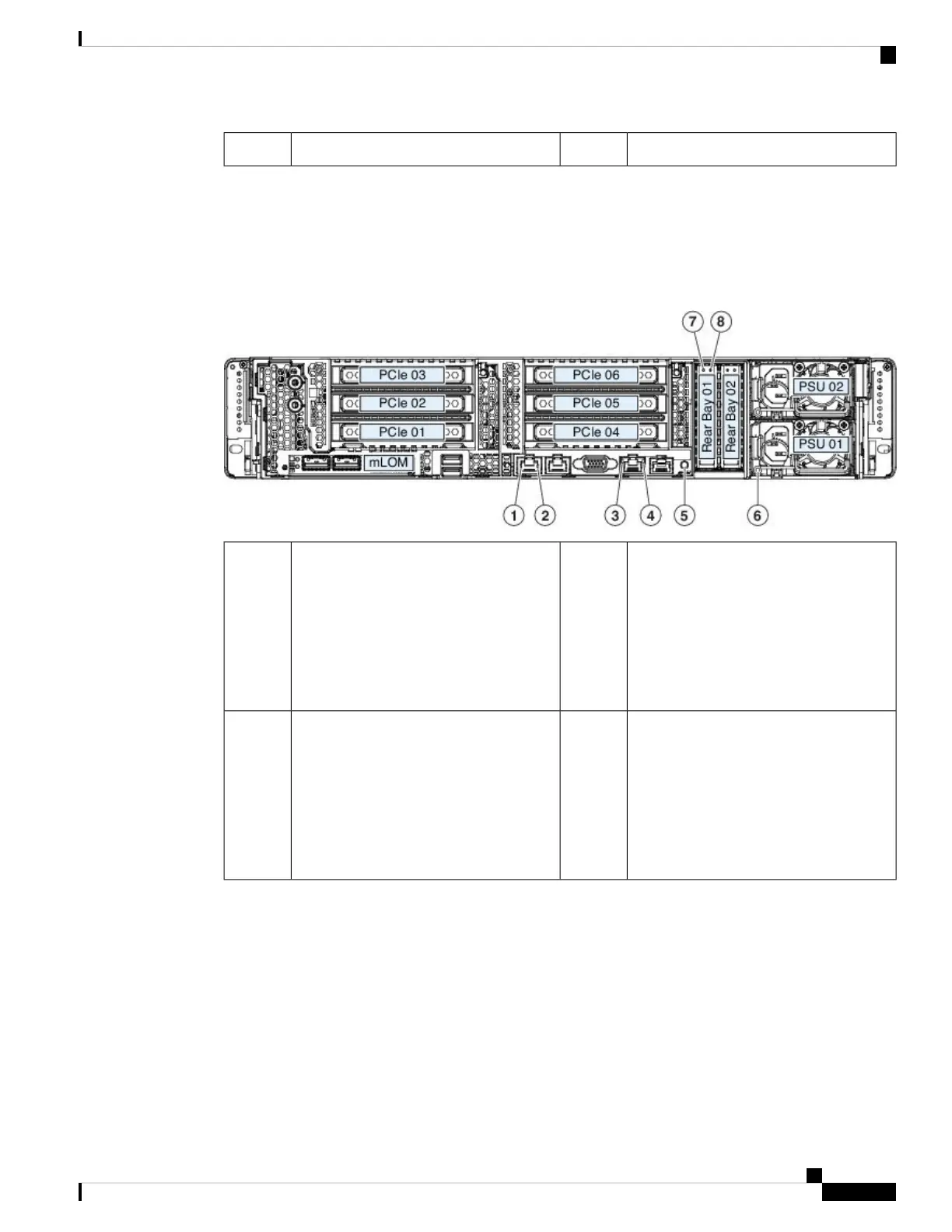
The following figure shows the rear panel LEDs and describes their states.
Figure 7: Rear Panel LEDs and Their States
1-Gb/10-Gb Ethernet link status (on both
LAN1 and LAN2)
• Off—No link is present
• Green—Link is active
• Green, flashing—Traffic is present
on the active link
21-Gb/10-Gb Ethernet link speed (on both
LAN1 and LAN2)
• Amber—Link speed is 100 Mbps
• Amber—Link speed is 1 Gbps
• Green—Link speed is 10 Gbps
1
1-Gb Ethernet dedicated management link
status
• Off—No link is present
• Green—Link is active
• Green, flashing—Traffic is present
on the active link
41-Gb Ethernet dedicated management link
speed
• Off—Link speed is 10 Mbps
• Amber—Link speed is 100 Mbps
• Green—Link speed is 1 Gbps
3
Cisco AMP PC3000 Hardware Installation Guide
9
Overview
Rear Panel LEDs



 To Next Page