Front Panel
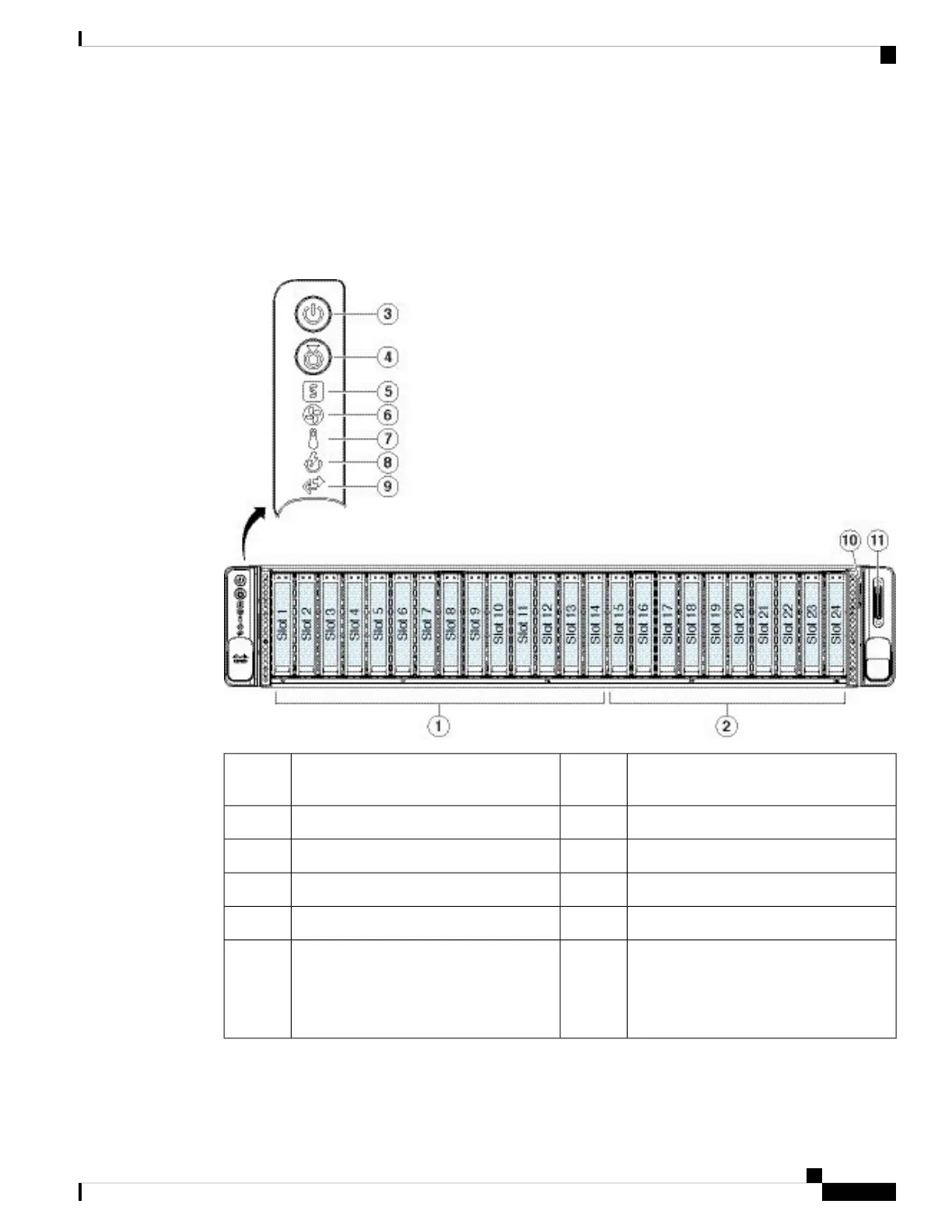
The following figure shows the front panel features and disk-drive configuration for the AMP PC3000. See
Front Panel LEDs, on page 6 for a description of the LEDs.
Figure 4: AMP PC3000 Front Panel
Drive bays 15-24 populated with SAS
HDDs for the /other volume.
2Drive bays 1-14 are populated with SSDs
for the /data volume.
1
Unit identification button/LED4Power button/power status LED3
Fan status LED6System status LED5
Power supply status LED8Temperature status LED7
Pullout asset card10Network link activity LED9
-KVM connector
Used with KVM cable that provides one
DB-15 VGA, one DB-9 serial, and two
USB connectors.
11
Cisco AMP PC3000 Hardware Installation Guide
5
Overview
Front Panel



 To Next Page