Mounting the DIN Rail Bracket on the Access Point
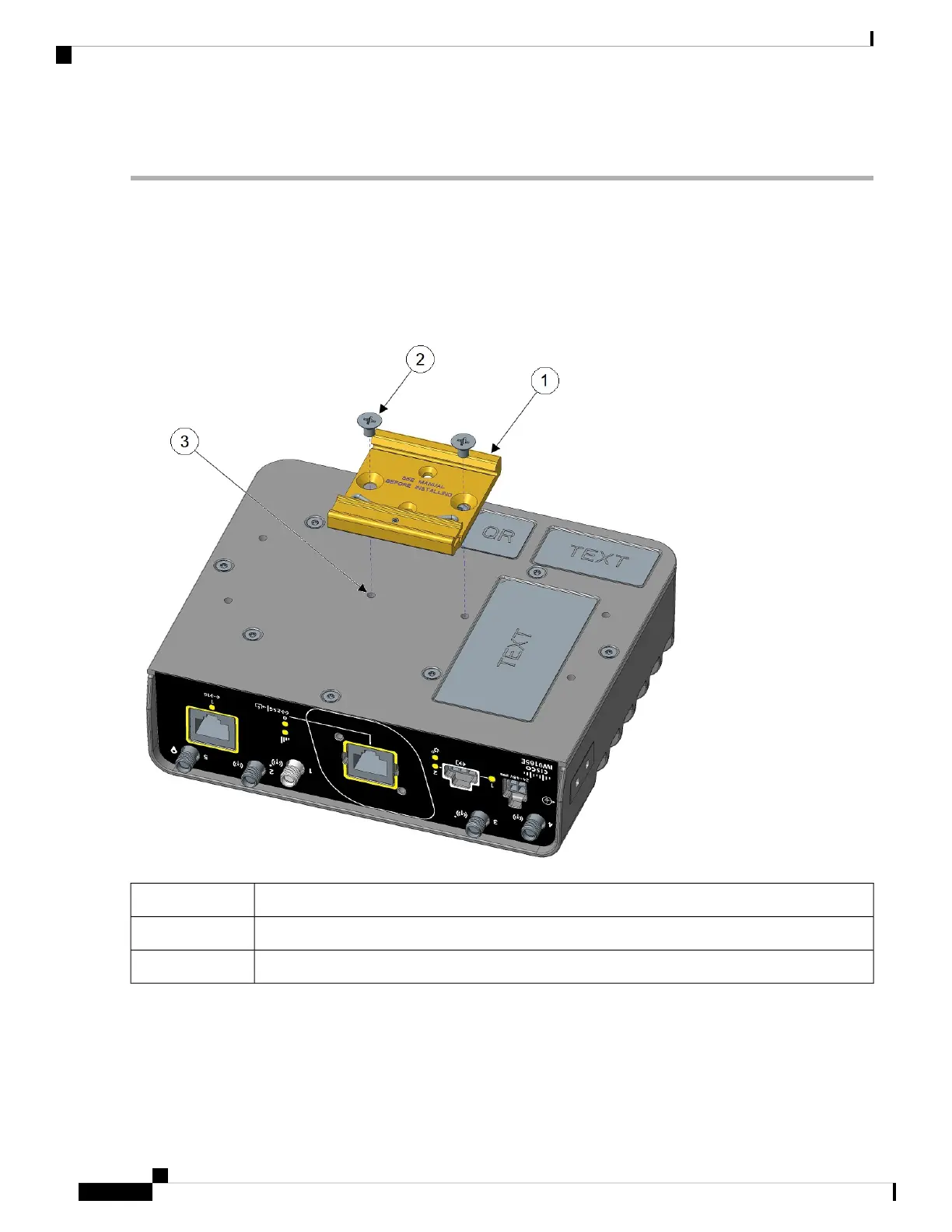
Step 1 First, attach the DIN rail bracket to the back of the access point. The DIN rail bracket can be attached to the bottom or
the back of the access point. For back mounting, there are two ways to attach the bracket.
Step 2 Attach the DIN mounting bracket to the access point using the two screws provided in the kit. Position the bracket over
the two mounting holes that correspond to your orientation. Use 12-15 in-lbs. of torque to screw the bracket onto the
access point.
Figure 5: Attaching the DIN Rail Bracket
DIN mounting bracket1
M4 screws from kit2
Mounting holes3
Step 3 Once the bracket is attached to the access point, it can be mounted onto the DIN Rail.
Installation Overview
6
Installation Overview
Mounting the DIN Rail Bracket on the Access Point



 To Next Page