Using Basic Phone Functions
Understanding Your Phone’s Lines and Buttons
Cisco Small Business IP Phone SPA9XX User Guide 32
3
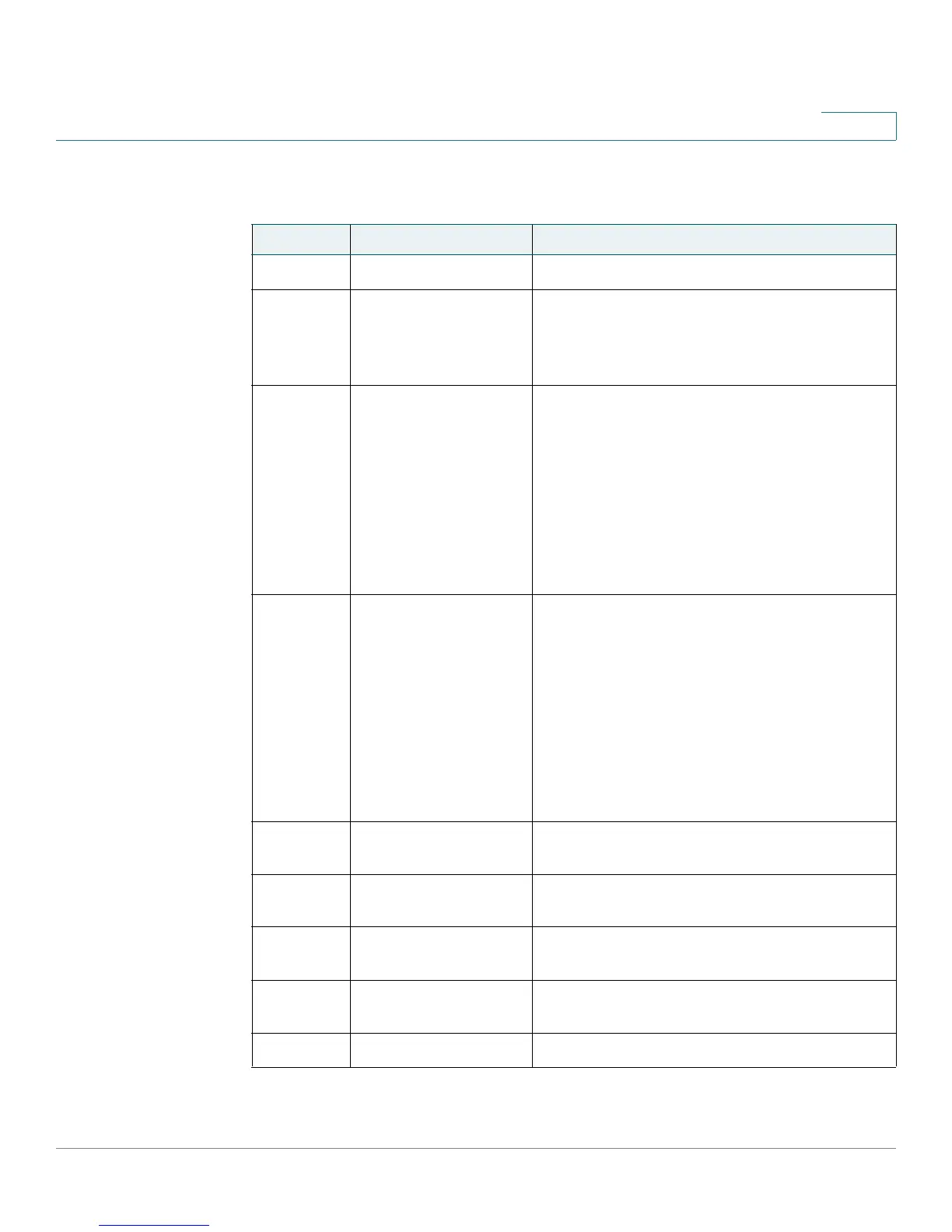
Table 1 IP Phone Components
# Phone Feature Description
1 Handset
Pick up to answer or place calls.
2
Message Waiting
Indicator
When lit:
• Red—You have a new voice mail message.
• Flashing Red—You have an incoming call.
3 LCD Screen
Your phone may vary, but typically displays:
• Date and time
• Phone station name
• Line extensions
• Softkey options
• Startup logo, screen saver, background
photo, and photo album (SPA962)
4
Line keys (not available on SPA92x)
Indicates phone line status. Your phone may
vary, but typically, when lit:
• Green: Line is idle.
• Red (steady): Line is active or in use.
• Red (blinking): Line is on hold.
• Orange: Line is unregistered (cannot be
used).
5
Softkey buttons Press a softkey button to perform the action
shown on the label on the LCD screen above.
6 Navigation button
Press in each direction to scroll through items
shown on the LCD screen.
7 Keypad
Use to dial phone numbers, enter letters, and
choose menu items.
8 Messages button
Press to access voice mail (must be set up by
your phone administrator).
9 Hold button
Push to place a call on hold.



 To Next Page