3-34
Cisco UCS S3260 Storage Server Chassis Installation and Service Guide
Chapter 3 Maintaining the System
Installing or Replacing System Components
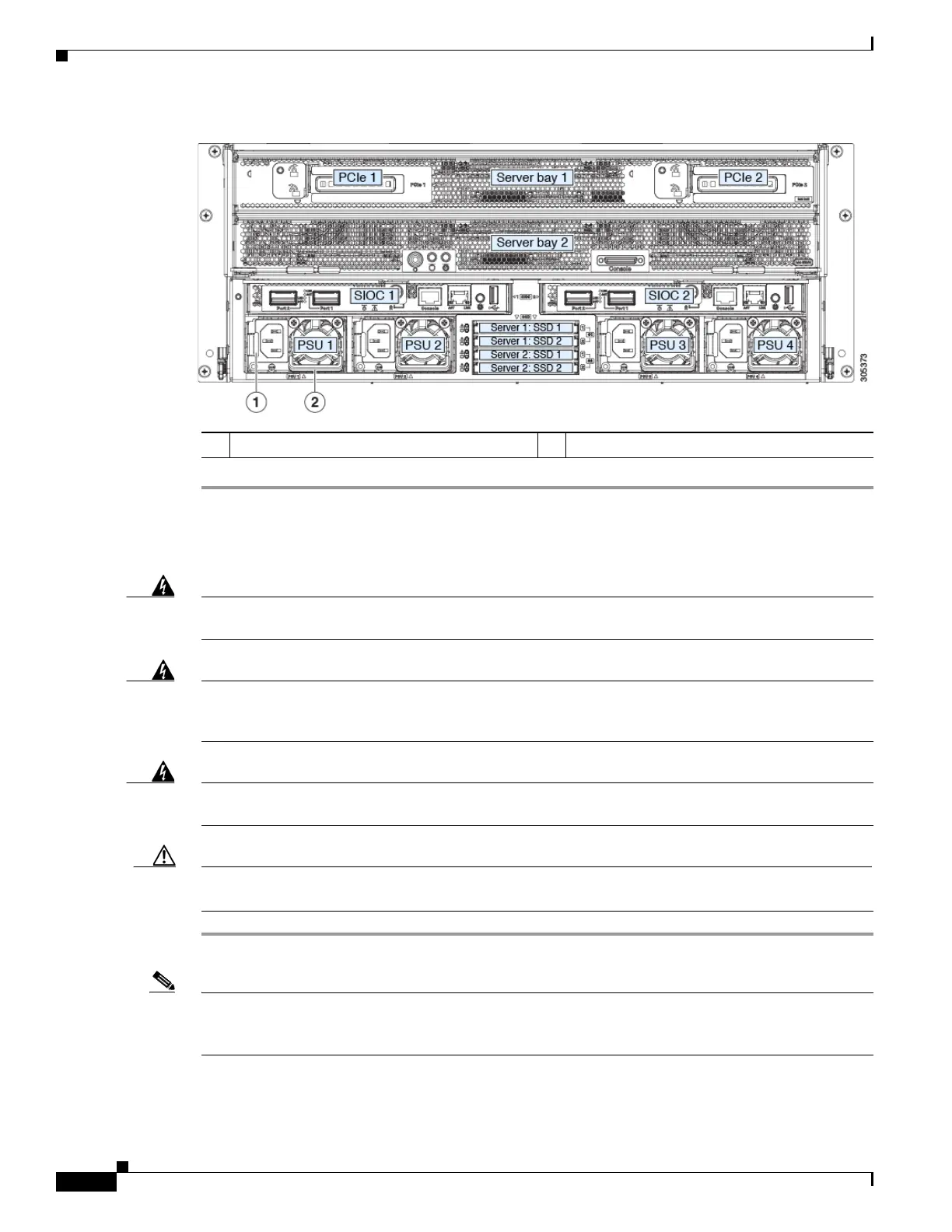
Figure 3-16 Removing and Replacing Power Supplies
Installing a DC Power Supply (First-Time Installation)
Warning
A readily accessible two-poled disconnect device must be incorporated in the fixed wiring.
Statement 1022
Warning
This product requires short-circuit (overcurrent) protection, to be provided as part of the
building installation. Install only in accordance with national and local wiring regulations.
Statement 1045
Warning
Installation of the equipment must comply with local and national electrical codes. Statement
1074
Caution Before beginning this wiring procedure, turn off the DC power source from your facility’s circuit breaker
to avoid electric shock hazard.
Step 1 Turn off the DC power source from your facility’s circuit breaker to avoid electric shock hazard.
Note The required DC input cable is Cisco part CAB-48DC-40A-8AWG. This 3-meter cable has a 3-pin
connector on one end that is keyed to the DC input socket on the power supply, as shown in Figure 3-17.
The other end of the cable has no connector so that you can wire it to your facility’s DC power.
Step 2 Wire the non-terminated end of the cable to your facility’s DC power input source.
1 Power supply release lever 2 Power supply handle










 To Next Page