English
Owner’s Manual
M508
4
4. CONTROLS
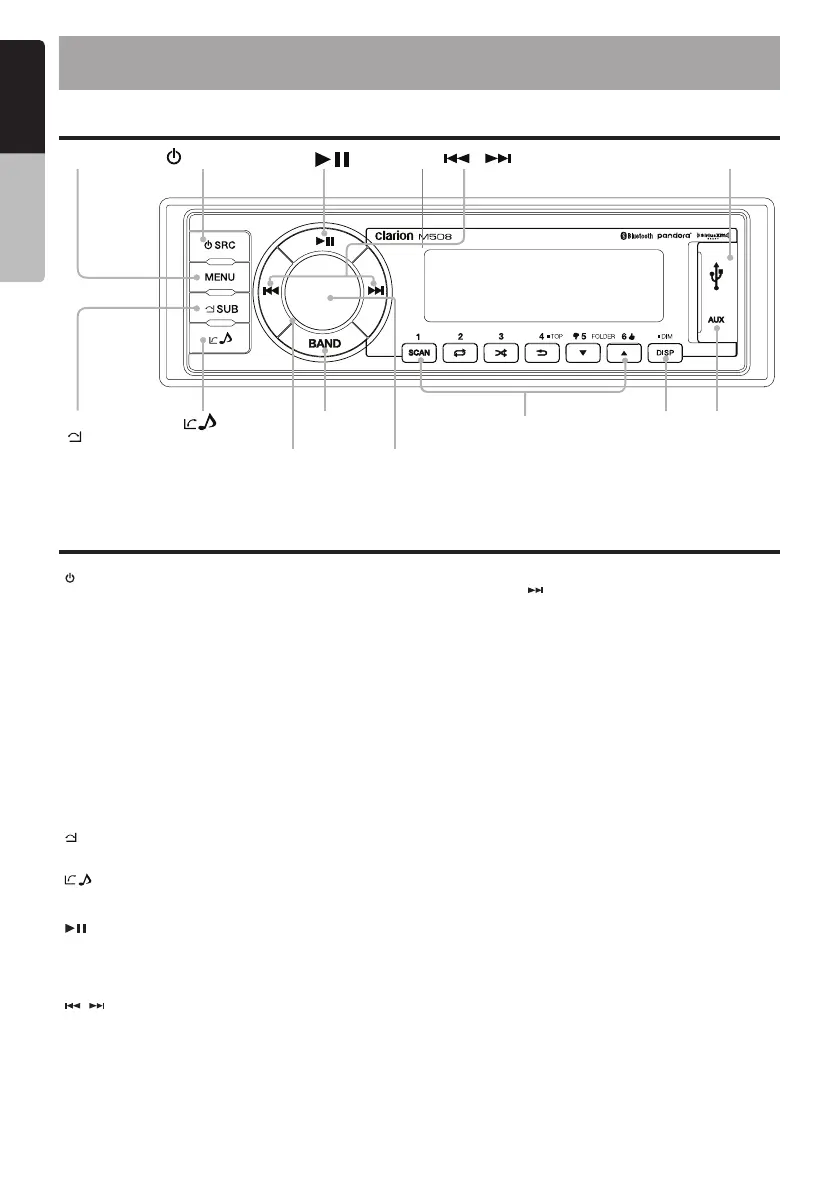
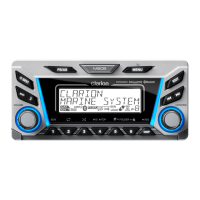
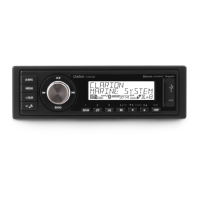
Operational Panel
Name of Buttons and their Functions
[ / SRC ] Button
• Toggle the audio source (Short Press)
• Power On/Off (Press and Hold).
[ VOLUME / ENTER / MUTE ] Knob
• Rotate to adjust volume level.
• Mute or Unmute the audio output (Short Press)
• Display Off (Press and Hold).
• Press to conrm operation (Short Press)
[ MENU (SP)] Button
• Tuner mode – Auto Store / Preset Scan
• USB mode – Search function
• iPod mode – iPod menu / iPod control (Press and Hold)
• Pandora mode – Pandora menu.
• SiriusXM mode – SiriusXM menu
[ MENU (LP)] Button
• System menu
[
SUB ] Button
• Adjust the Subwoofer Gain or Turn On the Subwoofer function.
• BT - End Call
[
] Button
• – Audio Settings
• BT - Answer Call
[
] Button
• USB/iPod/Pandora/Bluetooth - Play / Pause (Short Press)
• SiriusXM – Start Instant Replay Mode (Short Press). In Instant
Replay mode, for Play/pause (Short Press) or for Live mode (Press
and Hold)
[
/ ] Buttons
• Menu – View additional system settings (Short Press)
• Tuner mode – Station Up/Down (Short Press),
Scan Up/Down (Press and Hold)
• SiriusXM mode – Channel Up/Down (Short Press),
Rapid Channel Up/Down (Press and Hold)
SiriusXM Instant Replay - Skip forward or skip backwards (Short
Press), fast forward/rewind 5/10/30 seconds (Press and Hold)
• USB/iPod – Next or previous track (Short Press), Fast forward or
rewind (Press and Hold)
• BT – Next or previous track (Short Press), Fast forward or rewind
(Press and Hold)
• Pandora – Press
to skip track.
[BAND] Button
• Tuner mode - Select Tuner band FM1/FM2/FM3/AM1/WB
• SiriusXM mode - Select Tuner band SXM1/SXM2/SXM3.
• iPod mode - Simple mode (Press and Hold)
[ 1~6 ] Button
• [ 1 ] Button - Scan/Preset Station 1
• [ 2 ] Button - Repeat play/Preset Station 2
• [ 3 ] Button - Random play/Preset Station 3
• [ 4 ] Button - Preset station 4/Top play in digital source
Menu – Back one level in the menu. (Short Press)
Exit out of Menu (Press and Hold)
• [ 5 ] Button - Preset station 5/Previous folder/ Pandora mode -
Thumbs down
• [ 6 ] Button - Preset station 6/Next folder/Pandora mode - Thumbs
Up
[ DISP/DIM ] Button
• Display information for digital sources (Short Press)/Adjust LCD
backlight level, High or Low (Press and Hold)
[USB] Port
• USB Type A
[AUX input] Port
• 3.5mm Stereo plug
[
]
[ ]
[
/ ]
[ENTER/MUTE]
[VOLUME]
[BAND]
[ SUB]
USB PORT
AUX INPUT[DISP]
[1 ~ 6]
[MENU]
[ / SRC]


 To Next Page