EasyManua.ls Logo

Clarion CMS5 - User Manual

Clarion CMS5
46 pages
Print Icon
To Next Page IconTo Next Page
Loading...
Owner’s Manual
Mode d’ emploi et manuel
Manual de instrucciones
CMS5
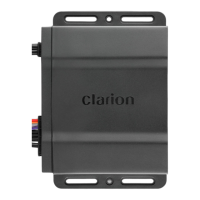
MARINE BLACK BOX SOURCE UNIT WITH J1939

Other manuals for Clarion CMS5

Questions and Answers

  • K
    kennedykarenAug 13, 2025
    Why my Clarion Marine Equipment unit will not power ON?
    • C
      Christina LeAug 13, 2025
      If your Clarion Marine Equipment unit isn't powering on, first ensure the power connector to the CMS5 is properly connected and the battery switch is turned on. Then, check the in-line fuse and the vessel's accessory/radio fuse. Also, verify the grounding to metal or the battery is secure. The issue may be due to no power, the vessel battery switch being off, a blown fuse, or a bad grounding point.
  • C
    Catherine HenryAug 17, 2025
    What to do if there is no sound from my Clarion CMS5 Marine Equipment?
    • J
      Julie ArellanoAug 17, 2025
      If there is no sound from your Clarion Marine Equipment, first check if the mute feature is activated by pressing the volume knob. If mute is off, verify the volume level and check the speaker connections. If you are using an amplifier, ensure that it is turned on. The problem could stem from the mute feature being on, a low volume level, or issues with the speakers or amplifier.
  • M
    Mrs. Teresa HarrisAug 20, 2025
    Why is my phone not working or charging with Clarion CMS5 Marine Equipment?
    • B
      Brian RobinsonAug 20, 2025
      If your phone is not working or charging with your Clarion Marine Equipment, ensure the USB phone cable is properly plugged into one of the USB ports. Also, the USB extension cable should not exceed 4 feet, as longer cables increase resistance and can prevent proper function. Consider using the Clarion CCAUSBAV cable. The issue may be that the USB phone cable is not connected or that the USB extension cable is too long.
  • M
    millsvictoriaAug 25, 2025
    What to do if Clarion CMS5 Marine Equipment controller is not responding?
    • M
      Mrs. Amy Nelson MDAug 25, 2025
      If the controller for your Clarion Marine Equipment is not responding, check the CAT5 Ethernet cable. Unplug the CAT5 Ethernet cable and then plug it back in, ensuring you hear a 'click' when connecting it. A bad cable connection may be the reason.
  • A
    Alexander AndersonAug 28, 2025
    How to fix 'Check Antenna' message on Clarion Marine Equipment?
    • M
      Matthew SnyderAug 28, 2025
      To address the 'Check Antenna' message on your Clarion Marine Equipment, verify that the antenna cable is connected to the SiriusXM Connect Vehicle Tuner. Inspect the antenna cable for any damage or kinks. If the cable is damaged, replace the antenna.
  • T
    Tasha MillerSep 1, 2025
    How to solve 'Check Tuner' message on Clarion CMS5?
    • K
      Kevin ConleySep 1, 2025
      To resolve the 'Check Tuner' message on your Clarion Marine Equipment, verify that the SiriusXM Connect Vehicle Tuner cable is securely connected to the radio.
  • E
    Elizabeth ReedSep 5, 2025
    What to do if my Clarion CMS5 shows 'No Signal'?
    • S
      sanchezleslieSep 5, 2025
      To fix a 'No Signal' issue on your Clarion Marine Equipment, ensure your vehicle is outdoors with a clear view of the sky. Verify that the SiriusXM magnetic mount antenna is mounted on a metal surface on the outside of the vehicle, away from obstructions. Inspect the antenna cable for damage or kinks. Consult the SiriusXM Connect Vehicle tuner installation manual for more information on antenna installation. Replace the antenna if the cable is damaged.
  • E
    Elijah HendersonSep 8, 2025
    How to clear 'Subscription Updated' message on Clarion CMS5 Marine Equipment?
    • T
      Taylor HallSep 8, 2025
      To clear the 'Subscription Updated' message on your Clarion Marine Equipment, press OK. If you have any questions about your subscription, visit www.siriusxm.com or call 866-635-2349.

Summary

FEATURES

PRECAUTIONS

CAUTIONS ON HANDLING

DISPLAY CONTROLLER BUTTONS

Name of Buttons and their Functions

Details the function of each button on the display controller.

OPERATIONS

Radio Operation

Instructions for operating the AM/FM and Weather Band radio functions.

SiriusXM Satellite Radio Operation

Guides for using the SiriusXM satellite radio service.

iPod Audio Operation

Instructions for playing audio content from an iPod or iPhone.

Phone Operation

Instructions for using the phone features, including calls and contacts.

TROUBLESHOOTING

SPECIFICATIONS

INSTALLATION AND WIRE CONNECTIONS DIAGRAM

Package Contents

Lists all the items included in the product package.

Installation Cautions

Important safety and installation guidelines to follow before installing.

Black Box Installation

Instructions for mounting the CMS5 black box unit.

Display Controller Installation

Steps for mounting the display controller unit.

Wire Connections

Diagrams and details for connecting various cables and wires.

Clarion CMS5 Specifications

General IconGeneral
BrandClarion
ModelCMS5
CategoryMarine Equipment
LanguageEnglish

Related product manuals