EasyManua.ls Logo

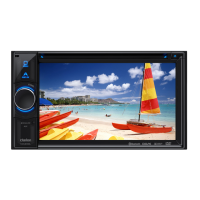
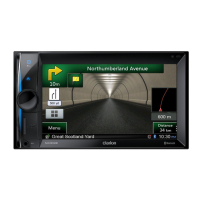
Clarion NX503E - User Manual

Clarion NX503E
107 pages
Print Icon
To Next Page IconTo Next Page
Loading...
Owner's manual
Navigation
N
X
503E

Table of Contents

Other manuals for Clarion NX503E

Questions and Answers

  • T
    Tamara ThompsonAug 25, 2025
    How to fix Clarion Car Receiver if GPS reception is not displayed?
    • J
      jessicabrownAug 25, 2025
      If the GPS reception is not displayed on your Clarion Car Receiver, ensure the antenna cable is connected. Also, remove any obstructions that may be blocking the signal. Keep in mind that positioning may be difficult depending on satellite placement, and the display may only appear while the vehicle is moving.
  • B
    brendarossAug 25, 2025
    What to do if my Clarion NX503E Car Receiver has no sound after inserting a disc?
    • E
      Elizabeth TaylorAug 26, 2025
      If your Clarion Car Receiver outputs no sound or immediately ejects the disc, ensure the disc is loaded with the label surface facing up. Note that CD-R/RW discs or copy-protected CDs may not be compatible. Finalize the disc to ensure it can be used. Also, MIX MODE CDs and 8 cm discs are not supported and should be ejected.
  • M
    Mark GarciaAug 26, 2025
    Why does my Clarion NX503E Car Receiver have skipping sound and noise?
    • B
      benjamin82Aug 26, 2025
      If you are experiencing skipping sound and noise with your Clarion Car Receiver, the disc may be dirty. Wipe the disc with a dry cloth. If the issue persists, replace the disc with one that is not scratched.
  • A
    Alexis RileyAug 27, 2025
    What to do if the screen is not displayed on my Clarion NX503E Car Receiver?
    • I
      Ian OwenAug 27, 2025
      If the screen is not displayed on your Clarion Car Receiver, try pressing the rotary volume key (NX503E) or the POWER button (FX503E) to redisplay it if it's hidden. The fuse might be blown.
  • D
    David VasquezAug 27, 2025
    Why is my Clarion Car Receiver showing my vehicle out of position?
    • S
      sbernardAug 27, 2025
      If your Clarion Car Receiver shows your vehicle out of position, especially when other electrical components are attached, move those components away from the unit and the GPS antenna wire.
  • J
    Jon ReynoldsAug 28, 2025
    How to fix Clarion Car Receiver error message when Smartphone linking is not possible?
    • T
      Tyler WebsterAug 28, 2025
      If you receive an error message and cannot link your smartphone to the Clarion Car Receiver, cancel the sleep state on your smartphone. Ensure you have installed the linking-compatible application and 'Smart Access' on your smartphone. Start the linking application on your smartphone. Reconnect the smartphone in a location with good reception. Disconnect and reconnect the connector cable. Check the OS setting on the unit. For Android smartphones, enable the HDMI output setting and verify that the smartphone supports Bluetooth SPP and HID profiles.
  • C
    Catherine WallaceAug 29, 2025
    Why is there no sound from my Clarion Car Receiver after turning it on?
    • C
      Cassandra ElliottAug 29, 2025
      If there is no sound output from your Clarion Car Receiver after turning it on, there might be water drops on the lens inside. Leave the unit with the power on for about one hour to allow it to dry.
  • M
    Melissa BradshawAug 30, 2025
    Why does the screen flicker on my Clarion NX503E?
    • P
      paulamartinezAug 30, 2025
      If the screen on your Clarion Car Receiver flickers, it may be due to electrical noise. Keep electrical components like cellphones, wireless radios, and minus ion generators as far away from the unit as possible. Avoid using these components if they adversely affect the unit, even from a distance.
  • M
    millersherylAug 30, 2025
    What to do if I cannot insert a disc into my Clarion Car Receiver?
    • K
      Karen HoffmanAug 31, 2025
      If you cannot insert a disc into your Clarion Car Receiver, check to see if other discs are already loaded.
  • D
    Diane GarciaAug 23, 2025
    How to reduce noise in the radio on my Clarion Car Receiver?
    • M
      Margaret DavidsonAug 25, 2025
      To reduce noise in the radio on your Clarion Car Receiver, tune to the correct frequency.

Summary

Warnings and Safety Information

Safety Precautions

Essential safety guidelines for operating the navigation system.

Getting Started with Navigation

Interface and Setup Overview

Covers initial setup, screen controls, buttons, and the navigation menu.

Navigation Modes and Features

On-Road Navigation Guide

Detailed guide on selecting destinations, planning routes, and modifying navigation.

Off-Road Navigation

Instructions for using the navigation system in off-road mode.

Reference, Legal, and Copyright

Reference Guide and Concepts

Explanation of core concepts, settings, and features of the navigation software.

Legal and Copyright Information

Includes glossary, end-user license agreement, and copyright notices.

Clarion NX503E Specifications

General IconGeneral
MP3 playback-
DVD Audio playbackYes
Aspect ratio16:9
Display typeTFT
Display diagonal6.2 \
Display resolution800 x 480 pixels
Output power18 W
Product colorBlack
Frequency range20 - 20000 Hz
Disc types supportedDVD+R, DVD+RW, DVD-R, DVD-RW
Signal-to-Noise Ratio (SNR)93 dB
AM band range530 - 1710 kHz
FM band range87.9 - 107.9 MHz
Supported radio bandsAM, FM
BluetoothNo
Line outputs (RCA)2
Weight and Dimensions IconWeight and Dimensions
Dimensions (WxDxH)178 x 157 x 100 mm

Related product manuals