14 15
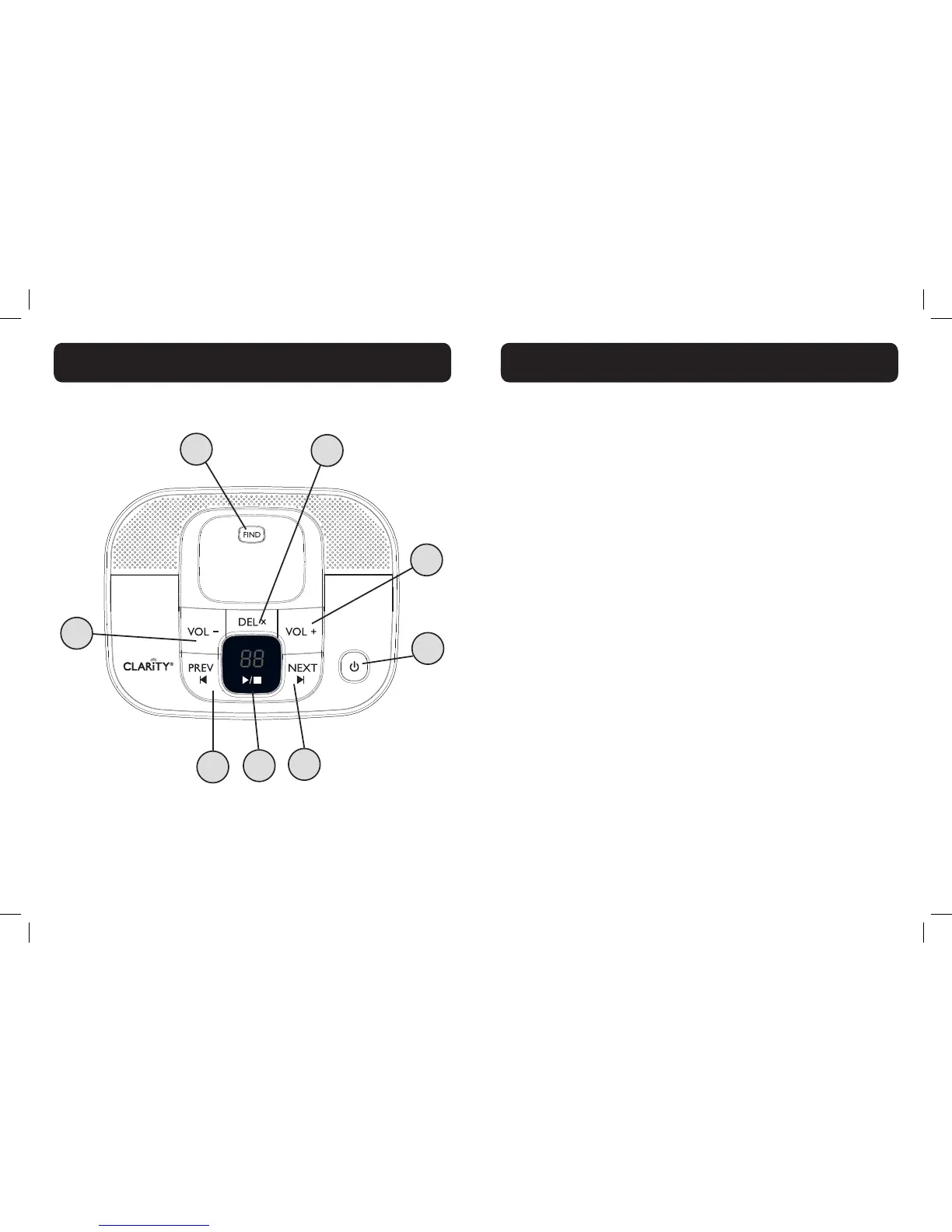
1. DEL (DELETE)
• Press once to delete the message during playback.
• While in standby, press twice to delete all old messages.
• Note: New voice messages will not be deleted.
2. VOL + (VOLUME UP)
Increase speaker volume during message playback.
3. ANSWERING MACHINE (TAM) (on/off)
• Press to turn on the answering machine.
• Press again to turn off the answering machine.
4. NEXT (SKIP FORWARD)
Press to skip the current message and play the next message.
5. PLAY/STOP
• Press to play the message.
• Press again to stop the message playback.
6. PREV (SKIP BACKWARD)
• Press to repeat playing the current message from the beginning.
• Press twice to skip backward to the previous message.
7. VOL - (VOLUME DOWN)
Decrease speaker volume during message playback.
8. FIND
Press the FIND button on the base station to page your registered
handset(s).


 To Next Page