5
English
1
2
3
4
5
6
7
• Replace thebattery immediately if thebattery warning symbols appears on
thedisplay. Aweak battery can cause incorrect results and thereby pose asafety
hazard.
• Neither themeter nor its accessories may be dismantled or modified in anyway.
• Remove thebattery from themeter if it is not to be used for anextended period.
• Turn themeter off afteruse.
• If themeter is placed close to astrong magnetic field, it might cause incorrect
readings which can be corrected by removing thecause of theinterference.
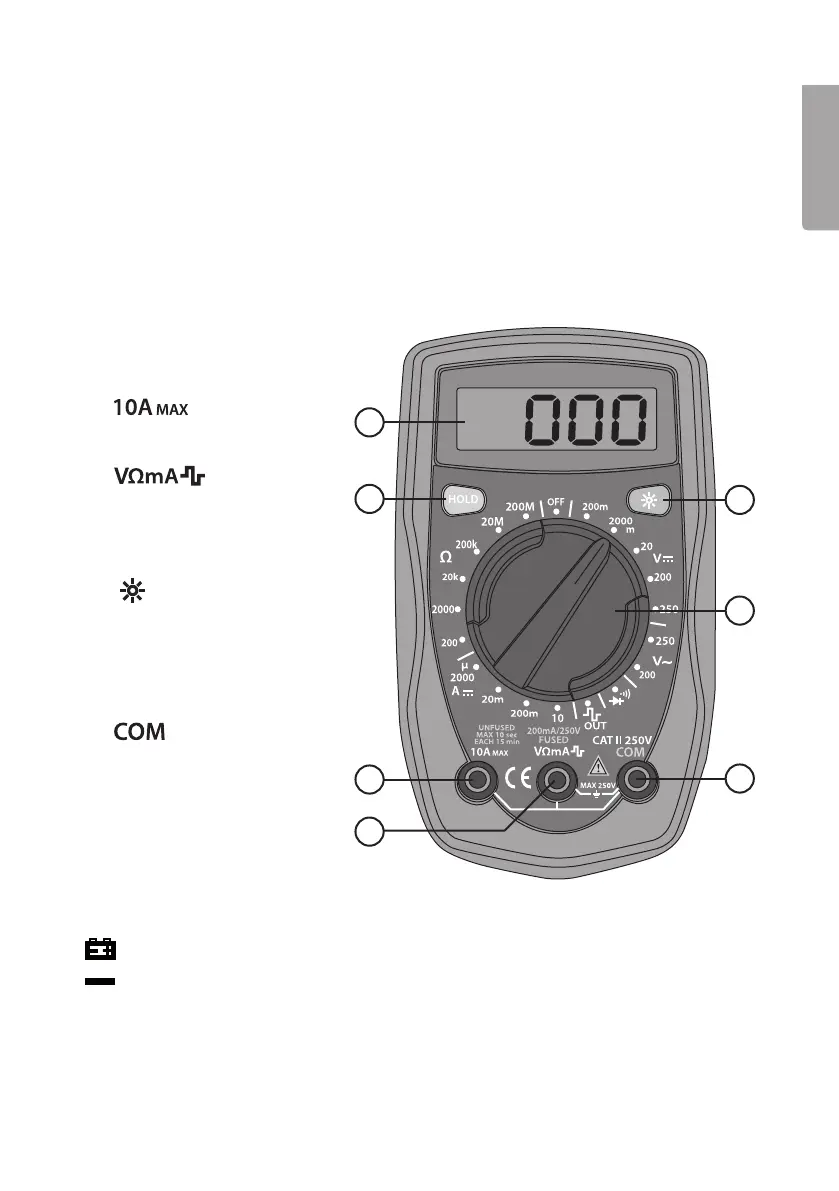
Buttons and functions
1. Display
2. [ HOLD ] Press to lock
themeasured value.
3.
: connection for red
test lead when measuring DC
current up to 10A.
4.
: connection for
red test lead when measuring
voltage, DC current up to
0.2 Aand resistance, and for
testing diodes and continuity.
5. [
] Switch display lighting
on/off. Note: Thedisplay
light does not switch off
automatically, it needs to be
switched off manually.
6. Function selector switch
7.
: connection for
theblack test lead (common).
Display symbols
: Thebatteries needs replacing.
: Thetest leads are connected with thewrong polarity to either theinstrument or
theobject being measured.
OL: Thereading is outside of themeasuring range.


 To Next Page