3
Remove Your SIM Card
1. Place your phone screen side down. Make sure it is on
a soft and dry surface.
2. Locate the cut-out slot at the bottom left corner of
your phone.
3. Insert your fingernail into the cut-out slot to remove
the back cover of your phone.
4. Place the back phone cover aside. You'll need it later.
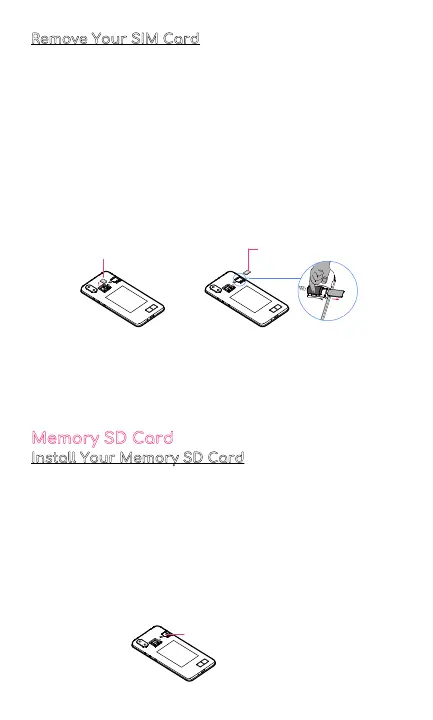
5. Find your SIM card you want to remove.
6. To remove the SIM card from Slot 1, press on your
SIM card to lift the cover and gently remove your SIM
card.
To remove the SIM card from Slot 2, find the ejection
lever on the lower edge of the SIM card slot. Use your
fingernail to push the ejection lever to the right. This
action will release the SIM card, allowing you to
remove it from the slot.
Memory SD Card
Install Your Memory SD Card
1. Turn o your phone
2. Place your phone screen side down. Make sure it is
on a soft and dry surface.
3. Insert your fingernail into the cut-out slot to remove
the back cover of your phone
4. Place the back phone cover aside. You'll need it later.
5. Locate your memory SD card
6. Gently slide your memory SD card into the slot until it
clicks
SIM Card 1
SIM Card 2
Memory SD Card Slot



 To Next Page