4Clover Station Pro Install Guide — EU 1.0
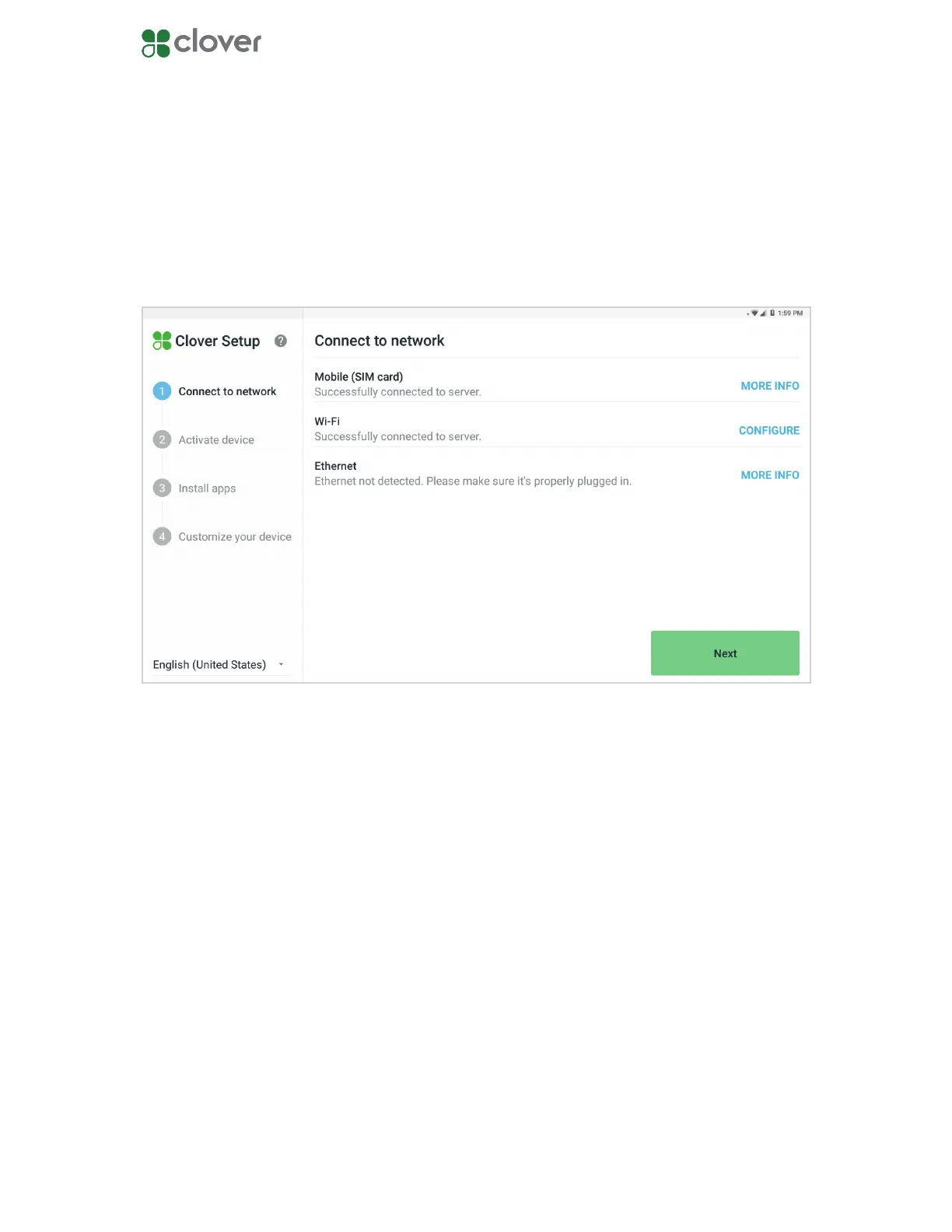
Connect your Station Pro to a network
Connect via Mobile (SIM card)
Connect via Wi-Fi
Connect via Ethernet
There are three ways to connect your Station Pro to a network: Mobile (SIM) card, Wi-Fi, and
Ethernet.
1. On the network connection screen, wait for the SIM card to verify that it’s connected to
the mobile cellular network.
2. Once you see a message conrming the connection, tap Next.
1. Tap CONFIGURE in the Wi-Fi section.
2. Select the network you want to connect to.
3. If you’re connecting to a secure network, enter the password, then tap CONNECT.
4. Once you’ve connected to a network, tap Next.
1. Plug one end of the Ethernet cord into the Station Pro hub.
2. Plug the other end of the Ethernet cord into a modem, router, or Ethernet outlet.
3. Your Station Pro will automatically try to connect to a network. If it does not, tap Check
Connection.
4. Once your Station Pro is connected to a network, tap Next.



 To Next Page