9Clover Station Pro Install Guide — EU 1.0
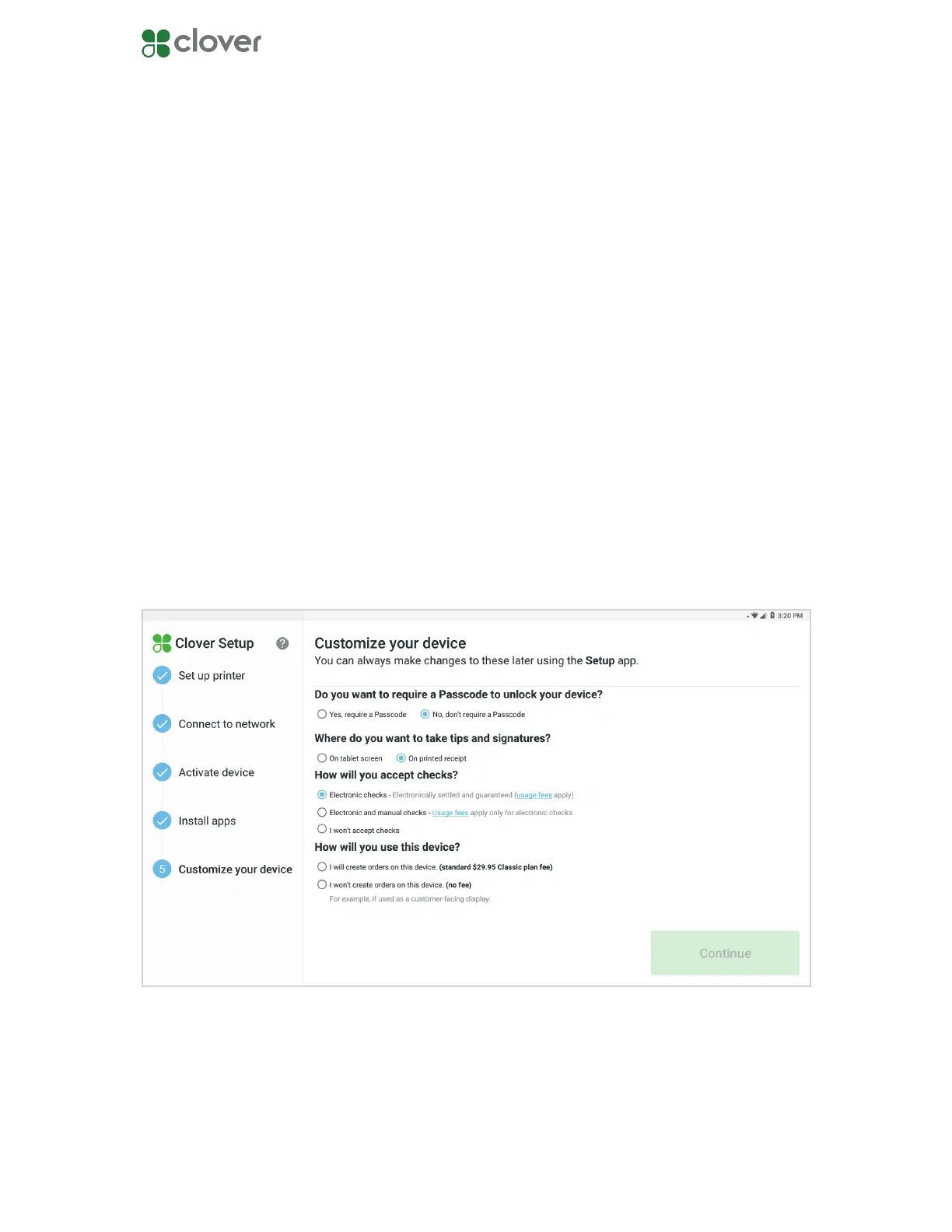
Customize your device
Customize passcode and payment settings
1. Select if you want to require a passcode to unlock your device.
2. Select where you want to take tips and signatures.
3. Select if you want to accept checks. You can select if you only want to accept electronic
checks, both electronic and manual checks, or no checks at all.
4. Tap Continue.
5. If your monthly fees have changed, you will see a screen detailing your new monthly total.
Tap Authorize to continue.
Choose whether you want to allow unlocking a device without a passcode, where you want to
take tips and signatures, and if you want to accept checks as tender.
You can always change these settings in the Setup app.
NOTE: If you want to accept tips on printed receipts, please make sure your closeout time is at
least an hour after your business has entered tips for the day.
NOTE: IF you do not see an option for tips, your merchant account is not enabled for tips. Con-
tact Customer Support and request tips be enabled.



 To Previous Page