EVAC-500 Voice Alarm & Evacuation System Operation Manual
14 / 42
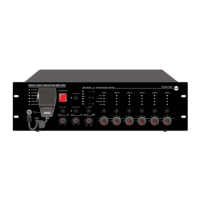
1—Power Indicators
1). AC POWER:
Yellow —— The system has equipment, but AC power failure;
Green —— The system has equipment and AC power is normal;
2). DC POWER:
Yellow —— The system has equipment, but DC power failure;
Green —— The system has equipment and DC power is normal;
2— Fault indicator
Yellow (NO SPARKLING)——Indicates that the current equipment or system has equipment module failure, The
user has identified the fault, Pls click “FAULT ACK”.
Yellow (SPARKLING)—— Indicates that a new fault exists in the device, To inform the user, At this point the user is
not confirmed.
Distinguished indicators—— All modules of the system work normally.
3— Emergency Microphone indicator
Yellow —— Means fault;
Green —— Means working;
Distinguished indicator —— Means communication is normal;
4— Indication Test
In any state,Press the test indication button on the host,the light on the LED will be lighted up. It is used to confirm
whether the LED is working properly;
5—Emergency Button
Red flash—emergency mode; extinguish--normal mode.
Making Emergency Broadcast: a) Emergency broadcast will be activated by manual press the button and red light
flashing. b) Auto emergency broadcast will be activated by the trigger inputs on the rear panel of host and extension unit
and red light flashing.
Reset the Emergency Mode: a) Press the “ACK/Reset” button on the front panel to exist the emergency mode to
terminate the emergency broadcast and terminate the zone output. b) Input a reset signal to the emergency control
input terminal on the rear panel of the EVAC-500 which has been assigned a reset function. These events history could
be recorded and inquired in the software history record.
6— FAULT ACK
a). If the system various modules work normal or abnormal system module diagnosis but press the button when the
indicator "FAULT" light is not flashing, equipment do not do any processing;
b). If the system module in the diagnosis of abnormal, "FAULT" of FAULT indicator light flashing, press some button,
"FAULT" stopped lighting from blinking, blinking indicating its disabled state, Buzzer to stop till To the new module
detects abnormal after heavy shine again "FAULT" LED lamp and start the buzzer hint user;
c). When the current partition has output, press the build close the current audio output, quick exit and quit play;
7—EVAC MSG & Alert MSG
Green——“EVAC MSG/ALERT MSG” Voice is in broadcast information;Yellow——“EVAC MSG/ALERT MSG” Lose
voice information or loss SD card;Extinguish—— “EVAC MSG/ALERT MSG” Normal.
Note: 1."EVAC voice information" refers to the EVAC voice ALERT and voice;2. If you need to manually play EVAC
voice messages,Need to enter the emergency mode, Then press the voice messages button; 3. System default
“EVAC” Voice priority is higher than "ALERT". Can change the priority through the EVAC - 500 SFT configuration. If not
special application requirements, please do not change it.
8—Four Function Button & Indicators
Light on means working. Flash means zone has been selected. Extinguish means no working.


 To Next Page