EVAC-500 Voice Alarm & Evacuation System Operation Manual
20 / 42
active status. The remote microphone is 24VDC powered by the EVAC-500 controller. The voice evacuation system is
strictly follow the Construction products Regulation(EU)No 305/2011: EN54-16:2008 Voice Alarm Control and
Indicating Equipment.
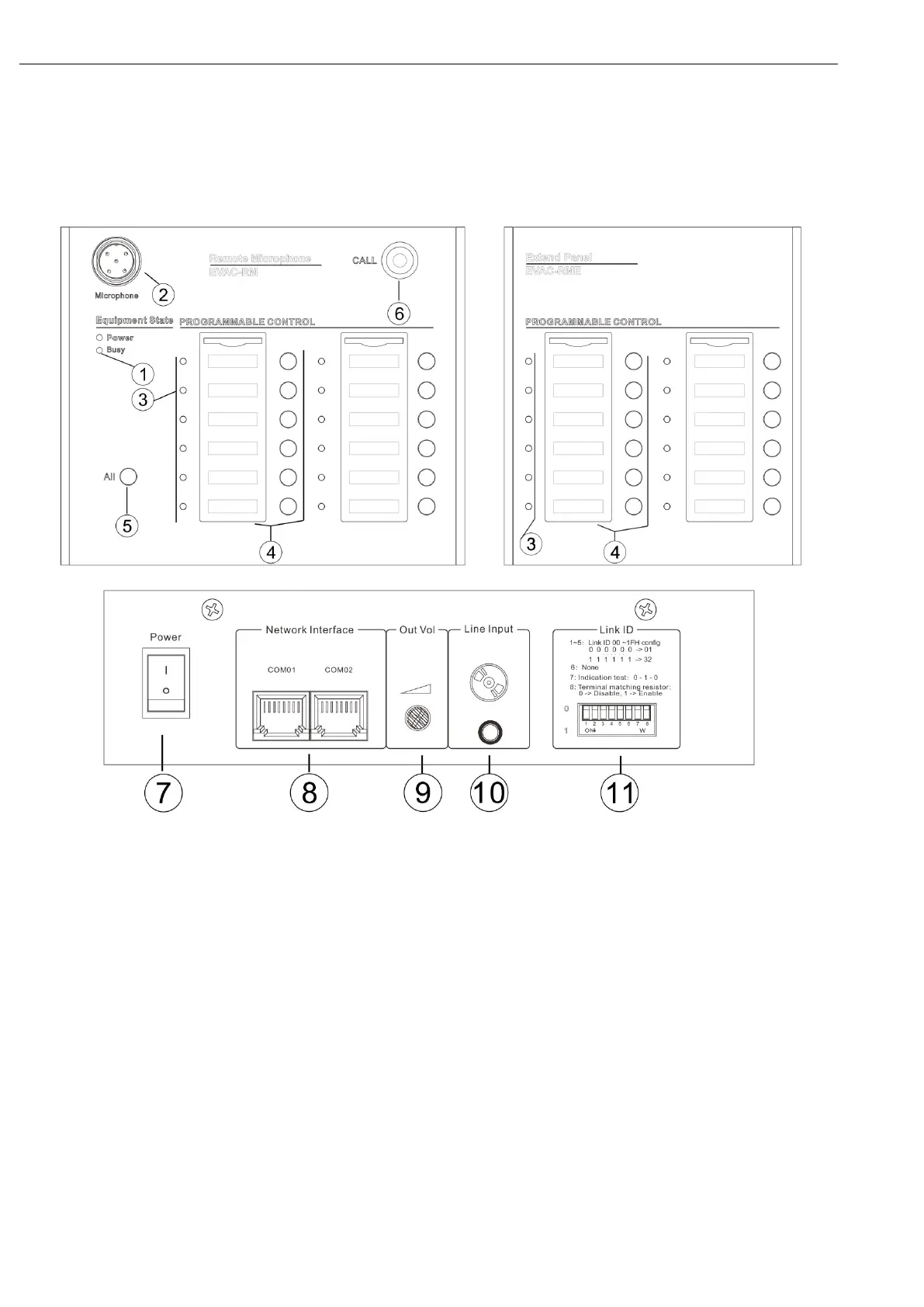
4.1. Front Panel and Rear Panel
1—Busy indicator
Green - the equipment is busy, please wait;
Off - normal state, can be used to call or control the specified partition;
2—Microphone XLR Socket
Connection with the supplied gooseneck microphone.
3—Zone Status Indicator
On - indicates that its current partition is in working condition;
Flashing - indicates that the user is currently selecting this partition;
Off - indicates that the partition is currently not working, handle the standby state;
4— Zone Name Card Insert
Here the user can print and insert the paper name card to indicate each zone.
5— All Zone
Used to select all current zones;


 To Next Page