Home
COBHAM
Transceiver
SAILOR 6000B
Page 54
COBHAM SAILOR 6000B - Page 54
82 pages
Manual
Save Page as PDF
To Next Page
To Next Page
To Previous Page
To Previous Page
Loading...
Chapter 2
: Operation
44
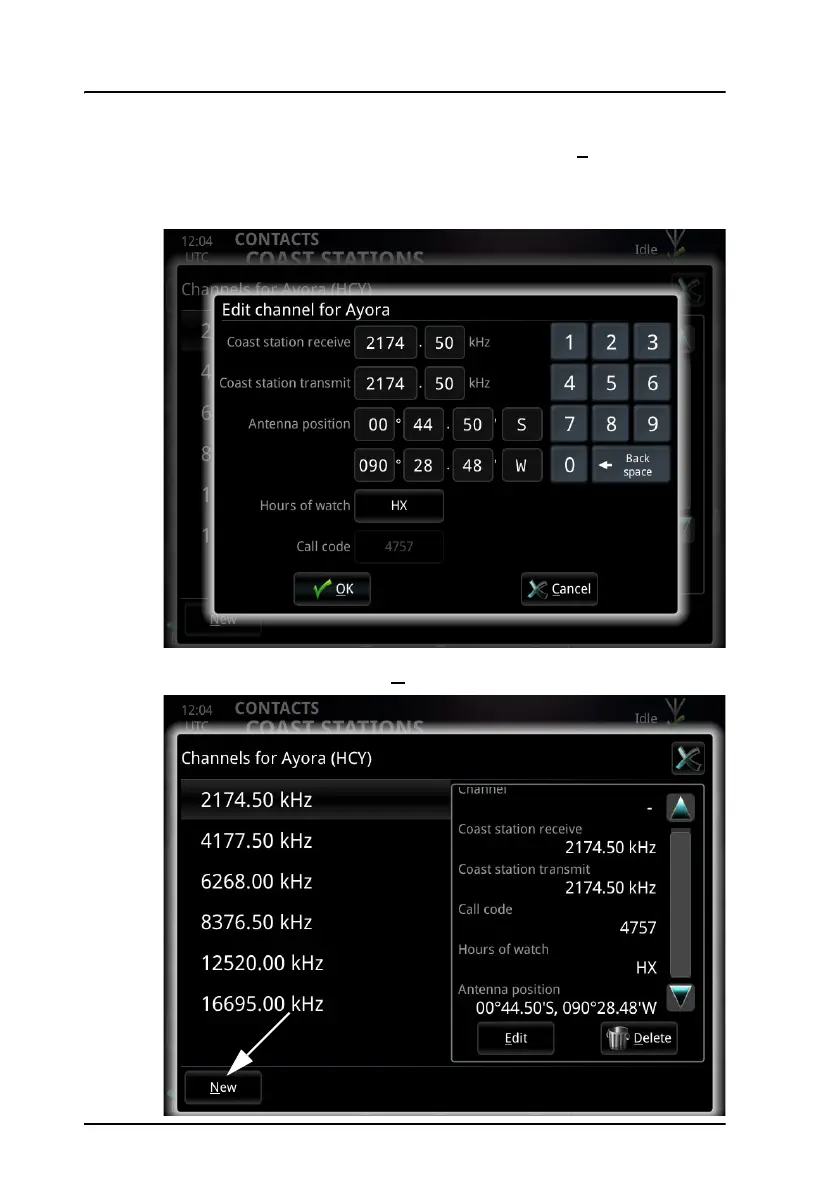
Contacts - Coast stations
4.
T
o edit a channel, sel
ect
the channel and then select
E
dit
in the small
window to the right.
5.
Edit the channel and select
OK
.
6.
T
o add a new channel, sel
ect
N
ew
at the bottom of the window.
53
55
Table of Contents
Main Page
default chapter
9
Table of Contents
9
Chapter 1 Introduction
11
System Overview
12
The Radiotelex Application
13
Chapter 2 Operation
15
Before You Start
16
Send a DSC Distress Alert
17
Send a Distress Telex
18
Cancel a Distress Alert
19
Overview of the Radiotelex User Interface
20
Set up a Telex Call
23
Make a Telex Call
26
Messages
33
Receive Telex Messages
39
Scan Frequencies
40
Contacts - Individual
45
Contacts - Coast Stations
49
Contacts Backup
56
System Information
57
System Settings
58
Power Status
60
Chapter 3 Troubleshooting
63
Get Support
63
Generate a Diagnostic Report
64
Troubleshooting Guide
65
Status Signaling
67
Glossary
73
Index
77
Other manuals for COBHAM SAILOR 6000B
Installation Manual
76 pages
Related product manuals
COBHAM SAILOR 6300
98 pages
COBHAM SAILOR 7224
94 pages
COBHAM SAILOR 7226 VHF
94 pages
COBHAM LGA-5005 HLD
43 pages



 To Next Page