Chapter 2: Installation
Installing the SAILOR 6080 Power Supply 13
2222
special guidelines given in Wiring 3 or more SAILOR 6080 units on
page 27.
To see an overview how to connect SAILOR 6080 Power Supply units in a
daisy chain see Wiring for daisy-chaining on page 17.
2.2.6.4 Battery input
You can connect an external 24 V emergency battery to the SAILOR 6080
Power Supply to make sure the unit is operational in case the AC input fails.
The battery input is protected against wrong polarity of the battery.
To connect the BATTERY input do as follows:
1. Connect the cable between the connector marked BATTERY and the
battery.
2. Remove the u-shaped cut-out for this input from the protective lid.
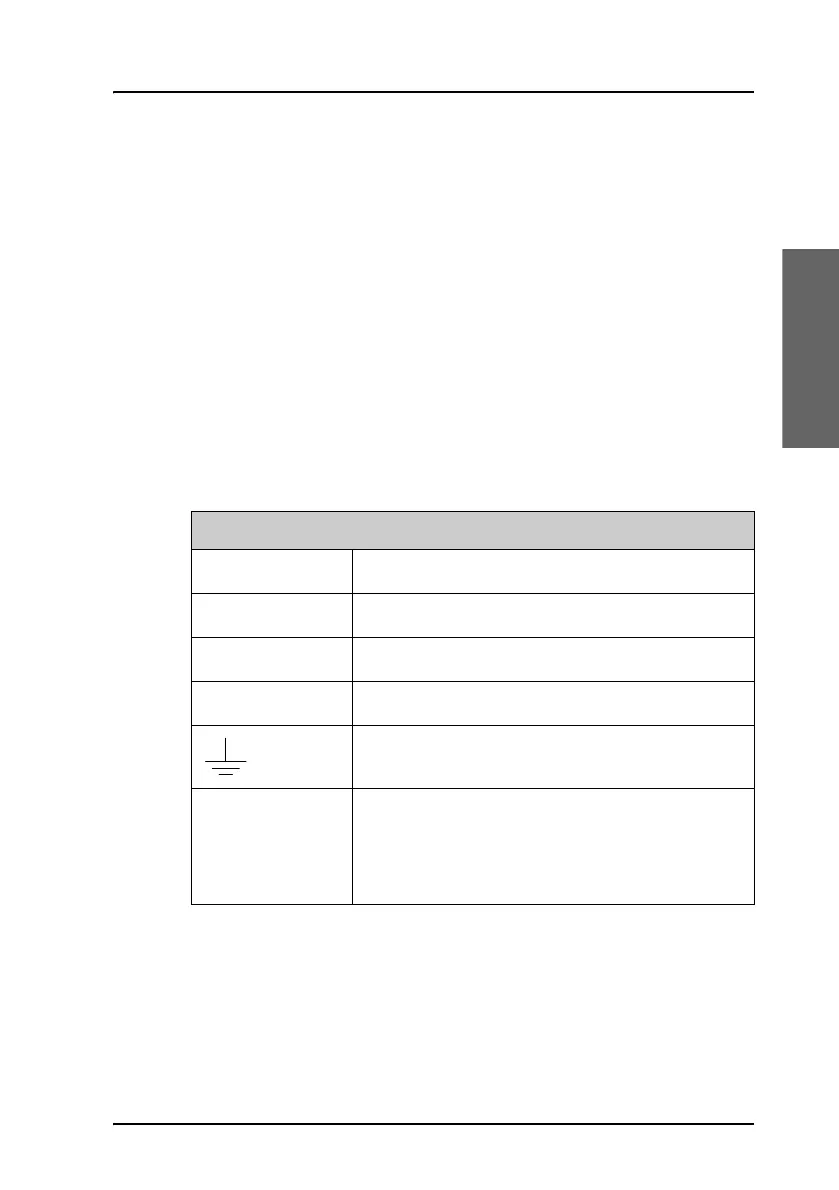
BATTERY
Connector type Spring loaded terminal
Wire cross section Up to 6 mm
2
+ Battery plus
- Battery minus
GND
Fuses Two 20 A fuses, one for battery plus and one for
the battery minus. These are accessible from
outside the housing and are positioned to the
right of the protective lid.


 To Next Page
 Loading...