Setup
Alternative types of PLA
These PLA Alternatives require advanced knowledge of the 3D Printer. Please visit
www.cocooncreate.com.au for details of lament types and parameters.
NOTE: Only use Cocoon Create Filament with your 3D Printer, using other laments may damage your
3D Printer and may void your warranty.
3.2 Inserting Filament:
1. With the printer initialised, press the Navigation Dial to enter the menu system
2. Navigate to, and select Quick Settings
3. Navigate to, and select Preheat PLA or Preheat ABS - depending on the material in use
4. Wait for the 3D printer to automatically return to the home screen, after approximately 15-30
seconds
5. Check the temperature of the Extruder and plate on
the LCD. When the temperatures are within a few
degrees of the target, you are ready to insert the lament
NOTE: Preheat PLA/ABS will still be shown, even after
temperatures have been reached
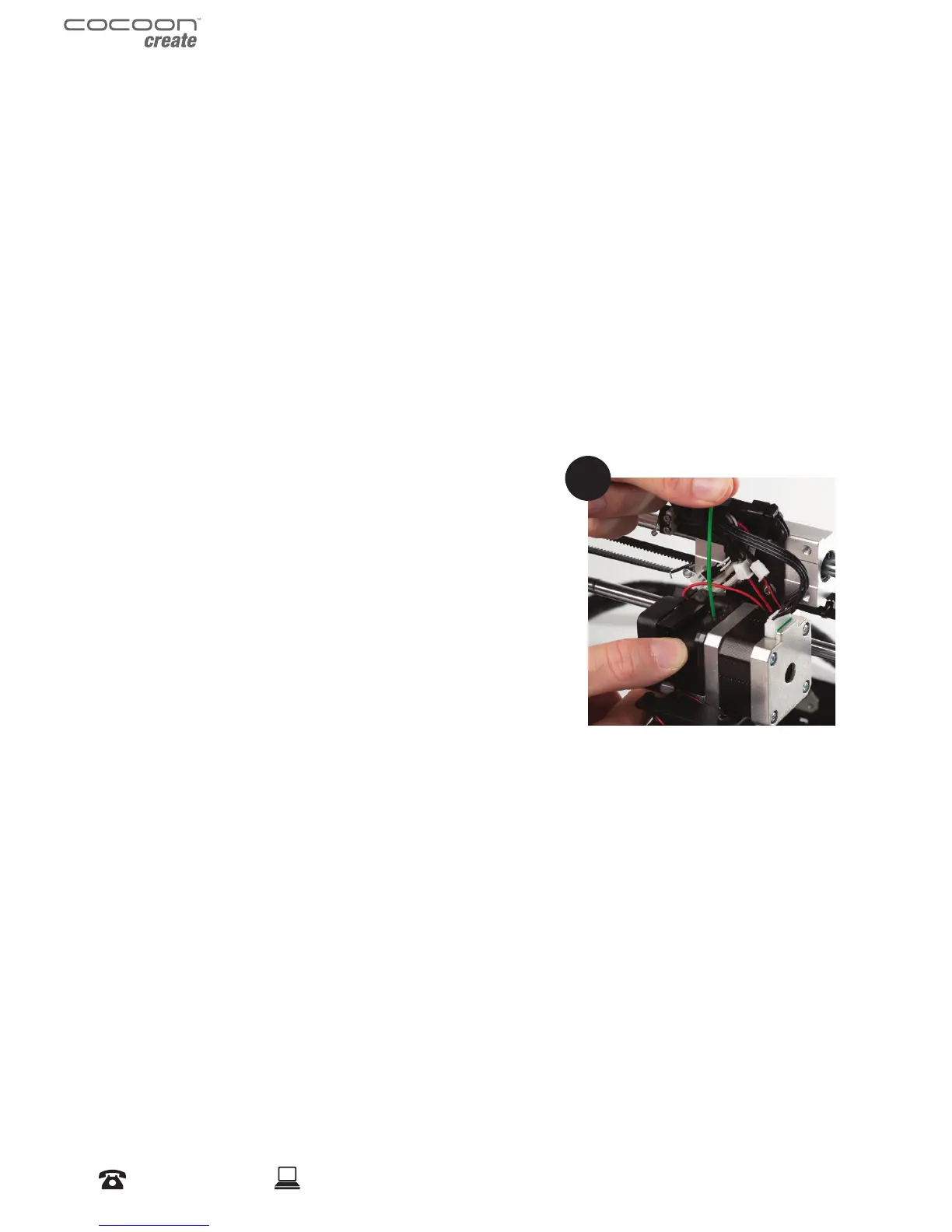
6. Carefully insert the included lament sample into the
hole on the Extruder as shown
7. While holding the lament in place with one hand, press
the Dial to enter the menu system
8. Navigate to and select Extruder > Extr. Position.
9. Gently push down on the lament while turning the Dial clockwise. You will feel the lament
being pulled into the Extruder. Continue until a few centimetres have extruded out of the
nozzle
10. Carefully clean the extruded lament o the Heated Print Bed and nozzle
WARNING: Extruder and Heated Print Bed will still be hot
6


 To Next Page