Using Cura
6.5 Quick Print Settings
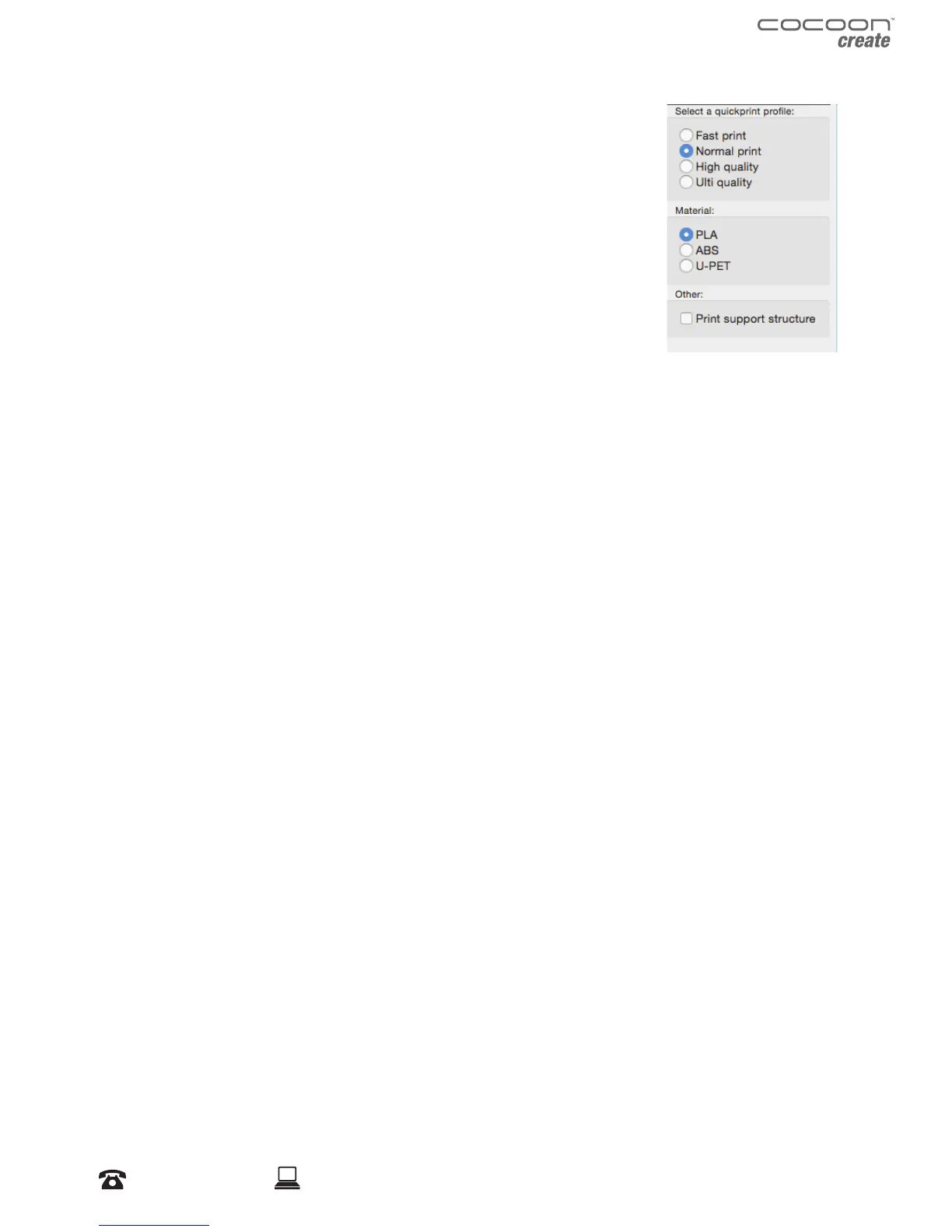
Quick Print mode allows you to quickly set the quality, material,
diameter and support structure of your intended GCODE le.
Enter quick print mode by selecting Expert > Switch to Quickprint…
High Quality
Designed to give greater detail and ner objects. This will have a smaller
layer height, which will make each layer thinner, so that curves seem
more natural and walls seem less noticeable.
Medium Quality
Designed to give a medium resolution, by increasing the layer height and print speeds. This will
make the organic curves slightly more step-like than the ne setting, but will reduce printing time.
Fast Quality
Designed for the fast prints, where overall model nish is not of concern. Most commonly used for
quick iteration of designs found in rapid prototyping.
Material Selection
Choose your desired lament. The Cocoon Create 3D Printer includes a 10 metre sample of PLA to
be used in your rst print.
Other laments are available for purchase at store.cocooncreate.com.au
Diameter
Ensure this is always set to match the lament diameter. Your 3D Printer only accepts Cocoon
Create 1.75mm laments.
NOTE: Advanced users can ne tune the diameter value to allow for tolerance if needed
Printing Support Material
Your Cocoon Create 3D printer is able to print models that have angles and overhangs, some of
these models will require support material depending on the overhang distance and angle. Turn
this option on if your model could benet from support material.


 To Next Page