15
2020 Voxx Electronics Corporation. All rights reserved.
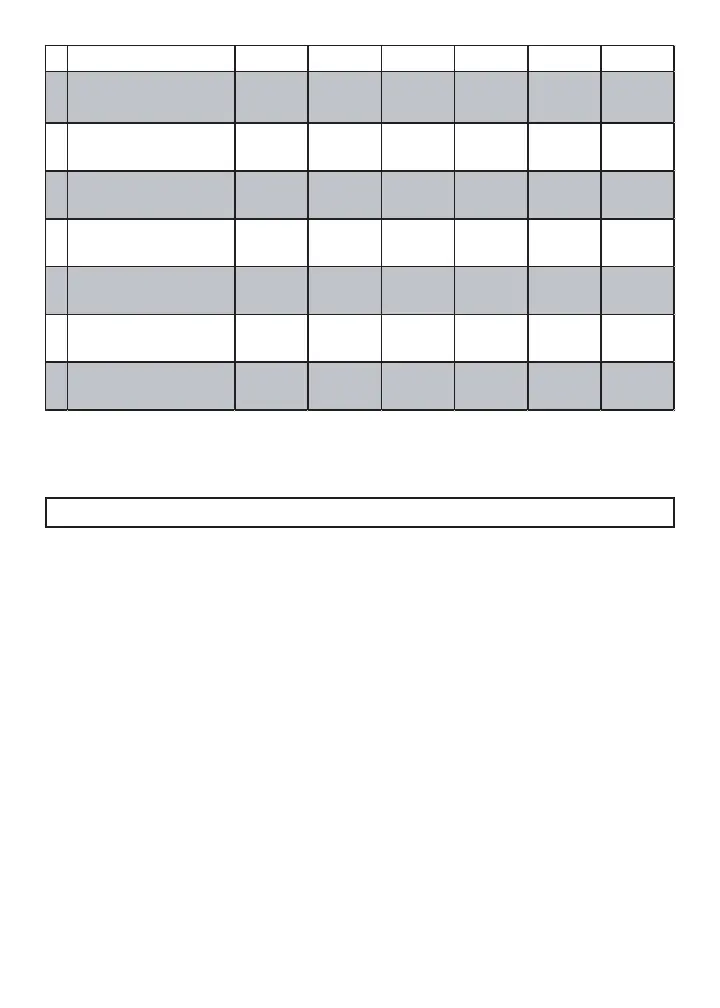
Feature Bank 3 - 5 Chirps
Output Control
1 LED Flash 2 LED Flash 3 LED Flash 4 LED Flash 5 LED Flash 6 LED Flash
1 Lock / Unlock Timing
1 Sec.
3.5 Sec.
1 Sec. Lock,
2x Unlock
30 Sec. Lock,
2x Unlock
2x Lock,
1 Sec. Unlock
0.5 Sec.
2
Factory Disarm
Lt Green / Black
Factory
Disa rm
2nd Unlock
Factory Disarm
2x 500mS
Factory Disarm
350mS
Factory Disarm
500mS
Factory Disarm
w/ Unlock
Timing
3Ignition Locks
OFF
Lock / Unlock Lock Only Unlock Only
4Trunk Output Timing
1 Sec.
10 Sec.20 Sec.
Latched until
IGN ON
Latched ON
until Button
Press
5Horn Output Timing
16mS
10mS 30mS 40mS 50mS
6Real Panic
ON
OFF
7
AUX 1
Violet / Black Output
Push and
Hold
Latched
Latched until
IGN ON
Dome Light
Output
PC Based Feature Programming / Firmware Updates (optional)
When using the NEW Code Alarm Utility App along with a VEPROG Programming
tool you may program selectable features or update the rmware of this module.
To Use a PC and VEPROG tool for Feature Programming or Firmware Updates:
1. Download and install the Code Alarm Utility App. from the Voxx Tech / Software
Downloads section of voxxuniversity.com (login required)
2. Launch the Code Alarm Utility App.
3. Connect the VEPROG to your PC via the USB port.
4. Connect the VEPROG to the Code Alarm Module.
5. Select the features you wish to change or update rmware if needed.



 To Next Page