Code Blue
•
259 Hedcor Street
•
Holland, MI 49423 USA
•
800.205.7186
•
www.codeblue.com
GU-157-AApage 55 of 76
CB 1 Series
Administrator Guide
28 PoE Installation Instructions
2
802.3at Switch
LAN 2
LAN 1
WAN
PoE
PAS
Control
Aux ports
PAS
Audio
+ -+ -
Power | Battery
S-550
S1000
Ethernet
1
IP5000 Connector Side
4
3b
3
DATA – PoE+
DATA
12 V DC
LED Faceplate Light Bar
2
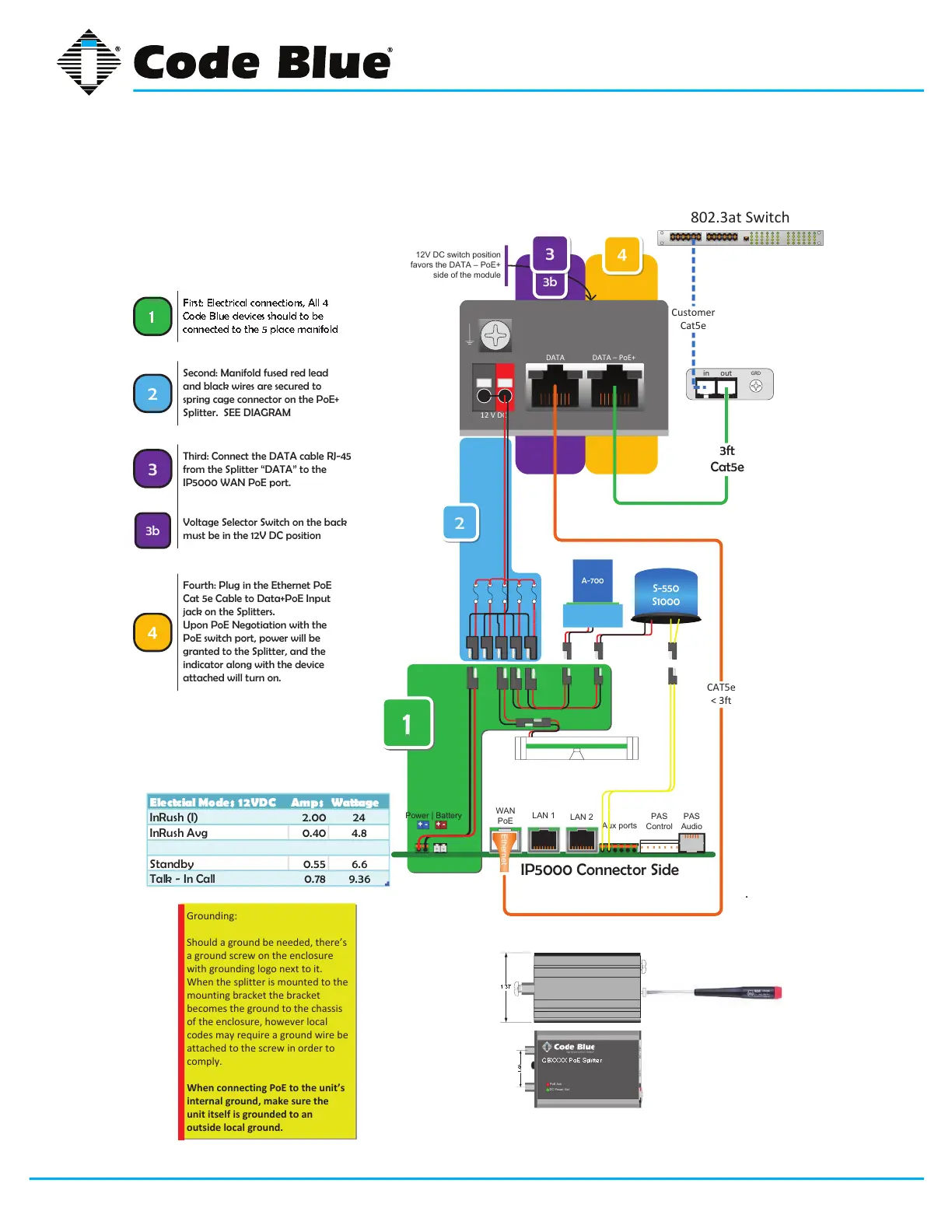
Second: Manifold fused red lead
and black wires are secured to
spring cage connector on the PoE+
Splitter. SEE DIAGRAM
Third: Connect the DATA cable RJ-45
from the Splitter “DATA” to the
IP5000 WAN PoE port.
Voltage Selector Switch on the back
must be in the 12V DC position
3
4
Fourth: Plug in the Ethernet PoE
Cat 5e Cable to Data+PoE Input
jack on the Splitters.
Upon PoE Negotiation with the
PoE switch port, power will be
granted to the Splitter, and the
indicator along with the device
attached will turn on.
CAT5e
< 3ft
in out
GRD
3ft
Cat5e
Customer
Cat5e
A-700
Ele ctcial Mo des 1 2 VDC Amps Wattage
InRush (I) 2.00 24
InRush Avg 0.40 4.8
Standby 0.55 6.6
Talk - In Call 0.78 9.36
Grounding:
Should a ground be needed, there’s
a ground screw on the enclosure
with grounding logo next to it.
When the splitter is mounted to the
mounting bracket the bracket
becomes the ground to the chassis
of the enclosure, however local
codes may require a ground wire be
attached to the screw in order to
comply.
When connecting PoE to the unit’s
internal ground, make sure the
unit itself is gro
unded to an
outside local ground.
3b
12V DC switch position
favors the DATA – PoE+
side of the module
DC Power Out
DATA DATA + PoE+
PoE Ack
CBXXXX PoE Splitter
1.00
1
First: Electrical connections, All 4
Code Blue devices should to be
connected to the 5 place manifold



 To Next Page