Code Blue
•
259 Hedcor Street
•
Holland, MI 49423 USA
•
800.205.7186
•
www.codeblue.com
GU-149-AApage 43 of 63
CB 2 Series
Administrator Guide
23 CB 2 Series Remote Mount Beacon/Strobe Installation
1.0 ATTACH J-BOX TO THE POLE
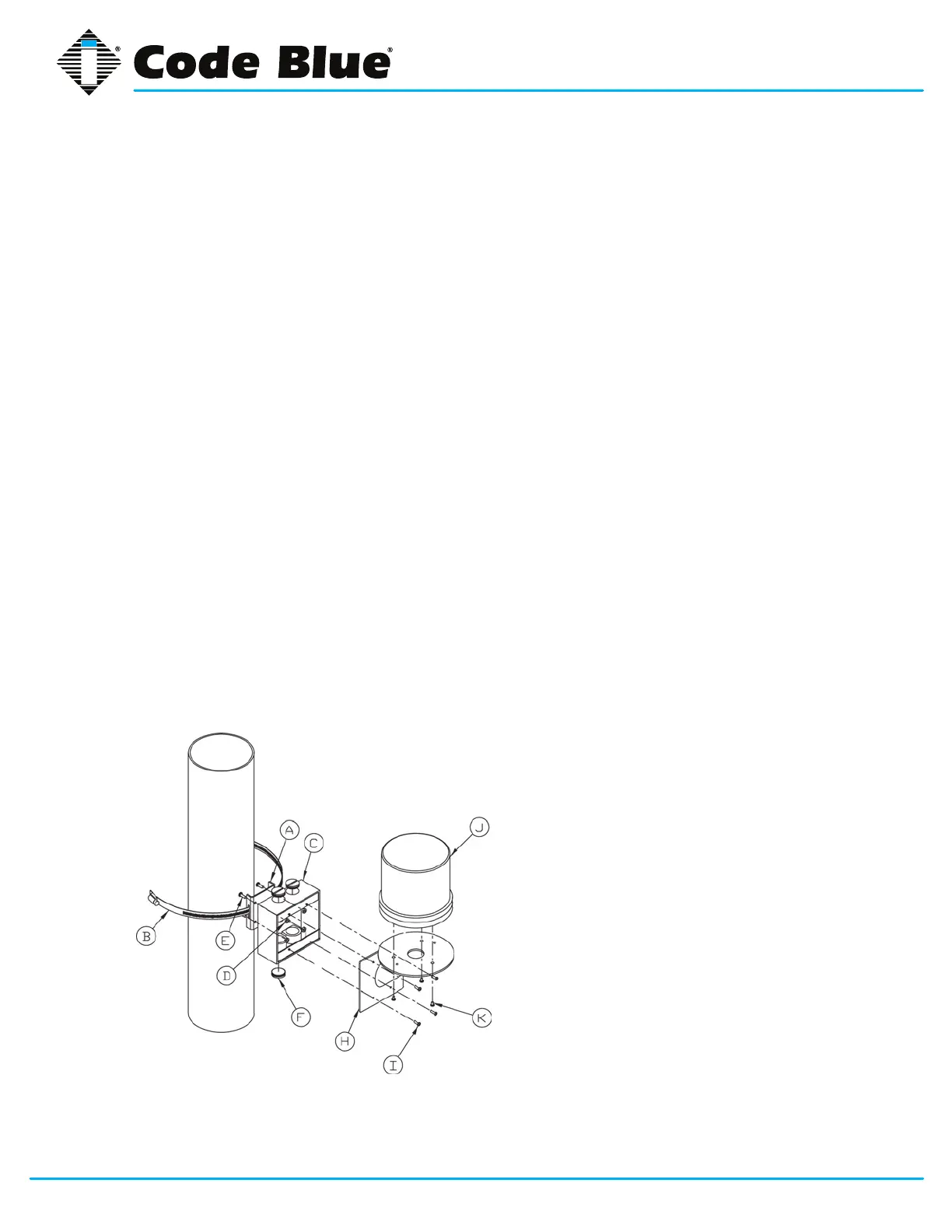
1.1 Thread the banding (B) through the pole bracket (A) located on the backside of the J-box
(C).
1.2 Wrap the banding around the pole. Cut the banding to desired length.
1.3 Using a screwdriver or nut driver, tighten the banding and make sure that the unit is in the
desired location.
NOTE: J-box must be positioned so weep hole faces down.
2.0 ATTACH LIGHT TO BRACKET
3.1 Using the three M4 X 8 screws enclosed (K), fasten the strobe (J) to the round portion of the
strobe bracket.
NOTE: If the beacon/strobe is mounted upside-down, a drain hole must be drilled into the
lens to prevent it from lling with water.
3.0 ATTACH LIGHT AND BRACKET TO THE J-BOX
4.1 Connect all wiring from the strobe to the wiring from the unit inside of the J-box using wire
nuts.
4.2 Attach strobe bracket to the J-box using four 6-32 X ½ screws as shown.
All wiring must be installed and connected by experienced and certied personnel to meet local and national electrical codes, and will
include a service disconnect.
A - pole-bracket
B - banding
C - J-box
D - pole-bracket mount nut (4 each)
E - pole-bracket mount screw (4 each)
F - conduit plug
H - strobe-bracket
I - 6-32 X ½ screws (4 each)
J - strobe light
K - M4 X 8 screws (3 each) (Low voltage)
K - 10-24 X ¾ screws (2 each) (High voltage)



 To Next Page