6 DataMan 200 Quick Reference Guide DataMan 200 Quick Reference Guide 7
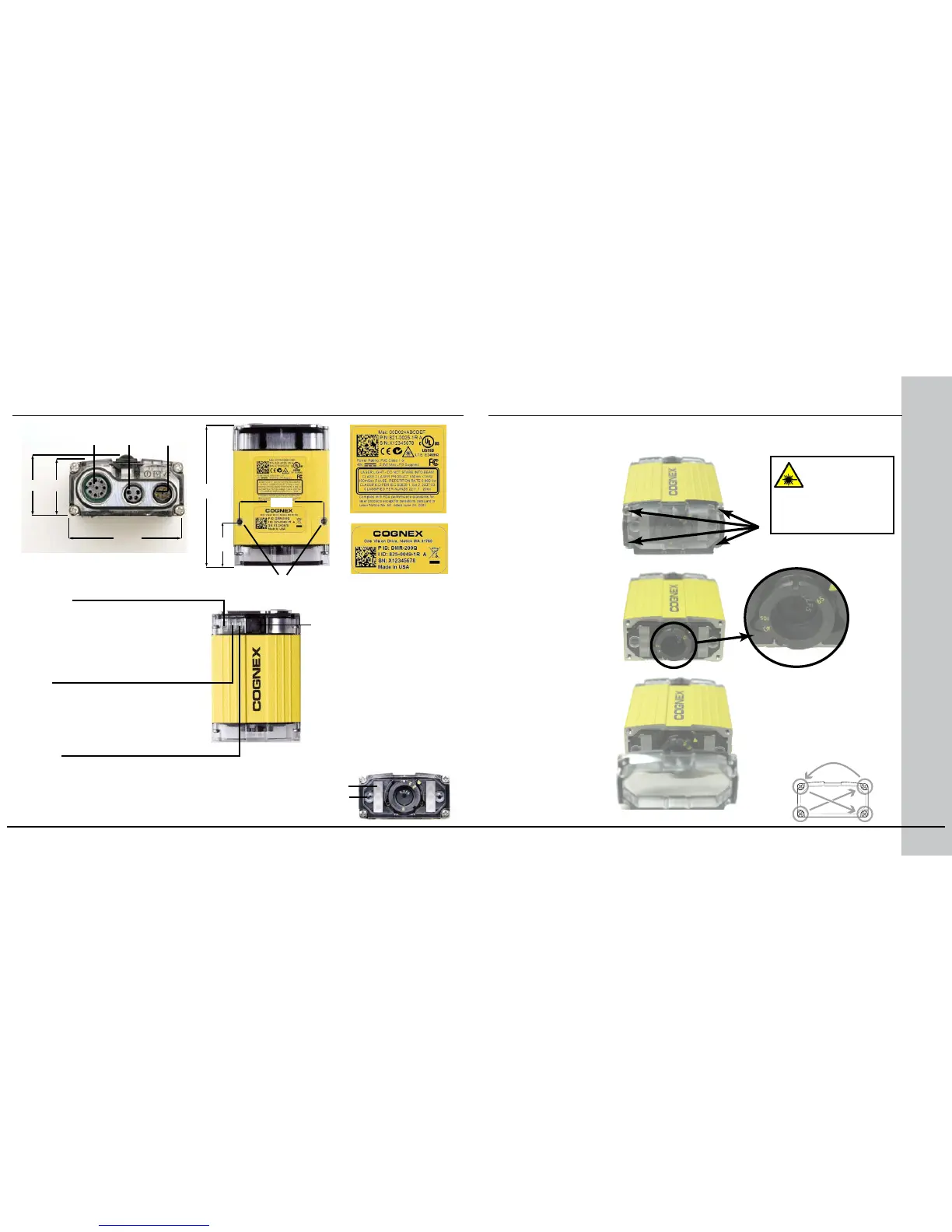
Reader Layout
Pushbutton
• Push to read
• Push and hold 3
seconds to train
• Use Setup Tool to
program additional
button functions
Setting the Focus Position
DataMan can operate in one of three distance ranges. To set the focus
position:
Set focus position.
Tighten screws in order
shown. Maximum torque
for the cover screws is 9
N-cm (0.8 pound-inch).
Disconnect
DataMan from
power before
adjusting
focus
Illumination LEDs (2)
Laser apertures (2)
(aiming)
Mounting holes
(M3 X 5)
System
• Yellow: Power
• Green: Ethernet connected
• Blink: Communication
(RS232, Ethernet or both)
User
• Yellow: Untrained
• Green: Trained
• Blinking: Trigger
Status
• Green (pulse): Read
• Red (pulse): No read
• Red/Green (long pulse): Train
or Optimize Focus result
2.
Remove screws
and lens cover.
1.
Replace lens cover
and screws.
3.
1
2
3
4
21.122.8
Ethernet RS-232
I/O
63.45
19.5
37.0
42.0
The size of the holes
in the standard lens
cover is M2x6. For
SHD, it is M2x18.
Maximum screw
head diameter is 4
mm.









 To Next Page