2
3
5
532 532 532
DataMan 200
2: Tx Data
3: Rx Data
5: GND
2: Rx Data
3: Tx Data
5: GND
PC
DataMan 200 DataMan 200
34 DataMan 200 Quick Reference Guide DataMan 200 Quick Reference Guide 35
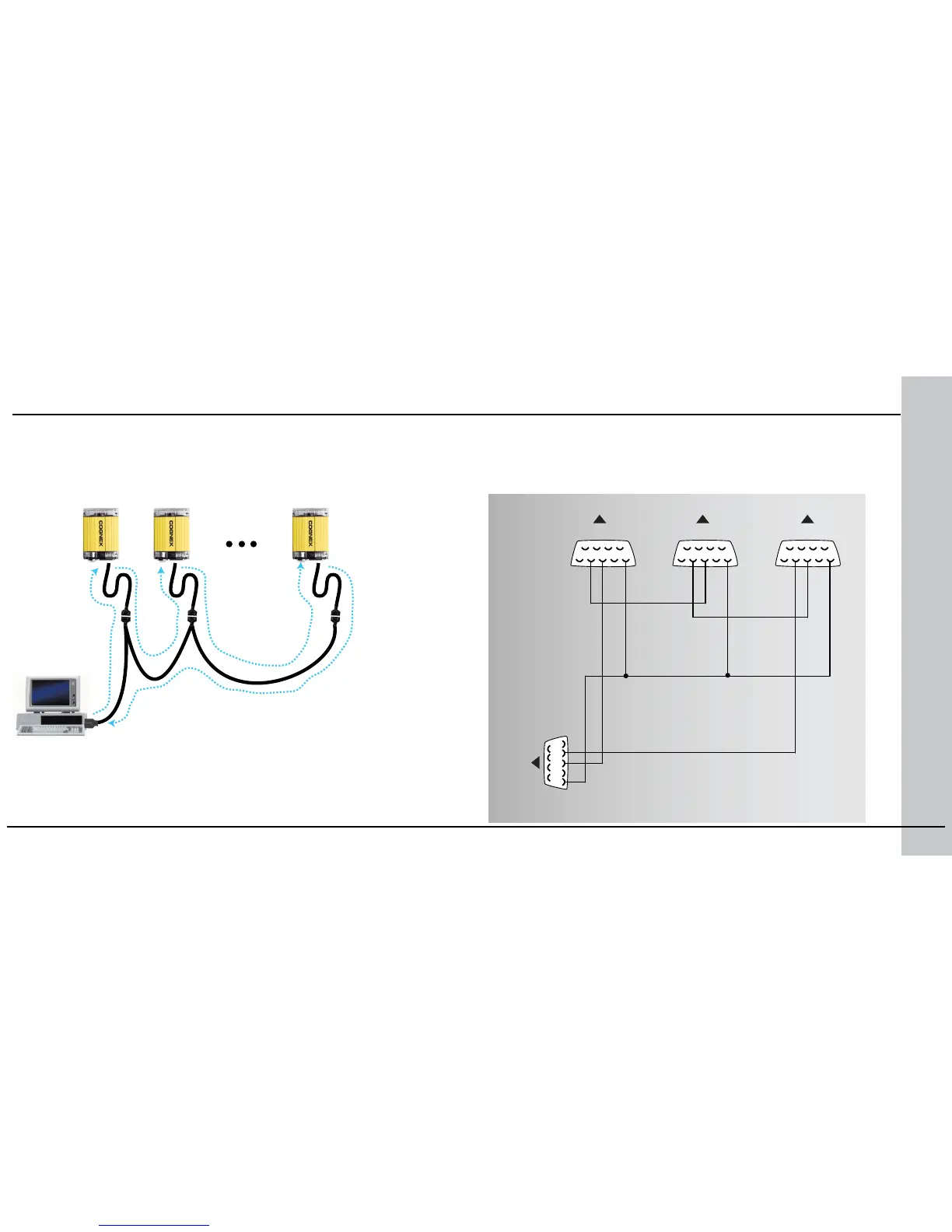
You can connect multiple DataMan 200 readers to a single PC (or other device
equipped with a serial port) using a multi-port connection.
A multi-port connection creates a daisy-chain of readers. Each reader receives
serial data from the previous reader and transmits it to the next reader. When
a reader transmits data, it is passed through each of the readers in the chain
between it and the PC.
Because of the large number of possible congurations, Cognex does not
supply cabling for multi-port DataMan 200 connections. Instead, you must
construct your own cable that meets the requirements of your system
conguration.
The cable must provide a DB-9 connector for each DataMan 200 serial cable
and a DB-9 connector for the PC serial port. Each DB-9 connector must
Multi-Port Connections
provide Tx Data, Rx Data, and ground. The Tx Data and Rx Data pins
on adjacent connectors must be connected to provide the multi-port
connection.
The following diagram shows how to create a multi-port cable for a
3-reader system:









 To Next Page