8 DataMan 200 Quick Reference Guide DataMan 200 Quick Reference Guide 9
Mounting the Reader
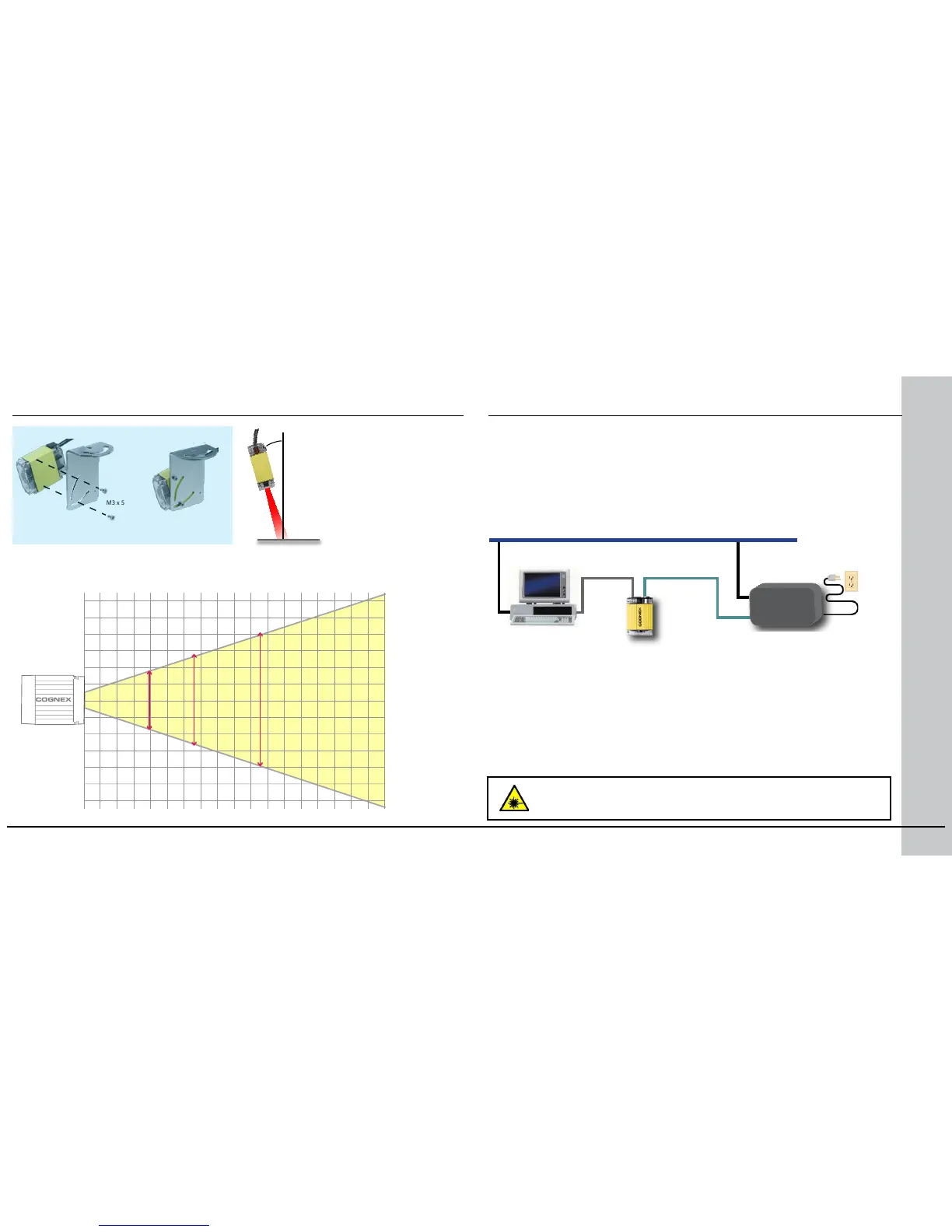
Mount the reader at
a slight angle (15°)
to reduce reections
and improve reader
performance.
Horizontal eld of view for the DataMan 200 at working distances of 40mm,
65mm and 105mm (with and without optional liquid lens):
Disconnect DataMan from power before removing or
changing cables.
Connecting the Reader
Ethernet
RS-232
PoE injector
In
Out
Using an RS-232 connection can be necessary to congure the reader
with parameters that allow it to communicate over your Ethernet
network.
M12 to RJ45
Supply power to the reader using a Power over Ethernet (PoE) injector.
Cognex recommends the following connection sequence:
1. Connect the PoE injector with the Ethernet installation (both sides of
the patch cable).
2. Connect the power cord (AC 230V/110V) to the PoE injector.
3. Connect the reader to the PoE injector.
(optional)
To disconnect the reader:
1. Disconnect the reader from the PoE injector.
2. Disconnect the power cord from the PoE injector.
3. Disconnect the PoE injector from the Ethernet installation.









 To Next Page