Overview:
WiFi Connect lets you use your iphone, ipod touch, or ipad to control your COLDTUB. Put it
in the waterproof case and you have the most advanced COLDTUB remote available. You
can turn the lights on, check and adjust the temperature, check and adjust ltration settings,
make sure there are no error codes etc…
COLDTUB Functions: The functions are controlled using Wi-Fi signals. The COLDTUB
creates its own wi network (no internet connection is needed). When you join the Wi-Fi
network of the COLDTUB and launch the app you will be able to control the functions of the
COLDTUB.
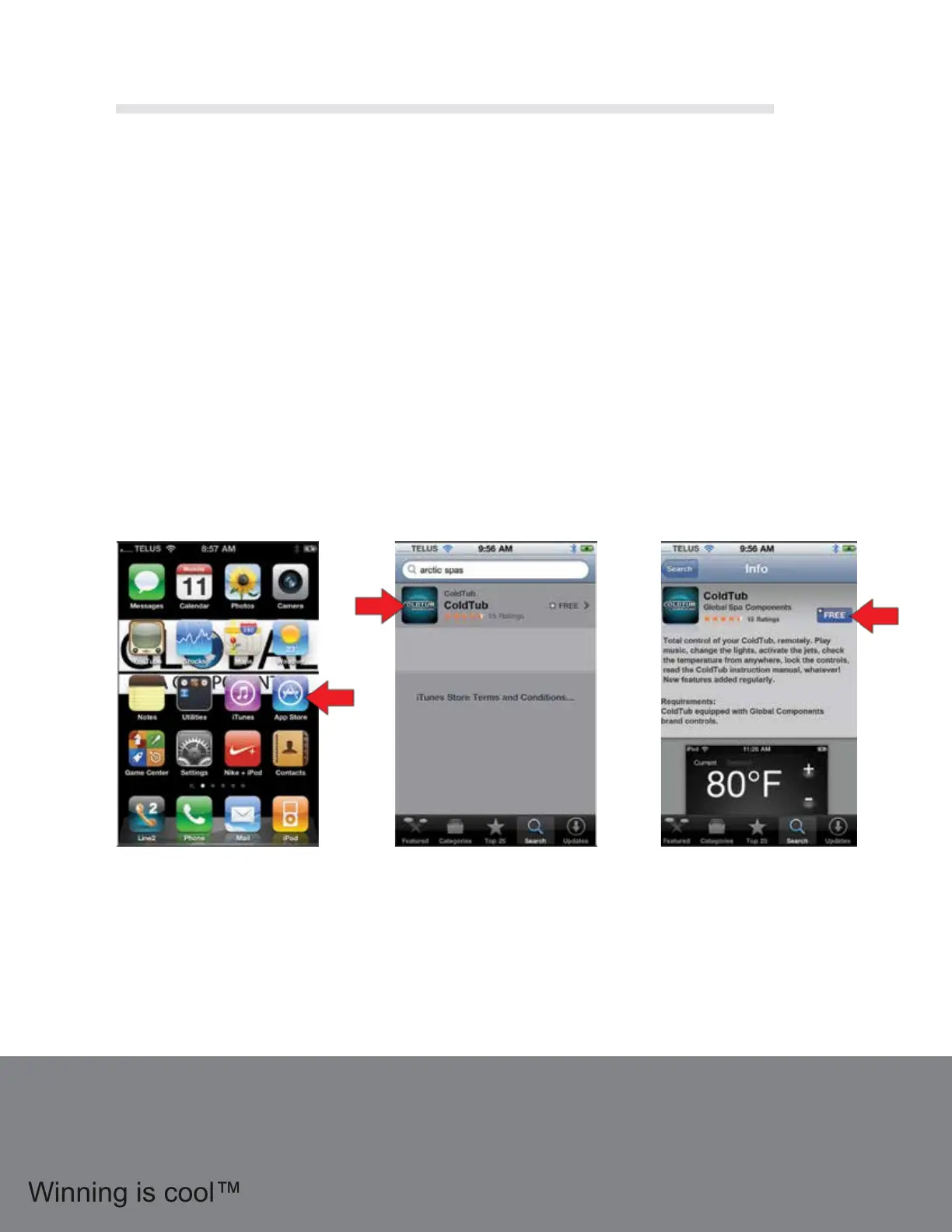
Downloading the App:
To download the app make sure you are connected to the Internet
and launch the Apple “App Store” app
From the main screen
nd and click on the “App
Store” Icon
Click on “Search” on the
bottom tab and type in
“ColdTub”, the app will
appear
Click the word “Free”,
then “Install” to begin
downloading the free app.
Its that easy!
1.18 Wi Fi Connect
24



 To Next Page