3.3 VEHICLE CONTROLS
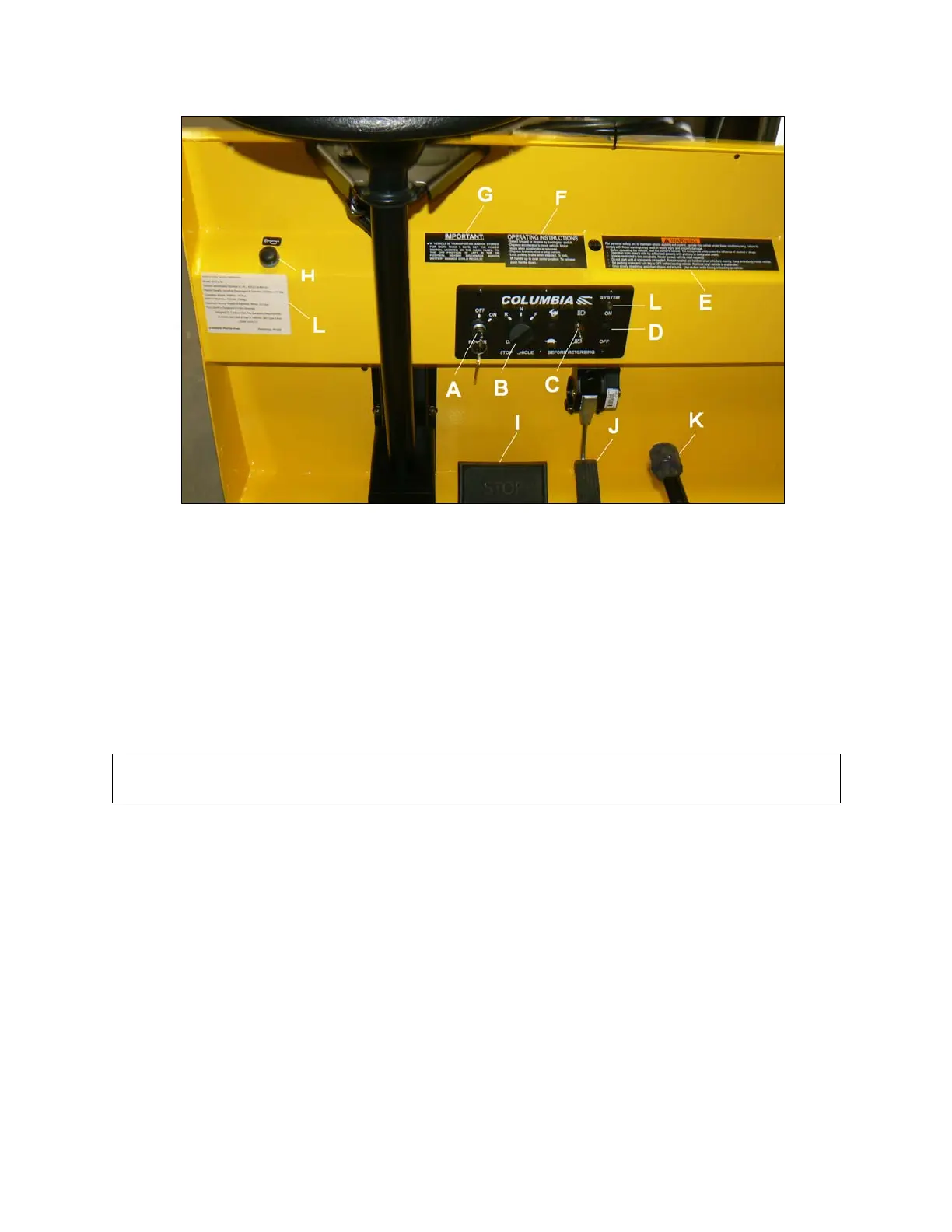
This section describes the operating controls of the vehicle. Figure 3.3.1 identifies many of these controls.
Figure 3.3.1
3.3.1 POWE
R KEYSWITCH – Figure 3.3.1A
With the power keyswitch in the “OFF” position, the Traction Control System is powered down. This conserves
battery energy by reducing the power draw when vehicle is not in use. Turning the power keyswitch or selector to
OFF is highly recommended whenever vehicle is not in use. Always take the key out of the power keyswitch when
leaving the vehicle
3.3.2 DIRECTION SELECTOR – Figure 3.3.1B
When the direction selector is in the vertical position, the vehicle’s direction signal is turned OFF or in neutral. Turn
direction selector to the right from vertical position to move the vehicle in a forward direction (F). Turn direction
selector to the left from vertical position to move the vehicle in a reverse direction (R). A warning buzzer sounds when
in reverse.
NOTICE: Direction selector must be in the N or neutral position prior to turning on the power keyswitch, or
a reset of the direction selector to neutral will be required before traction drive is enabled. See Section
4.11 CONTROLLER TROUBLESHOOTING (ACEplus DC Drive only)
3.3.3 LIGHT SWITCH – Figure 3.3.1C
The light switch is a two-position switch. Move switch up to activate headlight and taillights, down to turn off.
3.3.4 AUXILIARY EQUIPMENT SWITCH – Figure 3.3.1D
A switch for auxiliary equipment will be located in this position.
3.3.5 WARNINGS, OPERATING INSTRUCTIONS AND INFORMATION
Figure 3.3.1
Warnings (E), operating instructions (F) and information (G) labels must be read carefully before operating the
vehicle. Promptly replace if removed or damaged. Contact Columbia ParCar for replacements.
3.3.6 HORN BUTTON – Figure 3.3.1H
Press button to sound the horn.
3-2
BC 2012


 To Next Page