EasyManua.ls Logo

ComAp InteliNano MRS 3 - User Manual

ComAp InteliNano MRS 3
11 pages
Print Icon
To Next Page IconTo Next Page
Loading...
Operator Guide
TABLE OF CONTENTS
1 Operator Interface ......................................................................................................................... 2
2 Display Screens Structure ............................................................................................................. 4
2.1 Main screens structure (CT not connected) ............................................................................. 4
2.2 Main screens structure (CT connected) ................................................................................... 5
3 Alarms, Events and History ........................................................................................................... 7
3.1 Events ...................................................................................................................................... 8
3.2 Warnings .................................................................................................................................. 8
3.3 Shutdowns ............................................................................................................................... 9
3.4 ECU Messages ...................................................................................................................... 10
4 Start and Stop engine.................................................................................................................. 11
4.1 MANUAL mode ...................................................................................................................... 11
4.2 AUTO mode ........................................................................................................................... 11
InteliNano
NT
MRS 3
Single small gen-set controller
Single small gen-set controller for prime-power applications
Copyright © 2017 ComAp a.s.
ComAp, a.s.
U Uranie 1612/14a, Prague 7, Czech Republic
Tel: +420 246 012 111
E-mail: info@comap-control.com, www.comap-control.com

Other manuals for ComAp InteliNano MRS 3

Question and Answer IconNeed help?

Do you have a question about the ComAp InteliNano MRS 3 and is the answer not in the manual?

Summary

Operator Interface

Display Screens Structure

Main screens structure (CT not connected)

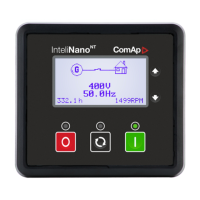
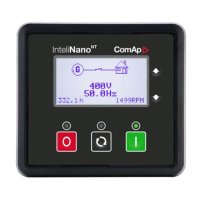
First screen displays basic info (voltage, frequency, GCB status, RPM) and alarm symbol.

Main screens structure (CT connected)

Displays detailed info: voltage, frequency, current, power, senders, energy, alarms.

Alarms, Events and History

Events

Every event listed is saved in history with running hours stamp.

Warnings

Covers active and inactive warnings, their indicators, and confirmation status for alarms.

Shutdowns

Details shutdown procedures and states (active/inactive, confirmed/unconfirmed).

ECU Messages

Explains diagnostic messages (SPN/FMI) and references for further info.

Start and Stop engine

MANUAL mode

Explains starting and stopping the engine using START/STOP buttons in Manual mode.

AUTO mode

Explains AUTO mode where start/stop is automatic, not manual.

Summary

Operator Interface

Display Screens Structure

Main screens structure (CT not connected)

First screen displays basic info (voltage, frequency, GCB status, RPM) and alarm symbol.

Main screens structure (CT connected)

Displays detailed info: voltage, frequency, current, power, senders, energy, alarms.

Alarms, Events and History

Events

Every event listed is saved in history with running hours stamp.

Warnings

Covers active and inactive warnings, their indicators, and confirmation status for alarms.

Shutdowns

Details shutdown procedures and states (active/inactive, confirmed/unconfirmed).

ECU Messages

Explains diagnostic messages (SPN/FMI) and references for further info.

Start and Stop engine

MANUAL mode

Explains starting and stopping the engine using START/STOP buttons in Manual mode.

AUTO mode

Explains AUTO mode where start/stop is automatic, not manual.

Overview

The InteliNanoNT MRS 3 is a compact gen-set controller designed for single small gen-set applications, particularly suitable for prime-power scenarios. This device provides comprehensive control and monitoring capabilities for generator sets, ensuring reliable operation and protection.

Function Description

The primary function of the InteliNanoNT MRS 3 is to manage the operation of a single gen-set. It acts as the central control unit, overseeing the engine's start and stop sequences, monitoring various parameters, and responding to alarms and events. The controller supports both manual and automatic operating modes, offering flexibility in how the gen-set is managed. In manual mode, an operator can directly initiate start and stop procedures, while in auto mode, the controller autonomously manages the gen-set based on predefined conditions and remote commands.

A key aspect of its functionality is the display of critical operational data. The controller's graphic B/W display (128x64 pixels) presents information in a structured manner, organized into multiple screens. These screens provide real-time data on voltage, frequency, current, power (real and apparent), power factor, oil pressure, coolant temperature, fuel level, and battery voltage. This detailed information allows operators to quickly assess the gen-set's status and performance.

The InteliNanoNT MRS 3 also incorporates robust alarm and event management. It categorizes issues into events, warnings, shutdowns, and ECU messages, each with distinct behaviors and implications for gen-set operation. Warnings indicate potential problems that require attention but do not immediately stop the engine, while shutdowns are critical faults that trigger an immediate engine stop to prevent damage. ECU messages provide diagnostic information directly from the engine's Electronic Control Unit, aiding in troubleshooting. The controller records these alarms and events in a history log, complete with running hours stamps, enabling operators to review past incidents and identify trends.

For engine control, the device includes dedicated outputs for key components such as the GCB (Generator Circuit Breaker), starter, prestart, fuel solenoid, and stop solenoid. These outputs are activated or deactivated based on the operating mode and detected conditions, ensuring proper engine sequencing and protection. The controller can also receive remote start/stop commands via binary inputs, enhancing its integration into broader control systems.

Usage Features

The InteliNanoNT MRS 3 is designed for ease of use, featuring an intuitive operator interface with clearly labeled buttons and a structured display.

Operator Interface:

The front panel includes several buttons for control and navigation:

  • Start (START) button: Used in manual mode to initiate the engine start sequence. It also confirms changes in setup mode.
  • Auto (AUTO) button: Switches between auto and manual operating modes.
  • Stop (STOP) button: Initiates the engine stop sequence in manual mode. It also cancels changes in setup mode, navigates back or exits menus, and confirms alarms.
  • Up (▲) button: Moves up in menus or increases values.
  • Down (▼) button: Moves down in menus or decreases values.

Display Screens:

Information is presented across multiple screens, which can be navigated using the up and down buttons.

  • Main screens (CT not connected):
    • First screen: Displays basic information like voltage, frequency, running hours, RPM, and GCB status. A general alarm symbol appears in the upper right corner if an alarm is active.
    • Second screen: Provides detailed voltage and frequency information.
    • Third screen: Shows sender information for oil pressure, coolant temperature, fuel level, and battery voltage.
    • Fourth screen: Displays the latest alarms or events.
  • Main screens (CT connected): When current transformers (CTs) are installed, additional screens provide more detailed power measurements.
    • First screen: Similar to the CT not connected version, but also shows real power (kW) and an icon indicating CT installation.
    • Second screen: Detailed voltage and frequency.
    • Third screen: Measured current for individual phases, often with bar-graphs.
    • Fourth screen: Real and apparent power, along with power factor for individual phases and totals.
    • Fifth screen: Sender information (oil pressure, coolant temperature, fuel level, battery voltage).
    • Sixth screen: Energy counters (real and reactive) and running hours counter.
    • Last screen: Latest alarms or events.

Operating Modes:

  • MANUAL mode: Indicated by the green LED above the AUTO button being off. In this mode, the operator has direct control over starting and stopping the engine using the START and STOP buttons. The controller will not automatically start or stop the engine.
    • Starting: Pressing START initiates the engine start sequence. The green LED blinks during starting, cooling, or stopping, and remains solid when the engine is running and ready to load. Pressing START again will close the GCB if configured.
    • Stopping: Pressing STOP once opens the GCB and starts the cooling/stopping procedure. Pressing STOP again immediately stops the engine. Holding STOP down provides a fast engine stop.
  • AUTO mode: Indicated by the green LED above the AUTO button being on. In this mode, the controller automatically manages the gen-set based on configured conditions (e.g., remote start signals, load demands). The START and STOP buttons are inactive for engine control in this mode. Remote start/stop commands can be issued via binary inputs (e.g., I02 Remote Start/Stop, I03 Remote Start And Load).

Alarm and Event Handling:

The controller provides clear visual indicators for alarms and events.

  • Engine operation LED (green): Blinks during starting, cooling, or stopping; solid when the engine is running and loaded/ready to load.
  • Operating mode LED (green): Solid in Auto mode; off in Manual mode.
  • Alarm red LED: Blinks for active warnings or unconfirmed shutdown alarms; solid for confirmed shutdown alarms that prevent engine start.
  • Alarm symbols: A general alarm symbol appears on the LCD's upper right corner for any active alarm. Specific warning or shutdown symbols are displayed in the history.
  • History log: Stores up to 15 records of events, warnings, shutdowns, and ECU messages, each with a running hours stamp. The latest four records are visible on the dedicated history screen. Operators can scroll through older records.
  • Shutdown confirmation: For shutdown alarms, the red LED blinks until the alarm is confirmed by pressing the STOP button. Once confirmed, the LED becomes solid, and the record in history is marked with a confirmation symbol. Inactive and confirmed shutdowns allow the engine to be started again.

Maintenance Features

The InteliNanoNT MRS 3 offers several features that aid in maintenance and troubleshooting:

Detailed History Records: The comprehensive history log is invaluable for maintenance. By reviewing past events, warnings, shutdowns, and ECU messages, technicians can identify recurring issues, understand the sequence of events leading to a fault, and diagnose problems more efficiently. Each record includes a running hours stamp, providing context for when the incident occurred relative to the gen-set's operational lifespan.

ECU Messages: The ability to display diagnostic messages directly from the engine's ECU (Electronic Control Unit) is a significant maintenance advantage. These messages, typically presented as J1939 SPN (Suspect Parameter Number) and FMI (Failure Mode Identifier) codes, provide specific information about engine faults. Technicians can refer to SAE HS-1939 publications or the engine manufacturer's error code lists to interpret these codes, pinpointing the exact nature of an engine problem. This reduces diagnostic time and ensures that the correct repairs are performed.

Visual Indicators for Alarms: The distinct blinking and solid states of the red alarm LED, along with the alarm symbols on the display, provide immediate visual cues about the gen-set's health. This allows operators to quickly determine if a warning or a critical shutdown has occurred, guiding them to investigate further. The distinction between active unconfirmed and active confirmed shutdowns helps in understanding the current state of a fault and whether the engine can be restarted.

Monitoring of Key Parameters: Continuous monitoring of parameters such as oil pressure, coolant temperature, fuel level, and battery voltage helps in proactive maintenance. Deviations from normal operating ranges for these parameters can indicate impending issues, allowing technicians to intervene before a major failure occurs. For example, a consistently low oil pressure warning might prompt an oil level check or a system inspection.

Running Hours Counter: The integrated running hours counter is essential for scheduling routine maintenance tasks, such as oil changes, filter replacements, and major overhauls, based on the gen-set's actual operational time. This ensures that maintenance is performed at appropriate intervals, extending the lifespan of the gen-set and preventing unexpected breakdowns.

Structured Display of Information: The organization of information into multiple screens, including detailed voltage, current, and power measurements, allows maintenance personnel to thoroughly evaluate the gen-set's electrical performance. This is crucial for identifying issues related to load balancing, power quality, or generator output.

Overall, the InteliNanoNT MRS 3 is a robust and user-friendly controller that simplifies the operation, monitoring, and maintenance of small gen-sets, making it an ideal choice for prime-power applications where reliability and efficient management are paramount.

ComAp InteliNano MRS 3 Specifications

General IconGeneral
ModelInteliNano MRS 3
Supply voltage8-36 V DC
Operating temperature-20 to +70 °C
Generator frequency50/60 Hz
Communication PortsRS485
Operating temperature range-20°C to +70°C
Protection classIP65
Supported protocolsModbus
Input voltage range8-36 V DC

Related product manuals