10 Using Your On-Screen Guide
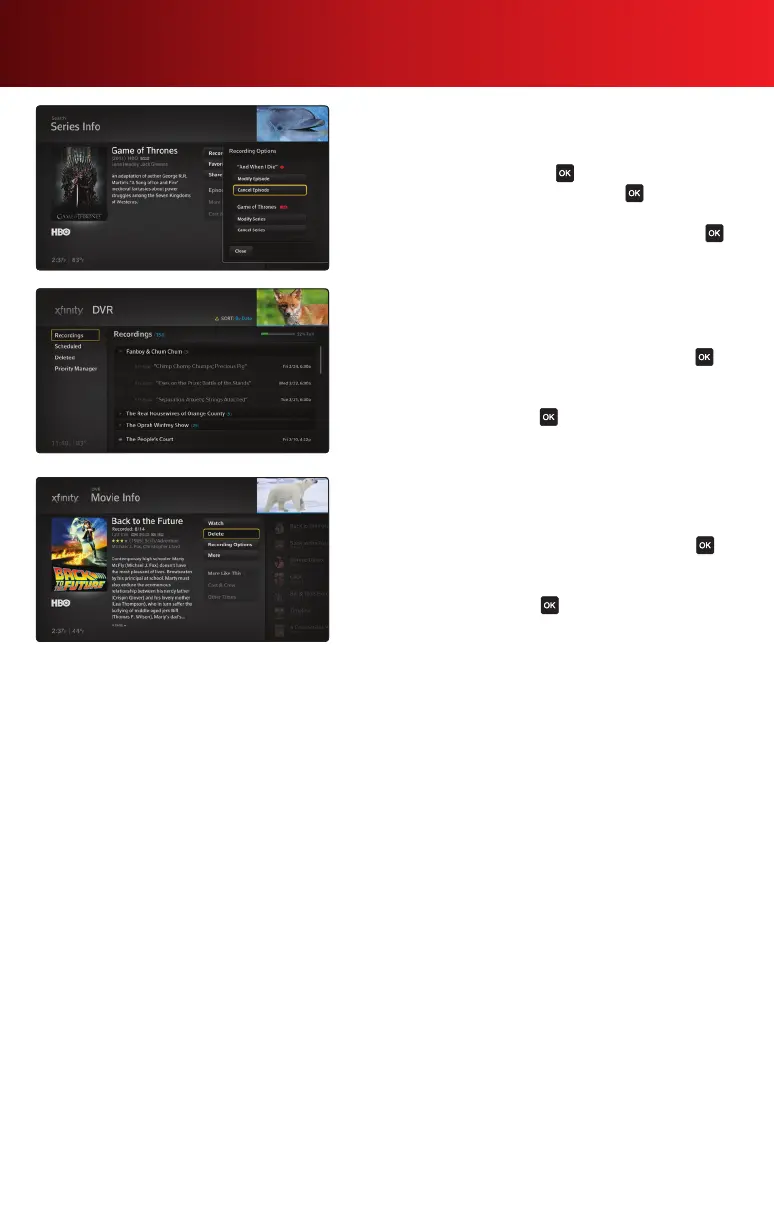
Cancel a Recording
1. From the Main Menu, go to DVR, select Recordings,
then select Scheduled. Highlight the scheduled recording
you want to cancel and press on your remote.
2. Highlight Recording Options and press . The
Recording Options panel appears.
3. Select Cancel Episode or Cancel Series and press .
Watch a Recorded Program
1. From the Main Menu, go to DVR, then select Recordings.
You will see a list of your recordings.
2. Highlight the program you want to watch and press on
your remote. The Information panel for the program will
display.
3. Highlight Watch and press . The program will play.
Delete a Recorded Program
1. From the Main Menu, go to DVR, then select Recordings.
You will see a list of your recordings.
2. Highlight the program you want to delete and press on
your remote. The Information panel for the program will
display.
3. Highlight Delete and press . You’ve just deleted the
recording.



 To Next Page