7Using Your On-Screen Guide
SEARCH
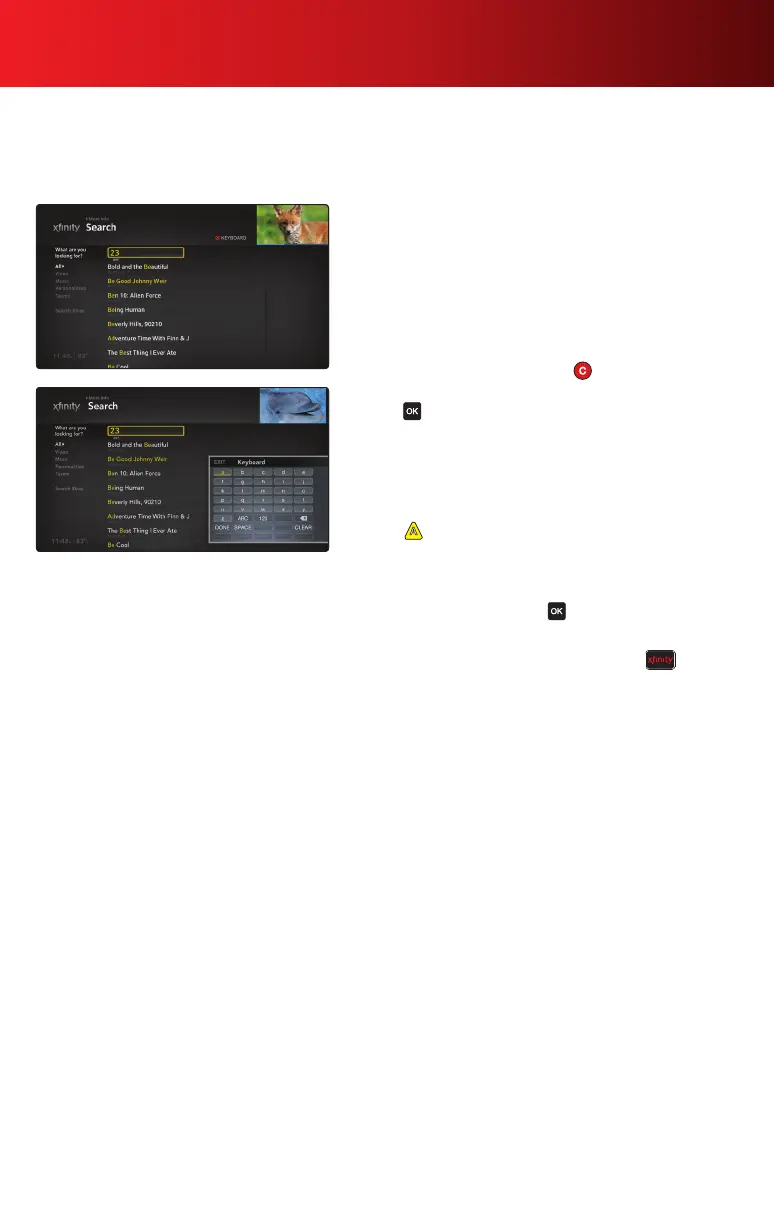
Search is the fastest way to find the people and programs you want to watch. You can search program titles,
personalities, sports teams and networks. The number keys on your remote represent the same letters as on
your telephone. Or, you can use the on-screen keyboard.
Search for a Program
1. Enter a search term using either the remote keypad or the
on-screen keyboard.
Remote keys — Search will map the number keys
on your remote to their corresponding letters. Zero
represents a space. For example, if you press 232, you
may see results for Adam Sandler, Beck or any program
with “Beautiful” in the title.
On-screen keyboard — Press on your remote to
display the on-screen keyboard. Use the arrow keys and
press to select letters, or switch between text and
numeric characters as necessary.
2. Enter characters until you see your match.
3. To further narrow search results, select a category on
the left of your screen. Search results are limited to that
category.
4. Press on your remote for additional search options,
such as limiting your search results to HD only.
Additionally, you can specify a safe search, which
removes adult programs from search results.
5. Highlight a match and press to watch, save or see
more options.
Note: You can also access Search by pressing on your
remote and using the
to navigate to the Search feature.
XFINITY On Demand programming and services not available in all areas. Programming subject to change. On Demand selections subject to
charge indicated at time of purchase. Some Help & Services programs may show a minimal transaction charge that is immediately credited
back to your account. Program availability subject to service level. Monthly fees and subscription service fees may apply. Pay-Per-View
programming not available in all areas and is subject to charge indicated at time of purchase.



 To Next Page