14 Quick Start Guide
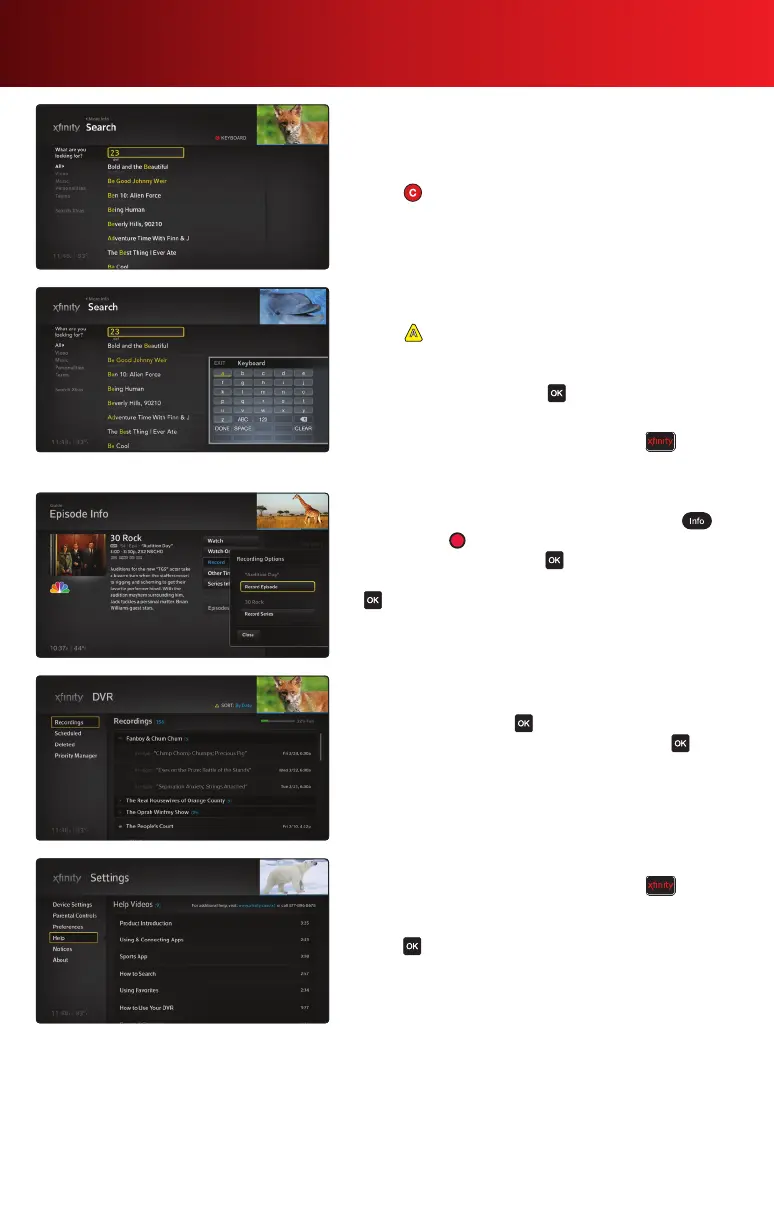
Search
Finding shows is as easy as changing channels. Just start
pressing numbers on your remote.
1. Enter a search term using either your remote’s keypad or
press to display the on-screen keyboard.
•
Entering 426 displays “HBO”
•
Entering 6397 displays “News”
•
Entering 2723 displays “Brad Pitt”
2. Enter characters until you see your match.
3. To further narrow search results, select a category on the
left of your screen.
4. Press on your remote for additional search options.
Additionally, you can specify a safe search, which
removes adult programs from search results.
5. Highlight a match and press to watch, save or see
more options.
Note: You can also access Search by pressing on your
remote and using the
to navigate to the Search icon.
Record a Program
1. Select the program you want to record and press , or
simply press on your remote.
2. Highlight Record and press on your remote.
3. Select Record Episode or Record a Series and press
. The recording will either begin immediately or you can
view recording options.
Watch a Recorded Program
1. From the Main Menu, navigate to DVR, select
Recordings and press on your remote.
2. Highlight the program you want to watch, press and
select from the options provided.
Help Videos
1. To learn more about the X1 Platform, press on your
remote, navigate to Settings, then Help.
2. Highlight the Help Video you would like to watch, and
press .



 To Next Page