18
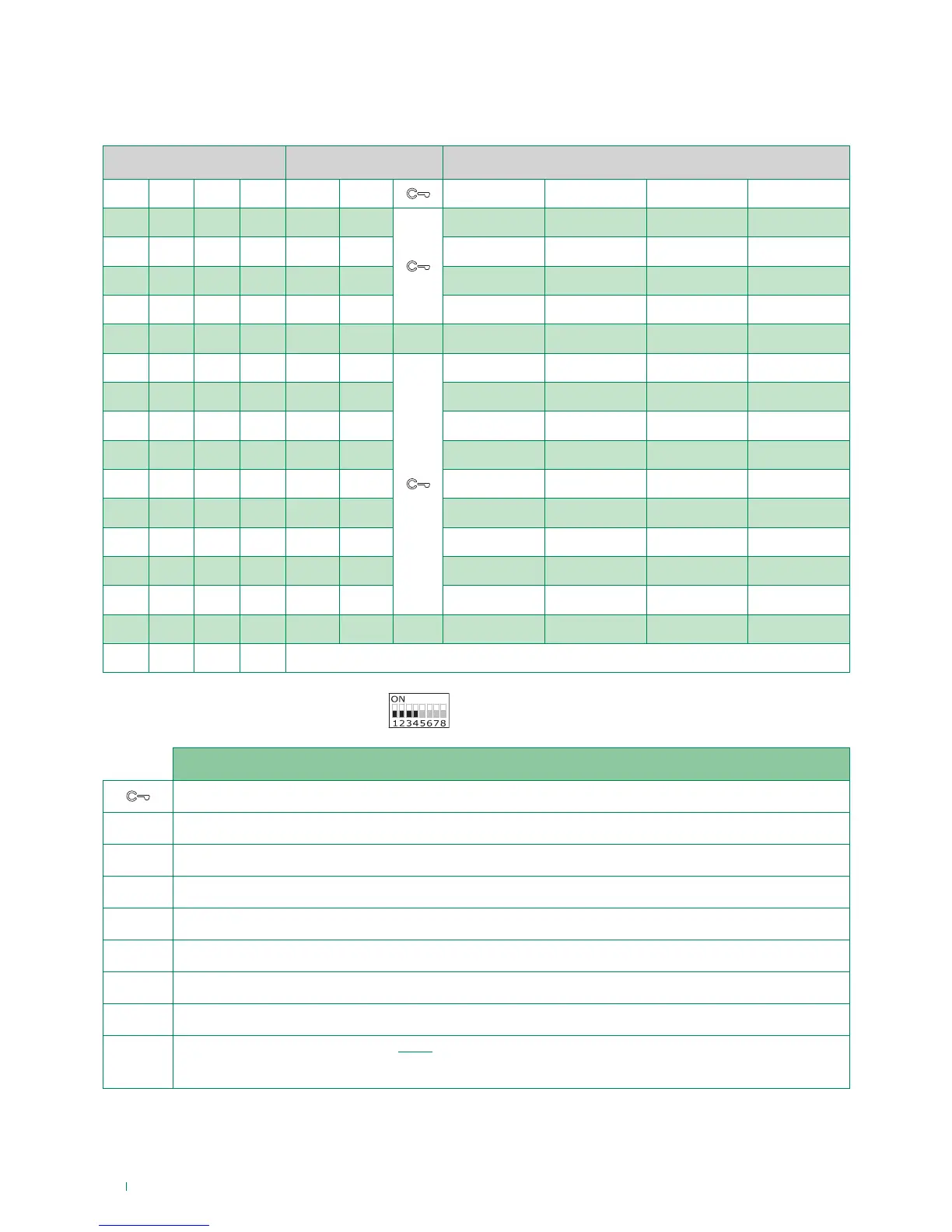
Standard configuration for DIP switches 1-2-3-4
Monitor configuration
Standard configuration for soft-touch keys
DIP S2 Art. (6700W / 6700W/BM / 6701W / 6701W/BM ) + Art. 6733W
DIP 1 DIP 2 DIP 3 DIP 4 P1 P2
P3 P4 P5 P6
0 0 0 0 ACT AI
NULL D NULL K
1 0 0 0 NULL AI INT INTb D ACT
0 1 0 0 INT AI INTb ACT NULL NULL
1 1 0 0 ACT NULL NULL NULL K D
0 0 1 0 ACT ACT ACT ACT ACT ACT ACT
1 0 1 0 INT ACT
NULL NULL INTb NULL
0 1 1 0 AI D K NULL NULL INTb
1 1 1 0 INTb INT AI INT NULL D
0 0 0 1 NULL NULL D AI INT INTb
1 0 0 1 K NULL NULL NULL AI INT
0 1 0 1 NULL K NULL ACT INT AI
1 1 0 1 NULL NULL NULL K ACT D
0 0 1 1 INTb AI INT ACT D NULL
1 0 1 1 INT INT INT INT INT INT
0 1 1 1 NULL NULL NULL NULL NULL NULL NULL
1 1 1 1 PROG
Legend
Lock- release
ACT Actuator
AI Self-ignition
K Guardian door-entry phone call
D Doctor
INT General or selective programmable intercom - singlefamily call standard for KIT 8461
INTb General or selective programmable intercom - two-family call standard for KIT 8461
NULL No function or DO NOT use
PROG
Programmed functions, see pages 19-23.
In this Dip switch setting, the buttons control the programmed functions; the NON-programmed buttons
control functions referred to on line 0000 (default).


 To Next Page