20
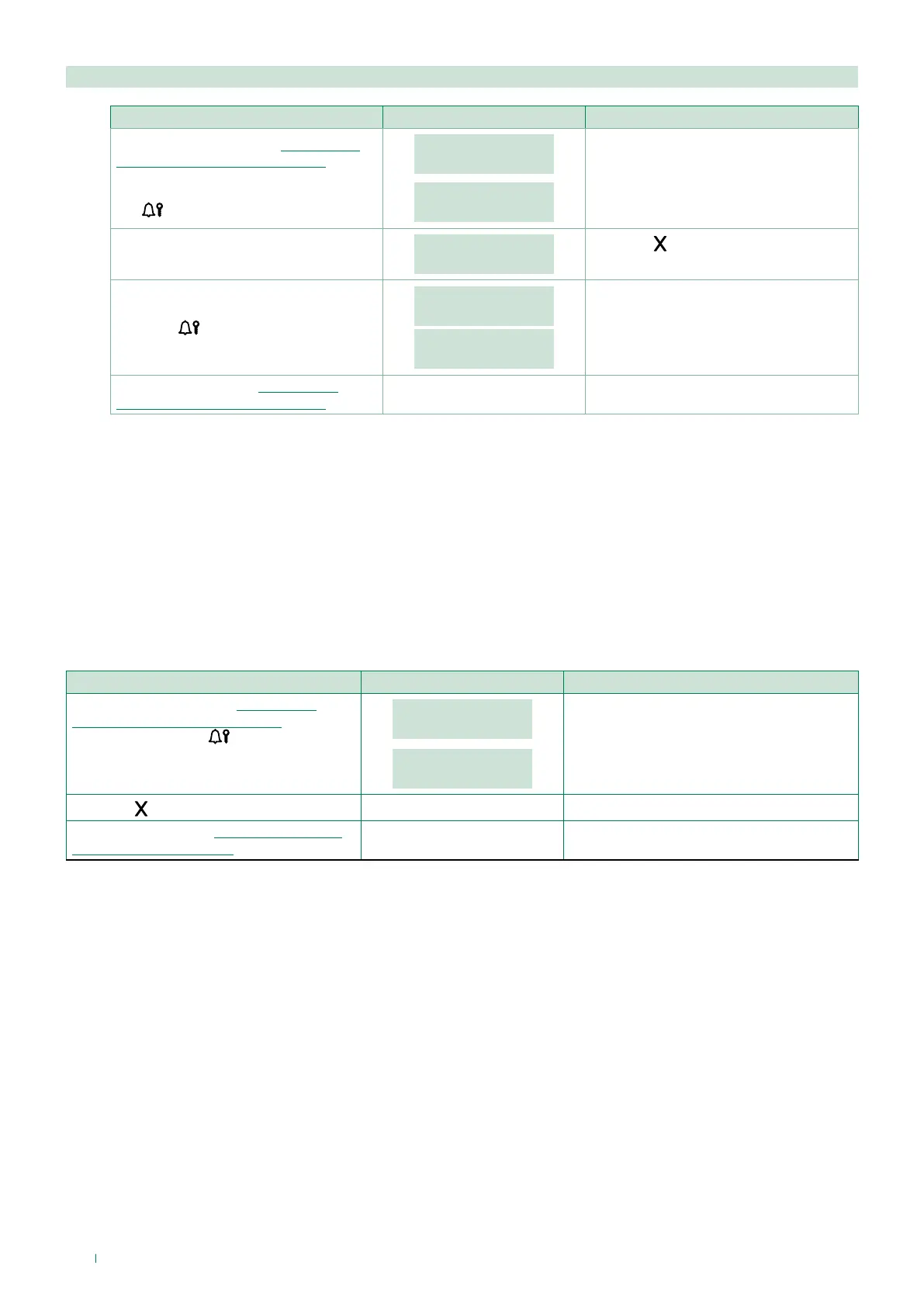
2.2.3. Delete all
PROCEDURE DISPLAY INFO DESCRIPTION
Access configuration (see “Accessing/
exiting the configuration stage”)
Select the menu ACCESS CONTROL /
PASSWORD / DELETE ALL using the
key
.
ACCESS CONTROL
PASSWORD
PASSWORD
DELETE ALL
The menus are scrolled through
automatically every 2 seconds.
DELETE
ALL PASSWORD?
Press the key to cancel
the procedure.
Press the
key to confirm deletion.
PLEASE WAIT
PARAMETER
CHANGED
Exit configuration (see “Accessing/
exiting the configuration stage”)
3. Info
This procedure can be used to view:
• the firmware version
• the number of users stored [NO VIP]
• the number of passwords stored [NO VIP]
• the RS485 address [NO VIP]
• the call mode
PROCEDURE DISPLAY INFO DESCRIPTION
Access configuration (see “Accessing/
exiting the configuration stage”) Select the
menu INFO using the
key.
MAIN
INFO
Art. 3070B
1.1
The menus are scrolled through
automatically every 2 seconds.
Press the
key to exit the menu.
Exit configuration (see “Accessing/exiting
the configuration stage”)


 To Next Page
 Loading...








