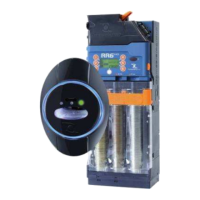
This document describes the World Key, World Key Lite, and World Key Move systems, which are Mifare cashless/contactless systems designed to provide high safety standards and management of multiple applications. These systems are developed by RFTECH SRL, a company within the Comestero group, specializing in cashless products with Mifare technology.
Function Description
The World Key, World Key Lite, and World Key Move systems utilize Mifare® (standard, Plus, DesFire, NFC) technology, enabling secure data transfer through proprietary encryption (Mifare® and RFTECH TDES - Triple Data Encryption Standard). These systems offer a broad range of devices and capabilities, including:
- Devices which use the Executive protocol: For communication with various peripherals.
- Devices which use the MDB and BDV protocol: For integration with vending machine components.
- Comestero KPD and KPM boards: For managing specific functionalities.
- Parallel interface integrated in World Key Par: For additional connectivity.
- Set up for integration of Ethernet, RS485, CAN BUS and ccTalk interfaces: Providing versatile communication options.
The systems are designed to interface with electro-mechanical devices for service dispensers and to manage various sales or identification applications. They support multiple types of electronic wallets for payment and can use any other form of RFID tag/transponder in the MIFARE standard. This allows for flexible access control and payment solutions tailored to customer needs.
Important Technical Specifications
The World Key, World Key Lite, and World Key Move CPUs, along with the Moon, Sky, and Galaxy reading heads, are the core components of these systems.
CPU Specifications:
| Specification |
World Key Move |
World Key |
World Key Lite |
| Dimensions (bxhxd) (mm) |
129 x 99 x 46 |
129 x 99 x 28 |
129 x 99 x 28 |
| Weight (g) |
240 |
200 |
170 |
| Warning regarding power supply |
To guarantee the correct functioning of all peripherals we recommend a power supply of 24Vac 50 VA |
To guarantee the correct functioning of all peripherals we recommend a power supply of 24Vac 50 VA |
To guarantee the correct functioning of all peripherals we recommend a power supply of 24Vac 50 VA |
| Power supply voltage |
15 - 40 Vdc |
15 - 40 Vdc |
17 - 39 Vdc |
|
12-27Vac 50-60Hz |
12-27Vac 50-60Hz |
14-26Vac 50-60Hz |
| periph |
5V USB is connected direct. to a host without periph. |
5V USB is connected direct. to a host without periph. |
5V USB is connected direct. to a host without periph. |
| Absorbed Power (W) |
3.75@ 24Vac (without peripherals) |
3.75@ 24Vac (without peripherals) |
3.25@ 24Vac (without peripherals) |
| Operating temperature (C°) |
- 20 ÷ + 50 |
- 20 ÷ + 50 |
- 20 ÷ + 50 |
| Humidity (non-condensed) (%) |
90% |
90% |
90% |
Reading Head Specifications (Galaxy, Sky, Moon):
| Specification |
Galaxy |
Sky |
Moon |
| Dimensions (bxhxd) (mm) |
77 x 113 x 50 |
55 x 75 x 75 |
50 x 75 x 55 |
| Weight (g) |
90 |
60 |
45 |
| Operating temperature (C°) |
- 20 ÷ + 50 |
- 20 ÷ + 50 |
- 20 ÷ + 50 |
| Humidity (non-condensed) (%) |
90% |
90% |
90% |
CPU Connections (World Key and World Key Move):
- J1 (microfit 3mm 16 poles): Connection of VMC and payment devices power supply.
- J2 (microfit 3mm 12 poles): Connection RS232 – I2C, +5Vdc, +12Vdc (KPM, KPD boards and display).
- SW1: Line end resistances switch, RS485, Can Bus.
- J3 (microfit 3mm 14 poles): Connection of Industrial devices, RS485, CAN BUS, CCTALK.
- J4 (strip 2.54mm 16 poles): Connection of banknote reader 12Vdc 2.3A ± 10%.
- J5 (strip 2.54mm 10poles): Connection of coin validator 12 Vdc 0.5 A ±10%.
- J6 (MCX 50 Ohm): Connection of Moon, Sky, Galaxy reading heads coaxial cable.
- J7 (Micro USB OTG): Connection to USB Host devices (PC) or (mass filing peripheral) device.
- J8 (Ethernet 10/100): RJ45 connection to Ethernet network.
- J9 (4-input low voltage connector): Vdc range: 8÷30 V, Vac range: 8÷28 V.
- J10 (High voltage connector): 2 relays 250 Vac / 6 A, 1 input Vac range: 15÷230 Vac.
CPU Connections (World Key Lite):
- J1 (microfit 3mm 16 poles): Connection of VMC and payment devices power supply.
- J5 (strip 2.54mm 10poles): Connection of coin validator 12 Vdc 0.5 A ± 10%.
- J6 (MCX 50 Ohm): Connection of Moon, Sky, Galaxy reading heads coaxial cable.
- J7 (MICRO USB): Connection to USB Host devices (PC).
Usage Features
The World Key systems are designed for ease of installation and operation in various vending machine environments.
Installation:
- CPU Installation: The CPU is fixed to a vending machine using M3/M4 screws. It should be arranged as near as possible to the reading key/card, with a cable length of about 1 m. Care must be taken to prevent the board from being subject to vibrations, humidity, and dirt. The device can also be fixed to the distributor using a velcro element.
- Reading Head Installation (Moon): Requires a 33 mm diameter hole in the vending machine metal sheet. The reader is inserted, and a fixing nut (M32) is used. A projection on the perimeter prevents rotation. For existing EURO KEY cashless systems, an oval shaped frame can be used to close up the rectangular hole.
- Reading Head Installation (Galaxy): Involves drilling a 29 mm hole and two 4.5 mm holes for screws.
- Reading Head Installation (Sky): Requires specific cutouts for mounting, including a 21 mm wide slot and various screw holes.
- Display Installation: The display unit has specific dimensions and mounting points for integration into the machine.
- Accessory Board Installation (KPM/KPD/RM925): These boards extend the system's capabilities, managing services, relay outputs, and network transformers. KPM boards can be cascaded for up to 16 different services. RM925 boards are provided for compatibility with previous systems and are not recommended for new developments.
Programming and Data Collection:
- UNICO Software: Used to program the World Key, World Key Lite, and World Key Move devices. UNICO AUDIT and UNICO CARD software manage media, keys, cards, and accounting.
- Safety Codes: Access device configuration and modification of entered data is controlled by three different privilege/access levels (Administrator, Rental, Access). Safety codes are crucial and must be recorded.
- Programming Key: A special contactless key (anthracite colored cap, red body) can program the operating parameters.
- Clone Programming Key: A contactless key (same color and storage capacity as programming key) can clone the configuration from one device to another.
- Firmware Update: Firmware can be updated via USB or IrDA interface.
- Data Collection: Data can be collected through three devices: Audit Key, PC via RS232 or USB with PC & UNICO & UNICO AUDIT program, and IrDA Interface. The Audit Key collects data to a PC, which can be saved as .TXT or .XML files. The IrDA interface allows data collection using a palm top PC.
LED Signals:
The reading head uses three LEDs (Red, Yellow, Green) to indicate system status:
- Red (1s flashing): Lack of protocol or protocol programmed on the reader is the same as that of the VMC, or protocol problems.
- Green: Protocol is operating perfectly, no configuration errors, or reader is ready to accept the key/card.
- Yellow (1s flashing): User key/card entered, manager code is the same as programmed, or the buzzer is activated to indicate presence of key.
- Yellow (stops flashing): Sale is made, fixed for the entire duration of the sale.
- Red (comes on): User key/card inserted with a different manager code or without a user application loaded.
- Red (1s comes on): Key Audit or programming key without a user code is inserted.
- Yellow (stays on): Audit key or programming key is inserted, data is being stored.
- Yellow (goes off), Green (comes on): Transfer has finished.
- Yellow (flashes every second): Programming key used, reader settings need to be changed without connecting to UNICO program.
- All LEDs flash together: Key or card must be re-inserted.
Maintenance Features
Regular maintenance ensures the longevity and proper functioning of the device.
- The machine is equipped with safety devices to prevent damage from short circuits and fire.
- These devices must not be bypassed, removed, or disabled.
- Maintenance or servicing should only be carried out when the power supply has been switched off.
- Safety devices are constructed in compliance with existing regulations. Periodic checks are recommended for correct operation.
Risks and Hazards:
- Electrical hazards: Direct contacts during connection to the main power supply. Operations must be carried out by a qualified technician.
- Installation and Setup Hazards: Risks for people and property are minimal if installation instructions are followed.
- Ensure distribution line is sized according to power supply.
- Connect system to ground before connecting machine and accessories.
- Connect device to SELV type circuits.
- Maintenance Hazards: Direct contact with live parts within the electrical cabinet. Operations must be carried out by a qualified technician.
- Service the machine only after the main power supply has been switched off.
- Battery Replacement Hazards: Explosion hazard if another battery which is incompatible is replaced.
- The battery installed has been dimensioned to last as long as the appliance. If problems arise, contact the Comesterogroup after-sale service.
General Warranty:
The goods and services are supplied under warranty for 12 months from the date of sale. The warranty is limited to normal operation and excludes damage from tampering, fault or breakage due to transport, acts of vandalism, natural calamities, willful damage, wrong or bad installation, inadequate or unsuitable power supply, carelessness, negligence, lack of skill, operation instructions not followed, claims for normal servicing, and repairs carried out without authorization.
External Maintenance and Cleaning:
- Clean the exterior surface of the device with a damp cloth and mild cleaning solution.
- Do not use aggressive solvents, detergents, or abrasive sponges.
- Do not immerse the device or expose it to direct sprays of water or other liquids.
- Periodically check the machine's surfaces for signs of damage or wear.
Technical Assistance:
For any faults or malfunctioning, contact Comesterogroup After-Sale service at +39 0295781111.
Putting Device Out of Service and Waste Disposal:
At the end of its life, the product must be put out of service and then sent to a waste disposal facility. Remove the appliance from its installation site and remove the cables. Contact your dealer to collect the appliance. The appliance must be disposed of as prescribed by the Legislative Decree 25/07/2005 N. 151.
- This appliance must not be disposed of as municipal waste.
- Dealers will collect used appliances free of charge.
- Collection centres of waste of electric and electronic equipment (WEEE) have been established.
- This appliance or parts of it can cause potentially harmful effects for the environment and human health if used improperly and if not disposed of in conformity with the present procedure.
- The symbol of the crossed-off bin indicates that the appliance was placed on the market after August 13, 2005 and must be collected separately.

 Need help?
 General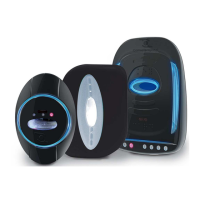

 To Next Page