20
active on the HOME screen. Additional dots may be present if a second system
is present. The zone being displayed will be a solid white circle. See “Table 1.
Home Screen and System Status Icons” on page 4 on how to rename each
zone.
Each zone can also be renamed from menu > settings > Comfort Sync
zoning.
zones
80°
80°
80°
80°
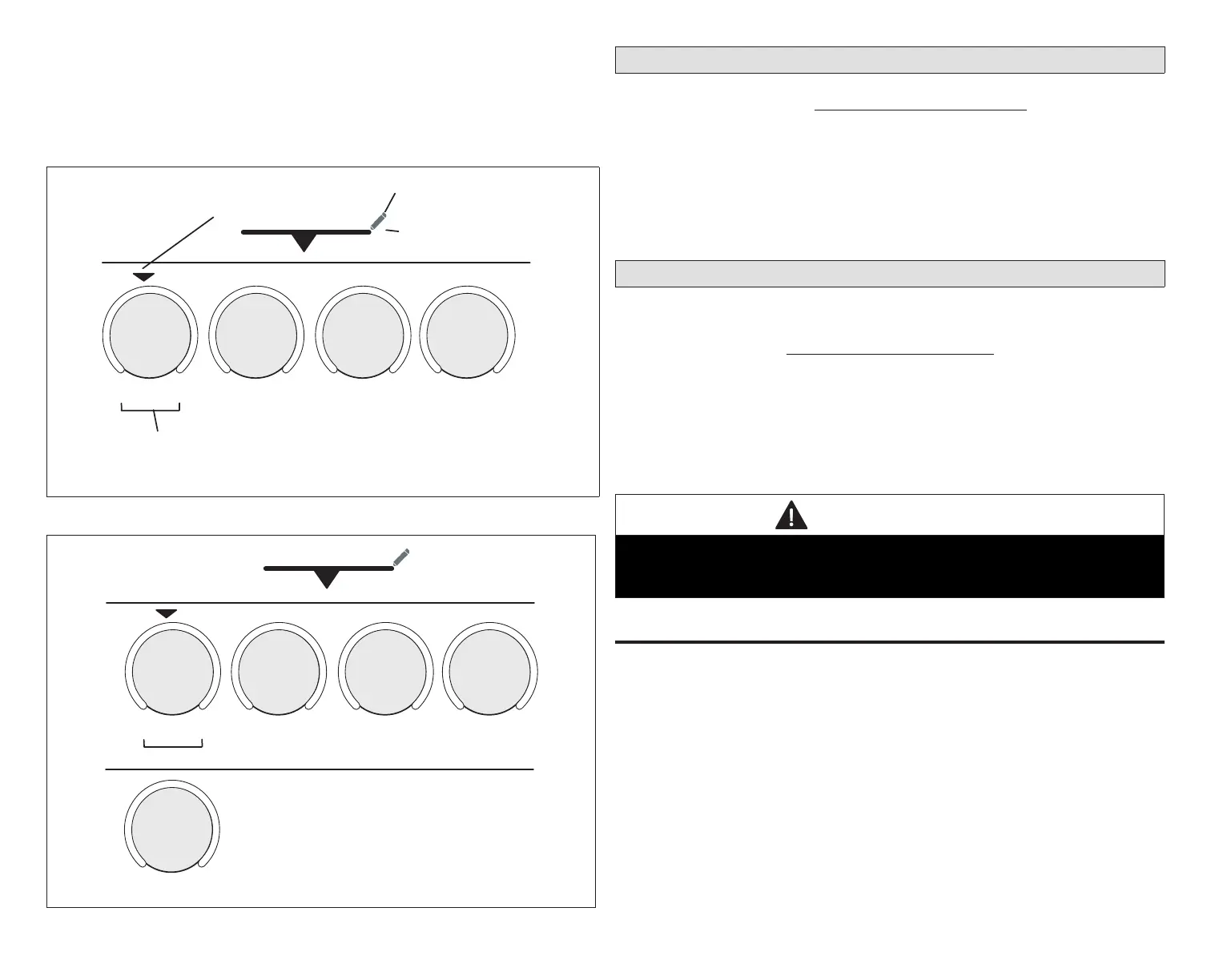
Zone 1 Zone 2 Zone 3 Zone 4
INDICATES ZONE
ACTIVE ON HOME
SCREEN
PRESS ON THIS ICON TO EDIT
THE ACTIVE ZONE NAME.
ZONES WILL CHANGE TO EDIT.
WHEN EDITING ZONES THE
PENCIL ICON CHANGES TO
IN EDIT MODE ALL OF THE ZONES
RE UNDERLINED. PRESS ON ANY
ZONE TO RENAME. PRESS TO
EXIT.
NOTE: ZONE NAME MUST BE 22 CHARACTERS OR
LESS.
SYSTEM
Figure 15. Zoning Pop-Up Display (single-zone)
80°
80°
80°
80°
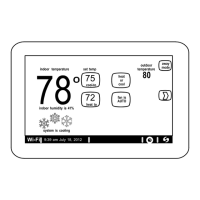
Zone 1 Zone 2 Zone 3 Zone 4
SYSTEM
SYSTEM 2
80°
Zone 1
Figure 16. Zoning Pop-Up Display (multi-zone)
Using the Secure Web Portal
Access all the great Wi-Fi enabled features on your Comfort Sync A3 thermostat
from our secure web portal. https://www.comfortsync.com/.
After signing in from your computer, tablet or smart phone, you will be able to
view your Comfort Sync A3 system settings, adjust the temperature and view
reminders and alerts – just as you would on your Comfort Sync A3 thermostat
at home. With a familiar look and settings this simple, you should feel right at
home.
From the web portal welcome page, you may also click on links to launch an
interactive demo or learn more about Comfort Sync A3.
Amazon Alexa and Google Assistant
The most current information provided by Allied is available on the Allied
Comfort Sync A3 Support Center at:
https://www.comfortsync.com
Apple, the Apple logo, iPhone and iPad are trademarks of Apple Inc. registered
in the US and other countries.
Android is a trademark of Google Inc. Use of this trademark is subject to
Google permission.
Amazon, Echo, Alexa and all related logos are trademarks of Amazon.com,
Inc. or its afliates.
IMPORTANT
For any of these third party applications to work with your thermostat, the
thermostat MUST be connected to the Internet and you MUST be logged into
your Allied Thermostat account.
Amazon Alexa
Download the Amazon Alexa app from Google Play or the App Store™ on a
compatible phone or tablet. Then follow the on-screen stops to nish setup.
Once you have added the thermostat to your Amazon Alexa app, then you can
use Siri
®
to voice control.
Changing to Celsius
Using your Amazon Alexa mobile app, select the three bar icon in the upper
left-hand of the screen.
1. Select Settings.
2. Choose your Amazon device
3. Select Measurement Units from the menu.


 To Next Page