- 21-
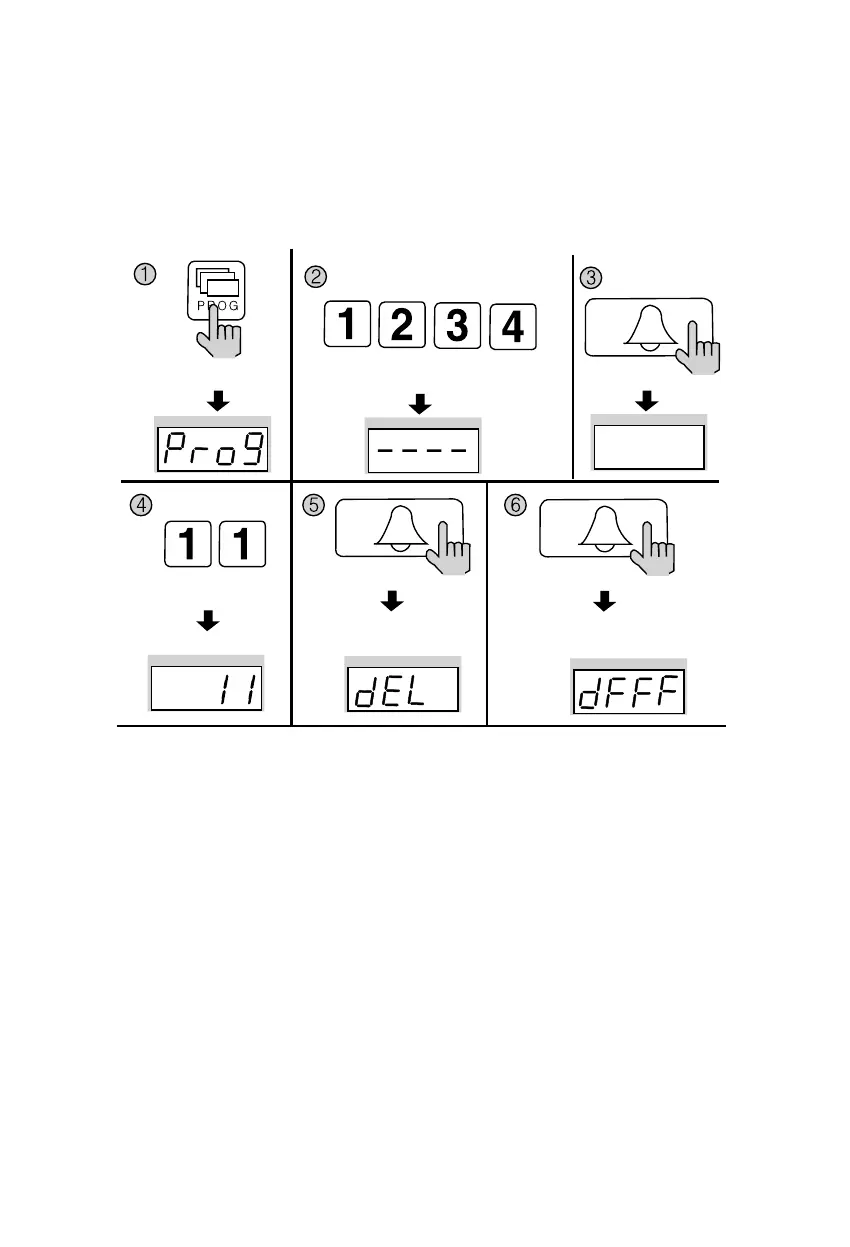
8-5. All Remote Cardkey deletion
✽ P - Building (Management) PIN - E - 11 - E - E
✽ Refrain from deleting all Remote Cardkeys, except for during installation.
① Press the Program button (P). (‘Prog’will appear)
② Enter the Building (Management) PIN.
③ Press the Call button (E).
④ Enter number 11 (All Remote Cardkey Delete Number).
⑤ Press the Call button (E). (‘dEL’will blink)
⑥ Press the Call button (E) again.
The number displayed on screen will change.
⑦ Press the Cancel button (X) to terminate the feature.
Press the Program button (P).
Enter the Building (Management) PIN.
ex) Building PIN
Press the
Call button (E).
Press the
Call button (E).
All Remote Cardkey mode All Remote Cardkey mode
Press the
Call button (E).
Press the
Program Number (11).


 To Next Page