- 23-
9. Surveillance Monitor Configuration
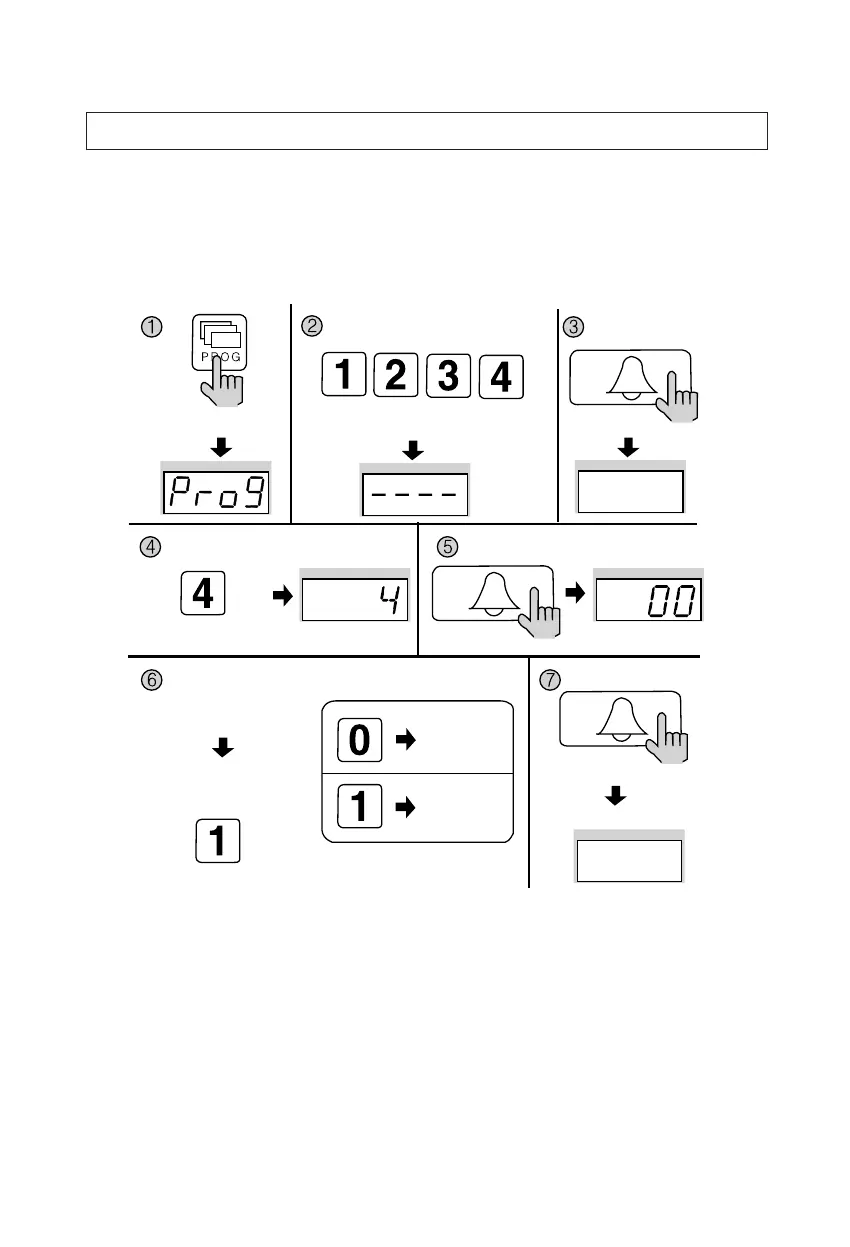
✽ P - Building (Management) PIN - E - 4 - E - 0 - E: Surveillance disabled.
✽ P - Building (Management) PIN - E - 4 - E - 1 - E: Surveillance enabled.
✽ This feature provides entrance surveillance of the Main Entrance to a separate
monitor by using the Camera from the Main Entrance Interphone.
① Press the Program button (P). (‘Prog’will appear)
② Enter the Building (Management) PIN.
③ Press the Call button (E).
④ Press number 4 (Surveillance Monitor Configuration).
⑤ Press the Call button (E). (Previous selection is displayed)
⑥ Choose a mode.
(0: Surveillance monitor cannot be installed)
(1: Surveillance monitor can be installed)
⑦ Press the Call button (E). (Modification updated)
Press the Program button (P).
Enter the Building (Management) PIN.
ex) Building PIN
Press the
Call button (E).
Press the
Call button (E).
Press the
Call button (E).
Press the Program Number (4).
Choose a mode
ex) Surveillance Configurated
Modification updated
Surveillance
monitor cannot
be installed
Previous selection
is displayed
Surveillance
monitor can be
installed


 To Next Page