- 27-
13. Video Out Impedance Adjustment
✽ P - Building (Management) PIN - E - 8 - E - 0 - E: Short Distance
✽ P - Building (Management) PIN - E - 8 - E - 1 - E: Long Distance
✽ By default, the unit is set for short distance.
Do not change if possible.
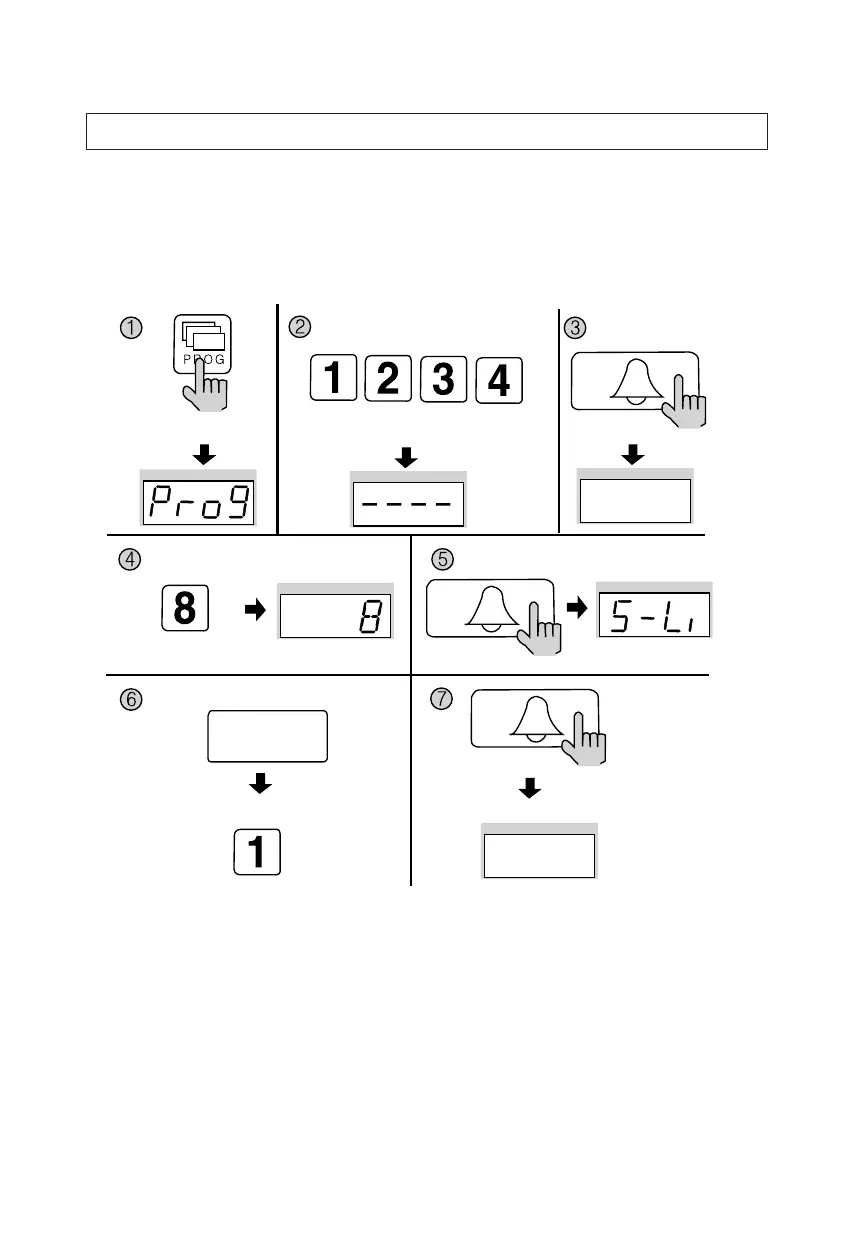
① Press the Program button (P). (‘Prog’will appear)
② Enter the Building (Management) PIN.
③ Press the Call button (E).
④ Press number 8 (Impedance Setup).
⑤ Press the Call button. (The previous selection is displayed)
⑥ Select the impedance.
✽ 0 : Short Distance
✽ 1 : Long Distance
⑦ Press the Call button (E). (Impedance selection updated)
Press the Program button (P).
Enter the Building (Management) PIN.
ex) Building PIN
Press the
Call button (E).
The current capacity
is displayed.
Press the
Call button (E).
Press the
Call button (E).
Press the Program Number (8).
Select the Impedance
0: Short Distance
1: Long Distance
Impedance selection updated
ex) Impedance Adjusted
short distance


 To Next Page